


PDF Shaper
Offers a variety of tools to protect, modify and convert pdf documents
Pros & Cons:
Our Review:
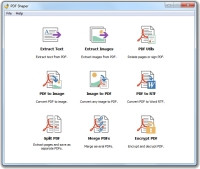
PDF Shaper offers a different set of PDF tools which include Split and Merge PDFs, Encrypt and Decrypt PDF, Convert PDF to Image and vice versa, Extract Images from PDF, Rotate Pages or Sign PDF, Extract Text from PDF and Convert PDF to Word RTF.
PDF Shaper lacks such tools such as adding watermark, adding header and footer, reorder pages, crop pages, adding PDF information, etc. available in PDFill PDF Tools, but it has some other tools that PDFill PDF Tools does not have, such as Extract Text from PDF and Convert PDF to Word RTF.
PDF Shaper sports a clean user interface and it's easy to use. However, the function of Convert PDF to Word RTF only did up to three pages of conversion and specifying pages for splitting PDFs encountered an error when tried.
During installation of PDF Shaper, uncheck the option for bundling a toolbar or any other component which you do not need.
PDF Shaper was reviewed by Jojo Yee on
 We are looking for people with skills or interest in the following areas:
Comments
On PDF Shaper download page look for the sentence "Also you can download free version without optional offers". "free version" is a link.