
|
 02. Jul 2019, 03:20 PM
|
#1 (permalink) |
|
Been Here Since the Begin

Join Date: Apr 2008
Location: Colorado, USA
Posts: 2,325
|
 Linux Questions
I have downloaded multiple Linux distro iso's in an effort to see which one I want to put on an older Dell laptop. I am using Rufus to create a bootable usb. Some of the distros include Linux Lite, Peppermint, Mint, Kubuntu, Lubuntu, Manjaro (3 different versions).
Question 1: On all but Peppermint and Linux Lite, I can't figure out how to connect to my wifi network?! I see a place on the rest to add my wifi network, but I don't see a way to "connect" to that wifi network? With Peppermint and Linux Lite, it's a piece of cake. But, with the rest, I can't figure out how to connect to my wifi network after I've added the network?! Question 2: Using Rufus, I can't get any of the Manjaro distro's to work. I tried gnome, xfce, and the 3rd version and none of them will boot once I've burned the iso to the usb with Rufus. I get some type of grub error. Any suggestions?
__________________
<-------Just jammin to some music.... |

|

|
|
02. Jul 2019, 06:55 PM
|
#2 (permalink) |
|
Site Manager

Join Date: Aug 2008
Location: South American Banana Republic, third bunch from the left
Posts: 15,186
|
The other distros you mention should also be able to "see" your wifi so it should be just a matter of clicking the named network and entering your pass key. If not then it's likely to be your wifi adapter that isn't recognized. To combat this I keep a USB wifi dongle handy and just use this rather than searching around for additional drivers and other stuff.
Rufus is not the best tool IMO especially for Manjaro which uses its own custom GRUB bootloader. Better to use Etcher instead. https://www.balena.io/etcher/
__________________
Buy a Hoover and prove technology sucks. |
|
|
|
|
02. Jul 2019, 07:03 PM
|
#3 (permalink) |
|
Site Manager
Join Date: Aug 2008
Location: South American Banana Republic, third bunch from the left
Posts: 15,186
|
Should also add that if the bios in this laptop is not UEFI compliant you will need to use distros with legacy support and download the appropriate version.
__________________
Buy a Hoover and prove technology sucks. |
|
|
|
|
02. Jul 2019, 11:31 PM
|
#4 (permalink) |
|
Been Here Since the Begin
Join Date: Apr 2008
Location: Colorado, USA
Posts: 2,325
|
Thanks a ton MC!
I did use Etcher and was able to flash the usb and run Manjaro via live session. I think I like the KDE version the best. So, I am now deciding between Peppermint, Linux Lite, and Manjaro KDE. I am a Linux newbie and am installing this on an older Dell laptop, but it does have 8 GB RAM. I'm going to install alongside Windows 10. Do you have recommendations regarding those 3 distro's? Thans.
__________________
<-------Just jammin to some music.... |
|
|
|
|
03. Jul 2019, 07:35 AM
|
#5 (permalink) | |
|
Site Manager
Join Date: Aug 2008
Location: South American Banana Republic, third bunch from the left
Posts: 15,186
|
Quote:
I've never really liked LXDE so wouldn't use Peppermint. LinuxLite serves a purpose but with your hardware specs it doesn't become a necessity. For Xfce I'd be inclined to look at MX Linux or Voyager (the LTS version) instead. IMO KDE is now the most advanced of the Linux DE's and is certainly my desktop of choice. I tend to shy away from rolling release distros though, especially Arch based, and wouldn't recommend Manjaro. Just a glance through their forum will tell you the type of issues you're likely to encounter and how messy some of them are to put right. Certainly not something I would offer to a Linux newbie. There are other KDE distros that come somewhere in between such as KDE Neon (user edition) but overall you cannot go wrong with Kubuntu so long as you go with the 18.04 LTS so this would be my recommendation.
__________________
Buy a Hoover and prove technology sucks. |
|
|
|
|
|
03. Jul 2019, 09:18 AM
|
#6 (permalink) |
|
Site Manager
Join Date: Aug 2008
Location: South American Banana Republic, third bunch from the left
Posts: 15,186
|
For information our friend Igor gave Kubuntu 18.04 9/10 a year ago and it's improved further since then.
https://www.dedoimedo.com/computers/...r-upgrade.html
__________________
Buy a Hoover and prove technology sucks. |
|
|
|
|
04. Jul 2019, 04:38 AM
|
#8 (permalink) |
|
Been Here Since the Begin
Join Date: Apr 2008
Location: Colorado, USA
Posts: 2,325
|
I tried Kubuntu with a live view and I could not see how to connect my wifi to the distro.
I don't want to actually install Kubuntu if I won't be able to connect to my home wifi?! Here is what it looked like: 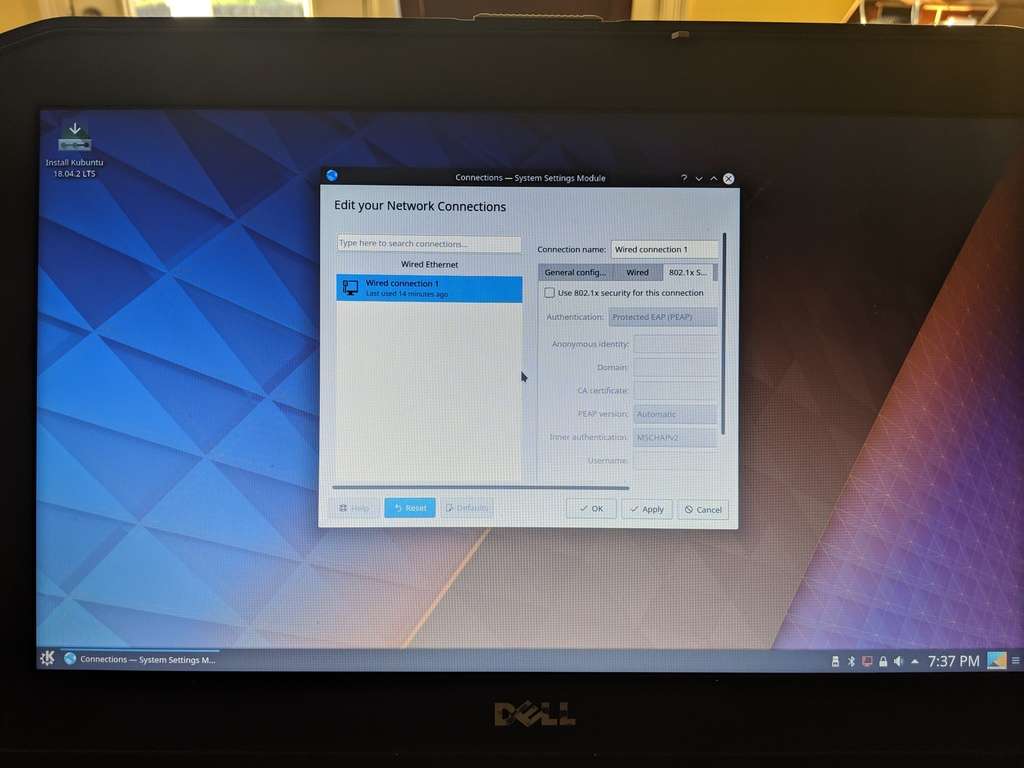
__________________
<-------Just jammin to some music.... |
|
|
|
|
04. Jul 2019, 07:12 AM
|
#9 (permalink) |
|
Site Manager
Join Date: Aug 2008
Location: South American Banana Republic, third bunch from the left
Posts: 15,186
|
With no wifi network showing there, as in my original post, it means your card isn't being recognized by Kubuntu. I know this is the case with my Dell because the version I ordered did not have a wifi card.
 In any case I prefer to use a plug-in wifi adapter because they are dirt cheap and I find them to be more reliable. My preferred make is D-Link and I've never had an issue connecting with it. I just shove it into one of the USB ports and then enter my ISP's ID password into the pop-up box. In any case I prefer to use a plug-in wifi adapter because they are dirt cheap and I find them to be more reliable. My preferred make is D-Link and I've never had an issue connecting with it. I just shove it into one of the USB ports and then enter my ISP's ID password into the pop-up box.You can either get one of these for yourself or risk installing Kubuntu using your wired connection and then hope the initial update brings in the necessary components to recognize your wifi. This will usually be the case although you can check in the Kubuntu forum first to see if there are specific issues for your particular card. If you enter 'lshw -C network' into a terminal using a live session it will list your network details so you know what to search for. This is the result from my laptop. (It says 'OptiPlex-3060' in the terminal window because I cloned the system from my Dell desktop into this Toshiba laptop using Clonezilla, hence it shows the desktop assigned system name). 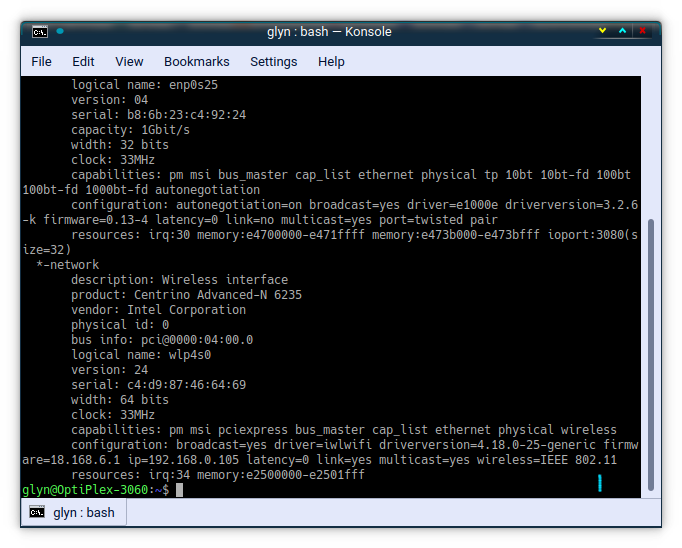
__________________
Buy a Hoover and prove technology sucks. Last edited by MidnightCowboy; 04. Jul 2019 at 10:52 AM. Reason: Added screenshot |
|
|
|
 |
| Thread Tools | |
| Display Modes | |
|
|




 Linear Mode

