Get our Latest Finds
 Subscribe to our RSS feed or enter your email address below to get the feed delivered to you by email:
Follow Gizmo
Using this Site
Top Rated
Gizmo's Freeware is Recruiting
 We are currently looking for people with skills and/or interest in the following areas:
- Digital photography software
- Windows defragmentation software
If this sounds like you then click here for more details
Best Free CD / DVD Burning Software
|
Other Language?
|
 Read this article in Spanish Read this article in Spanish |
|
In a Hurry?
|
 Go straight to the Quick Selection Guide. Go straight to the Quick Selection Guide. |
|
Introduction
|
|
When looking for the best free software program for either CD (Compact Disc) or DVD (Digitally Versatile Disc) I think it is worth the effort to precis your needs. Keep in mind that CD & DVD burning programs are designed for you to author CDs and DVDs for music, photos, movies, games, data, or other digital file and that will hopefully stimulate your creativity.. As well as CD burning software and DVD burner software, this category also includes Lightscribe software which enables you to produce laser-etched labels with text or graphics, as opposed to stick-on labels and printable discs. With new software (particularly new free software) don't be afraid to experiment and try try a few different options before you decide on the right one for you. Hello, my name is Dale. I am the New Editor in this Category. I ask that you please be patient with me, as i am still learning the ropes. I do hope, and will try, to do the best job that i can, and help everyone to the best of my ability. I am in the process of getting it re-done somewhat, and touched up a little bit. Also, be advised, that i am in the process of preparing other Reviews for various other Programs to populate the list with. Thank you so much for your time and patience, and i look forward to working with each and every one you.
|
|
Discussion
|
|
ImgBurn includes support for:
ImgBurn has several 'Modes', each one for performing a different task: Read - Read a disc to an image file. ImgBurn's advanced features may confuse you if you just want to do a basic burn. The welcome menu provides quick access to some common tasks, but other basic features such as erasing a re-writeable disc are not immediately visible. Playing around with ImgBurn for a while. Exploring the menus will certainly reveal most of what you need. However, if you simply aren’t interested in advanced functionality you may wish to check out my other recommendations. Although ImgBurn is primarily aimed at advanced users, I still feel that it is deserves top spot in this category.
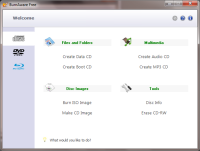
A launch window lets you choose the type of project you want and leads you through the process to completion. Navigating your directories is easy with BurnAware's file management system and adding files is as simple as highlighting them and hitting a button. BurnAware offers enough features for most burning projects. Features of BurnAware Free
Supports
Changes in BurnAware 3.0.6 :
Big picture - CDBurnerXP is a quick and easy solution for creating audio CDs,Video Discs (DVD and Vlu-Ray) and has extra features for ripping your audio CDs and finding track info on the Web. It adds sessions to multisession discs, burns on-the-fly, verifies burns, erases rewritable media; creates audio discs, creates video DVDs; command line version; LightScribe cover printing support with very basic designer supporting custom background images; enables access to drives for restricted users; multilingual; some advanced features and options. I like CDBurnerXP's clean user interface. The four-paned interface makes it easy to find what you are looking for. You can then drop-and-drag files to your chosen media. Also the audio player, which is included, helps you ensure you have captured the tracks you want. You may find the dropbox window handy as it allows you to browse your files using Windows Explorer and then quickly drop-and-drag files to your burn list as you go. Judging from other user reviews, some people had trouble with CDBurnerXP when burning data DVDs although I did find I was able to use this function without too many hassles. Once again, CD BurnerXP supports common types of optical discs like CD, DVD, and Blue-Ray discs including double layer mediums. You will find creating Audio CDs, Video Discs, DVD or Blue-Ray, very easy. I found dealing with re-writeable media is also very comfortable with this program. ISO files can be created and burned as well with support of converting BIN/NRG file formats into ISO.
Editor's Advisory Note: CDBurnerXP is now bundled with OpenCandy. See this article for more information.
InfraRecorder is a respectable burning program, but it has a few disadvantages as well. It does not support Blu-Ray discs or HD-DVDs. It also does not include many advanced options for tweaking the burn process to perfection like ImgBurn. Its interface isn’t as nice as that of BurnAware Free, and it doesn’t have any extra features like CDBurnerXP. Aside from these possible downsides, it feels like a solid program that definitely deserves a chance at becoming a part of your favored software collection.
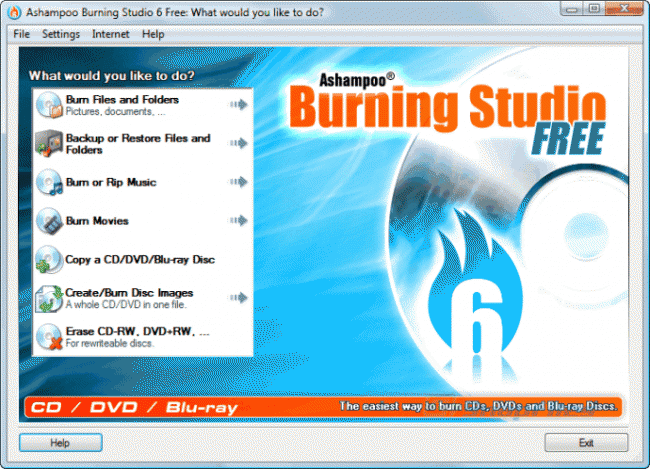
Anybody who is struggling with the ever increasing complexity of CD and DVD burning applications then Ashampoo 6.77 may be the answer you are looking for. If you want a program that focuses on burning discs quickly and easily with quality and a minimum fuss then this could be the program may well suit your needs. This version retains all the advantages of previous versions as well as adding multi-disc file backups and restores on CD, DVD and Blu-Ray. The program creates compressed backup archives with powerful password protection as well as splitting archives automatically across multiple CDs, DVDs or Blu-ray discs. I loved the fact it restored the archive contents to their original locations Ashampoo Burning Studio 6.77 FREE also features , an integrated audio CD ripper which stores your audio tracks as WMA or WAV files with an option across all formats to set the number of copies you want to burn. All discs can now be verified without ejecting first.
|



|
Related Products and Links
|
|
||||||||||||||||||||||||
|
||||||||||||||||||||||||
|
||||||||||||||||||||||||
|
||||||||||||||||||||||||


Ashampoo Burning Studio
|
||
 |
Full featured CD/DVD/Blu-Ray burning suite that enables you to create data, music, video and audio discs | |
 |
Tries to install toolbar. Need to deselect if not wanted | |
 |
www.ashampoo.com | |
 |
http://download.cnet.com/Ashampoo-Burning-Studio-Free/3000-2646_4-10776287.html?part=dl-61683&subj=dl&tag=button | |
 |
16.39 MB  6.80 6.80  Unrestricted Freeware Unrestricted Freeware  Windows XP/Vista/7 Windows XP/Vista/7 |
|
 |
64 Bit version available  Portable version not available Portable version not available |
|
 |
Requires registration within 10 days | |
|
This software category is in need of an editor. If you are interested in taking it over then check out this page for more details. You can then contact us from that page or by clicking here. |

- Article type:
 Printer-friendly version
Comments
InfraRecorder! Very good product. Burns anything I throw at it.
Astroburn
http://www.astroburn.com/download/astroburn/free
Im missing infrarecorder here :-) it tops all the others
ImgBurn is my favorite and can be portable too:
Does anyone know if ANY of these mentioned also give the user the ability to create DVD menus? The reviews don't say and I consider that an important part of creating a DVD.
Thanks.
I didn't see any mention to the free version of dvdfab. It gets updated regularly and is what i use first. I make an iso and go to dvdshrink if its too large a file for dvd5, using shrink i create a new iso and burn with dvddecrypter or imageburn. no need for nero burning engine this way...well for you dvdshrink fans, you know about this.
Agreed, InfraRecorder is straightforward to use and handles everything really well.
I have used Nero, cdburnerxp, imageburn, burnaware and some more. Currently i use ashampoo burning studio free edition. It is as convenient as first Nero vrsions. Why not even a mention about it?
http://dvdlegend.commongate.com/post/The_Ultimate_Freeware_Package_for_iPod
What about Starburn?
Ashampo Burning Studio 6 is free. Ashampoo software gives this away for free and it's an excellent burning program. I much prefer it to CD Burner XP. It has an very nice and intuitive GUI. It should have been mentioned in the list of programs. maybe you don't realize it is free because Ashamppo charges for all their other programs. The list should be updated to include it because it's better than all the others listed.
CDburnerXp doesn't support .bin or .cue file burning whic is lame. any one recommend me a program that does. thanks
I agree with the other guys about the infrarecorder. It is really nice piece of software and is a pity to be missed in the test list. I have only one thing to complain about it. I burned some file with Asian characters as file name and that is not readable any more. I experience this, however, with several other free burner I tried before. Besides that, it is nearly as good as CDBurnXPpro.
CDburnxppro is great ---- I started to equip it for 3 years ago (the over 10M version). I complained (to the author) about unicode support like Asian language file name, and get the answer that their (only?) 2 guys are busy with new .net based burner, and there is no promise it will support in the next release. However, the next release 4.0 series, support it. And it is a pleasure to see the improvement in organizing the GUI. I really like this kind of simple but pretty and easy interface. And it works fine, at least on my systems.
Imageburn. It is excellent.
CDBurnerXP looks like a perfect replacement to Nero, but with time you discover the multitude of bugs. The version I had from a couple of months ago couldn't drag and drop to specific folders in the DVD - everything went from the hard drive into the root directory of the DVD, and had to be redragged to the specific folder! Annoying as heck.
Worse was that it got this problem that burnt a disc halfway through and then stopped. Thinking it was a bad disk (which is more or less what it reported) I promptly put in another disc, only to eventually realize that ALL burns were going to be bad. The only solution is to reboot the computer. You don't know how many discs CDBXP killed. I downloaded the latest version, which fixed the dragging bug but still has the burning bug. Obviously I'm done using this software, though I believe it has much potential.
CDBurnerXP has never let me down.
CDBurnerXP is so effective that can be compared with the paid CD / DVD Burning Software.
Check always for a newer version, as they constantly improve it.
http://www.cdburnerxp.se/
I've always used Ashampoo because of it's extreme user-friendliness, still it can do just about anything. V6.77 is free and has all features. However, it didn't work on my new 64bit Win7 machine. Supposed to support Win7 it says.
Just a quick note to say over the holidays as I had a little time on my hands I downloaded and tried out " Koyote Soft - Video To DVD converter V3.2 " and have found the menu system in this far superior, it allows you to use images stored elsewhere on your pc as menu backgrounds and to move and change the colour, font etc of the titles. The whole program sems a little slicker than DVD FLICK though It did seem to have trouble with one file. Im lacking in any computer skills so couldn't Begin to guess why, but for me Koyote Soft - Video To DVD converter is a winner. Thanks for the help
ImTOO Music CD Burner v3.0
ImTOO Music CD Burner is expert music CD burning software with simple settings. It can burn music CD from almost all video and audio formats, including MPEG, WMV, ASF, AVI, MOV, MP3, 3GP, RM, MP2, WMA, WAV, AU, M4A, RA, OGG, AAC, AC3.
http://www.kooksoft.com/software/MP3-Audio/Music-Management/200808/16-58...
ZC WMV to DVD Burner
ZC WMV to DVD Burner transcodes and burns WMV, ASF, ASX files into DVD disc. With DVD encoding and burning engine integrated you can easily Merge up to 4 hours of multiple movies or episodic files to standard MPEG2 Video and burn it into a DVD±R/RW disc that playable on car or home DVD player.supports both NTSC and PAL TV system.Supports widescreen and standard TV. It's a 1 click solution to burn DVD movie from huge internet movie resources.
http://www.kooksoft.com/software/DVD-Video/Multimedia/200808/15-576.html
I just tried CDBurnerXP 3 times (download, reinstall,etc.). I tried copying a disk 3 times; it said there was an error with the disk. I then tried to use it to create a cd-the next 2 times the program hung and repeatedly would not respond. Pity, because I've read numerous positive ratings-and i downloaded the latest version. Perhaps there is something on my computer that is not compatible, but I honestly don't have the patience right now to go through everything...
I've just tryied five burners and the winner is ASHAMPOO BURNING STUDIO 6 v6.71
A freeware product with all the major possibilities everybody needs with a user friendly interface Please try it (softpedia). The second one is ImgBurn but it is not very simple to ad files in the window
Others are not finished , many had problems with the burn engine (freeze, bugs ,shutdown etc...)CD Burner XP Pro IS NOT the best thing (2 install 2 freezing )A pretty interface is not enough
I agree- I burned 3 very expensive dual layer coasters with CDburnerXP before I came to the same conclusion. Imgburn does it for me.
Maybe there should be a list of best software review/download sites!!! Oh wait... download.com (http://www.download.com/3055-2094_4-10847734.html?tag=pdl-redir) and most of the other popular sites have the categories broken down for: freeware, WIN or Mac... mobile, webware, & games...Editors picks, most popular, etc. etc. as you can see on the bottom of the page url I listed above. Not knocking you guys but there seems to be too much disagreement between your choices of "best" and those of the commentators??? Your "top" video editor page has only one choice: Virtual Dub...why??? I tried a few of your "top-picks" out of curiousity and didn't agree. Of course I do "buy" software when I really need it and there are always Utorrent/Mininova downloads where you can get the "big-boys" versions when cash is short, LOL. You'll find DVDFab5 there (full version)...just scan all your downloads with Kaspersky, etc... Which you can get there as well. Sorry for ranting (newbie here) but I hope you do a revamp of your reviews...categorized and unbiased...or maybe list the better sites where people can download free/share ware...Kinda like a review of the "reviewers. Cheers : )
I have used this software for 4 years ever since buying XP system now on 512mb of ram,and have had no problems,and is now a very easy and intuitive to use it virtually holds your hand,considering it's freeware that feel's it's not,and the only thing I think is are your disks good as poor quality can defeat the best.
http://www.majorgeeks.com/CDBurnerXP_d4242.html
Thank you for your comments.
You make some valid points, but no matter where you go for software downloads, there is always going to be someone who disagrees with their assessments. For example... I went to download.com and looked at their "Top Freeware in Windows" section and found that I disagreed with 6 out of their top 10 software picks. Does this make download.com any less of a valid resource? Absolutely not. They have their opinions and I have mine... and you have yours.
The focus of this site is to be a more personal resource. Sites like download.com have their place, but are rather impersonal. They just don't give a personal and practical review of the products they list. TechSupportAlert is attempting to do just that. You will also notice that other sites will list both freeware, plus shareware and commercial products. We don't do that. Software we review will be 100% free. Not everyone will agree with our editors assessments, but that is to be expected. If you don't like the products we are listing, feel free to suggest a product. We are not perfect either and heavily depend upon comments like yours to improve our reviews.
Thanks again for your comments.
I've tried CDBurnerXP, infraburner, Deepburner, imgburn, iso burner, etc and. I found all of them to be lacking in at least one area including usability, features, buggy performence, etc.
I've got to agree with Ashampoo free being the best and easiest to use freebie I've tried so far. If I was going to install a free burner on a non power users PC this is the one to use.
-J
BurnAware Free seems to insist on installing the ASK.com toolbar in my browser (Firefox) even when I unchecked that choice (pretty sure I did). Can be uninstalled or deselected of course -- but annoying still!
Yeah, we know it's good for XP SP2...
CDBurnerXP, for whatever reason, worked poorly for me on a Vista system. The problem was mainly the audio CDs I produced with it on a system with ample memory and processing power (and no other apps running during the burn), even though my CD burner was writing at below its top speed. As far as I know, there is nothing wrong with the CD/DVD writer. Especially recently, my audio CDs would come out with blips and skips on the tracks and extra long periods of silence being added to the end of the tracks. Data CDs were, to my knowledge, okay, but I don't burn many of those (and don't always check every single file after I do).
The other thing I noticed about CDBurnerXP was that with the CDs and DVDs I was using, it would miscalculate the time left when burning audio discs. If the software thinks you've exceeded the space on the disc for burning, it won't burn until you remove from your project the remaining files that it thinks don't fit. This probably had something to do with the fact that it was automatically adding long blank sections to the end of some tracks and factoring that in before the burn--I really don't know. But I obviously ended up having to abandon this app.
I liked alot the CDBurnerXP, but it doesn't verify the cd/dvd after recording an ISO. I think that option should be available.
Post new comment