


Microsoft Mathematics
It has the most features for a scientific calculator
Pros & Cons:
Our Review:
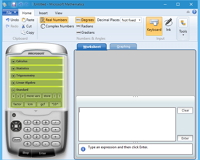
Microsoft Mathematics has the most features for a scientific calculator. The worst I can say about it is that it does so much that it might not seem as accessible as the simpler SpeedCrunch.
Many features will help basic users particularly unit conversions, comprehensive help, worksheets that explain the steps to the solution, export to to Microsoft Word, and if you're really keen there is an add-on that allows you to work directly in Word and OneNote.
There are lists of constants, functions and variables which may not be quite as comprehensive as SpeedCrunch. But you hardly notice because of many more cool features like one-click 2D and 3D graphs, the option of pen, touch or mouse input, nerdy stuff like differential calculus, complex numbers and matrices, and some interesting skins for the calculator.
Many languages are supported. The add-on to work in Microsoft Word and OneNote is available at http://www.microsoft.com/en-nz/download/details.aspx?id=17786
See also:
Microsoft Mathematics was reviewed by Gizmos Freeware on
 We are looking for people with skills or interest in the following areas: