Get our Latest Finds
 Subscribe to our RSS feed or enter your email address below to get the feed delivered to you by email:
Follow Gizmo
Using this Site
Top Rated
Gizmo's Freeware is Recruiting
 We are currently looking for people with skills and/or interest in the following areas:
- Online Backup Sites
- Disk De-fragmenter
If this sounds like you then click here for more details
Organize Your Desktop With Stardock Fences For Windows
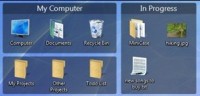 Need to corral those desktop icons? Try this free program from Stardock.
I’ve been using Fences for Windows for about a month now. Normally I don’t like anything on my desktop. No icons, just whatever wallpaper I’m using. To test drive Fences, I added some icons to my desktop, downloaded Fences, and started using it. I like it. A lot.
I found this excellent article from Scott Hanselman about Fences. He does a great job of explaining how Fences works and how he uses it. Since it’s a very clear explanation, I’ll send you along to his site. :)
Herding Cats: Organize your Desktop Icons with Stardock Fences for Windows
Have fun,
Rhiannon
Click here for more items like this. Better still, get Rhiannon's latest tasty tech treats delivered daily via your RSS feeder or alternatively, have the RSS feed sent as email direct to your in-box.

- Article type:
 Printer-friendly version
Comments
I finally got everything off my desktop. I have a quicklaunch bar (vista), but I hardly ever use that, either. I started using Launchy in XP, and come to find out it works in a Vista 64-bit environment, too. I love it. http://www.launchy.net/
Really, you're still using desktop Icons? Aren't there much and much easier and tidier ways to access your programms? like the Start Menu, Windows 7 Super Bar, Launchy, etc. etc.
I thought Desktop Icons also slow down your system a bit. And if you're working in a domain in the office and they were to throw your profile away (because of an terminal error), you would loose everything on your desktop (I hope you don't save precious files there).
has anyone had any problems with fences causing there computer to run slow? Had it on a Windows 7 box and my wifes XP box and after a few months I was troubleshooting them being slow, removed fences and the problem went away. Never found anything to be weird with resource usage so I don't know why it caused it. I really liked the program I have just been put off to try it again.
been using fences for quite some time now. it is superb. it really organizes all icons, no matter how many, and show only the ones that fit into the size of the "window" one defined for each category one also defined. don't understand why there is so little buzz about this excellent program.
I use fences too ... it has forced me to organize the icons on my dektop better into named categories.
The only probablem I seem to have with under windows 7 is when I have to change resolutions such as in a PC game. When the screens shifts back to my regular resolution, the last highlighted icon on the desktop (if there is one) does not shift back with the other icons and is left outside it's fence.
Well you know what. I have deleted all icons from the desktop as it takes same time to gp to the needed link in Start menu if you organize it well.
I've also converted to an icon-free desktop. I don't care if Auto Arrange or Snap To Grid is on or off. I hate the start menu though. What I did was create a folder with 6 subfolders categorizing my shortcuts. I hid this folder in Documents. Then I dragged the sub folders onto RocketDock and used custom icons to indicate the categories without the need for text. Stuff I use very frequently I also have in category stacks using 7Stacks. It takes another click to use the 7Stacks stack but it saves time hunting icons on the task bar. I have stacks for Editors, Internet, Hotkey Utilities etc..
With this type of organization I can set up a similar feel be it on XP, Vista or W7. I can think about what I want to do instead of which OS I'm on.
My way of doing it: Build a Launcher Yourself without needing any other programs.
Take a look at LaunchTab 2.0 http://tobiascohen.wordpress.com/
After I got a widescreen monitor I dragged the quick launch bar to the left so it's vertical, loaded it up with everything I use and set the properties to Always On Top. Still plenty of screen real estate for programs and no need to run a separate program for launching.
I liked Fences until they tied it to that Impulse installer/update program and turned off the beta features. If you want all the features that the beta had you have to pay for it.
I have been using Fences for quite some time. It is nice to be able to organise files temporarily on your desktop. Thoroughly enjoy it.
Good program. I always have the desktop filled with icons - and now they are better organized. Windows(XP) program menu of all programs doesn't work optimally - when there are many items and sub-items, the whole screen will be filled, and it doesn't scroll when you reach the right side. So icons on the desktop work better. Tip: if there is not enough space, make some folders on the desktop with room for more icons (e.g. Utilities, Multimedia, etc.).
They removed that and now it's standalone again - and well worth it! I got burned on that too. Uninstall and reinstall the latest version.
If you have a computer that is slowing down because of
desktop icons....time for a new computer. They have
come a long ways since 1993.
I use desktop icon toy....much better than fences.
But of course I got it for free from GiveAwayOfTheDay.
I, too had a problem with 'Fences'. I have 'Statbar' running and noticed that my quadcore CPU was almost always showing 25% busy. Also several programs crashed. By a process of elimination I found that deleting 'Fences' solved all my issues. Too bad, I really liked the way I could organize my desktop.
ahhh, and was I thinking that desktop Icons were from 1993.
And that was the reason I wasn't using them anymore since 2000-something.
Point was: there is no need for desktop icons in 2009, unless... you're using Windows 98??
Nice program. Have been using it for a while. It was on GiveawayoftheDay. I use to have the whole desktop filled with icons and folders with icons. Better organized now! Windows (XP) menu (All Programs) does not work properly when the whole screen is filled, and when it reaches the right side. But with icons and folders with icons you have unlimited space.
You going to share your toy with us? I know like someone else wrote, I used fences and liked it until I started to get pop-ups and warnings and basically they were pestering me and I assuming they wanted me to pay for an upgrade. I just took it off. So what is 'desktop icon toy'?
I use ICONOID from sillysot.com. It's FREE.
I wonder why people on here and everywhere else actually recommends a program or site they don't type the URL to make it easier for the rest of us to give it a try.IE GIVE AWAY OF THE DAY.
Anyone know of an application that may hide some desktop icons and make they visible again with a password? Fences can do that but without a pass and it´s bloatware.
Just reading this page was a waste of time. I do not have time to go fishing to learn what the app's features are. Besides, windows can already do this.
Well, I'm so sorry that your "busy-busy" life also prevents you from being polite when addressing others in a public forum. The 80+ volunteers contributing content to this site also have commitments outside of TSA but that doesn't stop them posting items in the hope that they might benefit others. I suggest that if you ever have any spare time you spend part of it trying to realize that there are other people on the planet apart from yourself.
And your response to his perceived impoliteness was to be impolite in return? Fascinating.
I'm sorry but ignorance on this scale deserves whatever response it gets. How do you know it is a "he"?
Hi there!. As everybody can see, icons are por personal use and "taste". So, here is a tip: a. Make a folder on desktop and namne it, f.i., APPS or whatever you want. b. Put in there all or some icons you want. c. Go to the Toolbar, make right click, go to Toolbars, now go tu New Toolbar, and finally select APPS, that's it!: You've got a Quick Start Tool in the Toolbar with the name APPS (Or another one), make left click on the doble arrow and Voila!: the menu will display ALL the icons you hav put in the folder APPS (Or whatever name you've used). I think this resource can really be very usefull. Please excuse my poor English and Felíz Navidad y Próspero Año Nuevo from Guadalajara, Jalisco, México!.
Hi!. This is not a reply: I just wanted to say "Name it" and "double arrow". I'm sorry.
It's me again:I wanted to say: "go to New Toolbar". Sorry.
I'm a little unclear here, are you saying you installed Vista Premium and then installed Fences, and you're having trouble with labels and mouseover since you installed Fences?
Post new comment