

Get our latest top picks
 Subscribe to our Top Picks RSS Feed or enter your email address below to get the feed delivered to you by email:
Follow Gizmo
Using this Site
Top Rated

Gizmo's Freeware is Recruiting
 We are currently looking for people with skills and/or interest in the following areas:
- Best Free CD Ripper
- Best Free PDF Writer
- PC Tune-up Utility
- Rootkit Scanner & Remover Interested? Click here
Best Free Music Player and Organizer for Android
|
In a Hurry?
|
 Go straight to the Quick Selection Guide Go straight to the Quick Selection Guide |
|
Introduction
|
|
Android. The Operating System that is flexible, can do everything, can do social networking, can do media, music... wait a minute. That "music" app on my desktop is supposed to be my music player, and organizer? What kind of junk is this? On my high-end Android? Let's face it: the stock Android music player can, well, play music. That's about where it ends. It does the typical stuff, sort by artist, song name, create playlists, whatever. While some companies have added a skin to Android's music player on their device, it usually doesn't add all too much. Hey, I'm on a Samsung Galaxy Player, which is basically an Android mp3 player. And I've got basically that music player, just with the Samsung skin. Fine for basic playback, but what do you do if you want something more than "shuffle"? That's where Android's magic shines - you can use whatever app you want to play music, and, if the developer did it correctly, you won't even notice that you're not using the default app. Here are the best music players and organizers for Android. |
|
Discussion
|
|
These are the music players I reviewed:
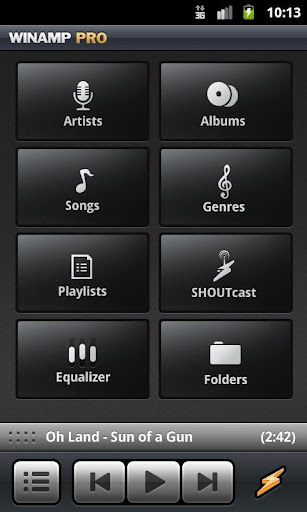
That easy-to-use part is probably what you'll notice first. Right from the start, what you get is a very clean interface, without anything complicated. It's a comfort to the eyes, after seeing some other more complicated apps. It's divided into Artists, Albums, Songs, Genres, Playlists, SHOUTcast, Equalizer (not available in the free version), and Free Music. On the bottom, you get your music controls. It will have your music the first time you start it up - no searching, no nothing. It's there. The Artists through Playlists parts of the app are the parts that have your music in it. Again, it's all very simple: Artists, Songs, Albums, and Genres work as expected. In the Albums section you can see your album art. Scrolling is smooth almost everywhere except in the albums, when there is a lot of album art. Playlists are when you run into the first bump. There are a couple of auto playlists - Recently added, Recently played, and Top played, which are nice. But on your own playlists, you can't add songs to them from within the playlist. You have to go somewhere else, long-press on the song you want to add, and click "add to playlist", and choose your playlist. And... you have to add the songs individually, doing this same procedure for every song. On the other hand, it's easier to add songs to what is called the "queue". This is basically the equivalent of the "Now Playing" playlist in Windows Media Player. In order to add songs to this playlist, you can, for example, go into a specific genre, and add all of the songs of that genre. It's very nice to have this - you can just add your songs to here, and it will automatically play, no setting up a new playlist, no whatever. And, if you like the playlist you put together, you can save it as a playlist. If you have Winamp on your desktop, you can also sync Winamp on Android with it. The SHOUTcast feature is also nice for those of you who are tired of the music you have on your device, but who don't like what is playing on the local radio station. Or, who don't have an FM chip in their device. The selection is massive, and There is also the free music part. In my region, you have a free music download store, with those "free deals", but it seems to be one of those things where you get the songs for free that no one wants. You also have a service where you can stream full albums to your device. Equalizer, well, you have to pay for that. The controls are also great. There is what looks like a menu button, which gets you the list of tracks you're playing, your normal backward-play/paus-forward buttons, and the "Winamp" button, which gets you back to the starting screen. The backward and forward buttons can be used for fast-forwarding and rewinding as well. Tilt your device to get it into landscape orientation, and you have controls for shuffle and repeat. Above the buttons, you have a bar with information about the music that's playing. Pull that up just the way you pull down the notifications tray on Android, and you have your now playing screen. Brilliant and intuitive. There is also a "lock-screen player", which is basically the same thing as the RealPlayer lockscreen widget. Basically the same thing applies here as to RealPlayer - see below. The one difference is that you can turn it off if you don't like it - in fact, it's off by default. Headset button controls work as well, but you have to enable it in the options. Single press to play/pause, double press to go to the next track, and triple-press to go to the previous track. The one disappointment with music playing is that the app seems to need about 30MB of memory to run in the background. For those of you who don't know, that's a lot. For comparison, lightweight applications can use down to 5MB when running in the background fully. That memory footprint could shed a couple of pounds. Overall, however, this is a very good music playing app. It gets the job done easily and intuitively. If you are looking for a music playing app that is easy to use, but has a good amount of functionality, this is it.
TTPod Music Player is next. Probably the first thing you'll notice about this app is its non-native look. And the fact that it uses too much Japanese. Or Chinese. But more on that later. Sure enough, this player is skinnable. And oh yes can it look great. You can choose among a couple of built-in skins, usually about two, or download more. Except here already is the first point where we're running into this Japanese stuff. I'm not sure if this is only me, or if others are having this problem as well. You can tell me down in the comments. Here, though, it shouldn't be that tough getting around the Japanese, because you can look at the screenshots, and choose which ones you would like that way. Oh, right, and this is a music player, and not just a skinnable app. The playlist function is fairly good. From within the playlist, you can browse the file system to add songs. You get some Japanese, but with some experimenting, you can figure it out. You can add entire folders, or just files. You can also add songs when you're somewhere else, for example in an Album or in a genre. There, press menu and choose "edit". Then, you can check the songs you want to add, and click "add to...". Otherwise, you can view your music by artists, albums, by folders, or by songs, what they call "medias". Note that you can't see any album art here. There is also a "My favourites" playlist. I haven't figured out a way of adding songs to it, however. Also interesting is the "recent added" playlist, although I don't know how recently a song has to have been added in order to be here. Playing a song is simple. Play a song by tapping it, or pause by tapping it again. You will have a bar at the bottom of the screen with a pause/play button and a forward button. Click on the album icon to get to the now playing screen. Here, everything is simple and straightforward. Swipe left and right for a visualisation, album art, and lyrics, an interesting feature of this app. The problem is that this app ignores what is included in the file, and searches for album art and lyrics on the Internet. It's nice when it gets it right, but that's not always the case. It has a hard time working with remixes. For example, when I'm listening to the Moguai remix of "Push the Tempo", it thinks I'm listening to the original track by Fatboy Slim. This probably means that the lyrics won't be properly synchronized or incorrect. But, when it does work, it's quite nice, actually. It has synchronized lyrics, a nice addition. A note to the parents, though: it displays the full lyrics, even if you have the radio edit playing. That can be quite a shocker sometimes. On the other hand, it did let me know that iTunes actually ripped me off by selling me a radio edit without marking it as such... You can shuffle, play a song repeatedly, use a nice 10-band equalizer, get more information and edit it, or set a sleep timer. How all of this is arranged will vary depending on your skin. In the menu, you get some more options for the lyrics, and make a ringtone out of the song. Good luck with the Japanese, though. You also can access settings, and I was going to write about that too... except the app updated itself, only to find out the settings have mostly reverted to Japanese as well. The one thing that I did remember from before the update that stood out was the shake feature. Just like on the iPod touch, you can shake to shuffle, or go to the next song. Except here, it one-ups that. You can shake left to go to the previous song, or shake right to go to the next song. It two-ups it by letting you use the shake feature while you're not in the app, and three-ups it by letting you use it when your device is turned off. I just wish I was able to understand the settings. You also have some online stuff, and recommendations, but because that is completely in Japanese, I can't get through there. This Music Player would be great if it didn't have that whole language problem. It's not only me, either - looking at the reviews in Google Play, other people are having this problem as well. There is Japanese (or chinese, I'm not sure which one it is) everywhere, which makes some things a pain. What's worse, all the help files are also in Japanese, so that doesn't work either. Maybe I'll be able to figure it out sometime, but for now, it's a pain. If you have any suggestions, again, you can leave me a comment. Once the problem is solved, this app will probably be at the top of the list, but for now, it's just too hard to use.
The experience starts with a very nicely designed home screen, which slightly reminds me of Windows Media Center. RealPlayer finds your music, videos and photos very well, but it might take a little time at first. It will find your media without any progress indicator, so you might be wondering what is going on. However, once it finds your stuff, it runs very well. The app has three parts - music, videos and photos. We will be focusing on the music part for this article. The Music part is really well done, and is RealPlayer's strongest point. It has various automatic playlists, such as recently added and favorites, which I missed in the stock Android music player. It also has ratings, another thing I really missed in the stock player. However, managing your own playlists is where it gets a little tough. The songs are grouped by artists, and that's it. No sorting by album or song name when you're adding songs to a playlist. When looking up songs by name, artist or album, there isn't much to say, except that the scrolling seems to be surprisingly laggy on my 1 Ghz processor. The "now playing" screen has the standard layout - in other words, nothing new here - except that the seek bar is on the bottom. This might confuse you if you have previously used iOS. When there is music playing, you get a status bar icon, with information about what is playing in the notification tray. You can't control music from here, though. The headset button will also only play or pause the music. However, the player will accept certain commands from some headset button controlling apps on the market, meaning you can then play, pause, skip to next track, and skip to previous track. One interesting feature to this player is the lockscreen widget. When you have music playing, and you lock your phone, you will have your lockscreen covered by something looking very similar to the now playing screen. It will let you access most of your controls very nicely. Interestingly enough, you can also pull down your notifications tray there, even if you aren't normally able to do it on your phone's lockscreen. Aside from the media controls, there is also a button to return to your "normal" lockscreen, just the way you know it, which is called the "unlock" button. It doesn't make sense, but that's the way it works. The lockscreen widget isn't for everyone, though. If you get used to it, it will be very handy. However, if you are used to quickly unlocking your phone by hitting the power button and swiping, this will trip you - swiping does nothing here, it might only mess up the music you're listening to. You first have to hit "unlock", and then swipe. Then, when you are not playing music, everything is back to normal, confusing you once again. The biggest problem is that I have until now not been able to find a way to turn off the widget. In one sentence: great idea, but it needs some work. If you are the kind to get used to these things easily, though, you will love this widget. On another note, gestures are not supported in this app - so if you absolutely need gestures, this app is not for you. Overall, Realplayer has enough potential, but certain areas, like the lockscreen widget, need to be ironed out. However, if these issues do get fixed, this will be a good deal better.
More apps to be reviewed: |


|
Related Products and Links
|
|
You might want to check out these articles too: |
NOTE TO PARENTS: This program is rated "Everyone" in Google Play, but in my experience, the "Everyone" rating is not justified. The problem is when the program finds lyrics, it finds the lyrics of the unclean version of the song. Lyrics may include: swearing, violent language, sexual content, and more.
App's main use is for finding lyrics (not playing music), and it will work well with other media players as well
|
Editor
|
|
This software category is maintained by volunteer editor trainman261. Registered members can contact the editor with any comments or questions they might have by clicking here. |
|
Tags
|
|
best free music player, top free music player, Android, smart phones, mobile device, music organizer |
Back to the top of the article.

- Article type:
 Printer-friendly version
Comments
As I wrote in the "Best Media Player" thread, I cannot believe everyone's short memory of what a godawful company (and behemoth, manipulative product) is RealPlayer. It shouldn't even be considered.
Beyond that, this is a hard category for me because I finally gave up and settled on a paid app... which, sadly, I can't mention here because this site's focus is freeware. But before I settled on the one on which I ultimately settled, I gave both WinAmp and MixZing a long, hard look. They're both worthy of serious consideration...
...and the WinAmp name... c'mon!
Don't forget, also, Meridian, and the eye-candy-rich Cubed.
If lyrics are your bag, then TuneWiki's a good bet...
...though, that said, musiXmatch, long known for having the superior lyrics database, now has a music player built right into it... and it actually doesn't suck.
This really is a hard category, though, because the two truly best-of-breed audio players out there are both not-free/paid apps, which, again, we can't mention here.
Oh, well. [sigh]
Hope that helps.
Gregg DesElms
P.S. And, oh, yeah... I forgot to mention: Let's not completely dismiss the Google "Play Music" app. When I actually took some time to fiddle with it, I was pleasantly surprised. Yes, its interface, and the logic of its operation could be better and more straightforward...
...but 20,000 song upload/storage capability? Yes, you read that right: TWENTY THOUSAND SONGS... regardless how much disk space on Google's servers they require. TWENTY THOUSAND! That's what you can store in your Google Play Music account using the Google Play Music app. That, alone, makes the app worth at least considering. Along the way, you'll actually discover that it ain't half bad. That said, it ain't half good, either. It's passable (to maybe better than passable), at best... doesn't suck. But there's other stuff that's better.
But, still: TWENTY THOUSAND songs! Not to be sneezed at.
Thanks for the feedback. The reason I added the RealPlayer app was because when I took over the media player article, it was a stub with RealPlayer as the only product. Both of these articles are not really complete in that sense - I still have quite a few apps to look at, which I am testing and fiddling around with. RealPlayer is only at the top of the list because it was first there - I will be changing that soon, though, at least in the media player section.
That being said, I don't think it isn't worthy of consideration because it has a questionable history. As long as in it's current state it is not somehow infected, aggressive or something else bad, it is worthy of consideration. Many big companies have questionable pasts (a couple of examples: Microsoft, Apple, Google, to name very few), but their technology is still being used.
As to the other apps, I am still digging around, not to mention trying out and testing the apps that are in the "to be reviewed list". So expect more apps in this review soon.
I have dug around a long time for good media players, and here's my list...
1.TTPOD- has everything you need, including a 10 band equalizer and shake feature, looks good, and handles media well...only cons are the intermittent chinese and slight lag
2.Meridian- Not as good looking but great player, fast and clean, has loads of features
3.Real Player_ easy on the eye...though equaliser missing is a serious flaw!
You should probably take a look at "VLC Beta (NEON version)" and "DeaDBeeF Player" -- two no nonsense, clean interface, rich media support players. VLC's device support is limited and it's a beta -- don't expect perfection, but what's already there is very impressive for a free app.
[Moderator's note : Commercial details of app edited out. Sorry, but any kind of commercial details are not entertained]
Is VLC also a music player, or does it just do music as a "side dish"? I'll be adding VLC to the media player section, but if it just plays music the way it plays any other file, I don't think I'll add it here.
The author is reviewing everything except the sound quality.
Post new comment