Get our Latest Finds
 Subscribe to our RSS feed or enter your email address below to get the feed delivered to you by email:
Follow Gizmo
Using this Site

Gizmo's Freeware is Recruiting
 We are currently looking for people with skills and/or interest in the following areas:
- Digital photography software
- Windows defragmentation software
If this sounds like you then click here for more details
Best Free Program Launcher
|
In a Hurry?
|
 Go straight to the Quick Selection Guide |
|
Introduction
|
| Program Launchers try to provide a more efficient way of running programs than by using the Windows Start Menu or having your desktop littered with icons. The approach adopted varies from product to product and ranges from dockable windows to tray icons through to keyword typing. None of the solutions is perfect; each has its strengths and weaknesses. The suggestions will be divided in five subcategories: keyword search, keyword command, panels, menus and docks. |
|
Discussion
|
|
Keyword Search
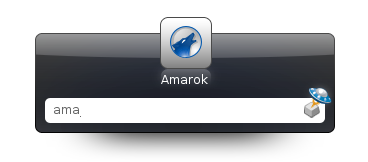
With Launchy you can not only launch applications but also -- using the same keyword philosophy -- launch your preferred media player with a specific MP3 file; invoke your preferred desktop search tool while entering a search term of your choice; or have your preferred browser open on a specific bookmark or page from the history. The possibilities are virtually endless. Version 2 of Launchy is less stable than v1, and many users prefer to retain the final version 1 iteration! But alongside Launchy, the other contenders fall down on configurability or indexing performance.
Keyword Command
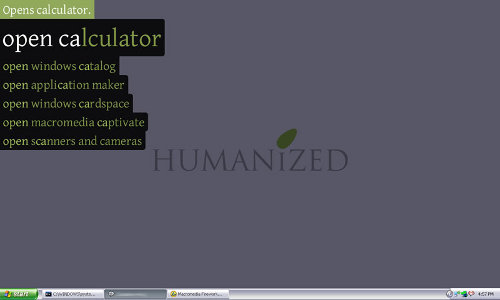
** Please note that the Google Safe Browsing service is currently reporting the Enso site as suspicious. WOT (Web Of Trust) and Comodo DNS still see this site as being clear but It may have been tampered with and malicious code inserted. This is why we have broken our own link to the vendor's home page in the Quick Selection Guide below and listed Softpedia as the download source. A simpler alternative is SlickRun. Slickrun is minimalist but extremely easy to work with. At its heart is a concept called MagicWords which, as you might expect, are typed shortcuts to programs or functions. Helpfully, it guesses which shortcut you want before you've finished typing it, so it can be very quick to use. New MagicWords can be added through an easy dialog, or by dragging shortcuts to its command window. It also incorporates a simple note-taking feature. Well worth a try. For anyone who wants simplicity and ease of use without too many bells and whistles, it's a very good choice. Panels Coming to the panels class, there are a lot of good choices, including FSL Launcher, Fast Launcher and 8Start. But 8Start comes out on top in many key areas like footprint and functionalities. Menus In the menus class, readers suggestions have led me to change my mind and suggest as the best solution Free Launch Bar: this is an extremely stable piece of software that will give you exactly what you want from it. A good contender is JetStart, but the free version is limited to 5 pre-set general categories. Docks Finally, the docks class. These tend to be graphically interesting, often featuring a configurable background shape on which appears icons for applications, documents, shortcuts or controls. They can usually be persuaded to stick themselves to a screen edge or some other location. They're often a bit like toolbars, but prettier. I have to admit I'm not an enthusiast of these type of launchers, so my tests may be limited by my lack of imagination or insight into their good points. Two specific programs of this type are worth a look. I can say that a good choice is RocketDock. It is well supported, has a small memory footprint and can probably do whatever you'd expect from a dock. It's very configurable, with good options for visual style, behaviour and docking position. Another excellent choice is Magic Formation (thank you Anonymous reader!). It sits somewhere between panels and docks in function but is included here because it's visually more dock-like than panel-ish. It doesn't require installation (although I have yet to check if its truly portable). Its default behaviour is to display a circle of icons around a colourful centre circle when a circle gesture is performed with the mouse anywhere on the desktop. This means it's there when you want it and not when you don't. (Although as I use a graphics tablet rather than a mouse, I occasionally find I get it by accident!) New icons can be added by dragging them to the centre circle. Documents can be dragged to application icons too. By default, the circle of icons contains shortcuts to favourites, My Documents, the desktop, My Computer, the command prompt, calc.exe, notepad.exe, mspaint.exe and the volume control, but any or all of these can be modified. The program allows the selection of any one of up to 25 pages of icons. If I had to choose a launcher of this type to use, this one would definitely be my choice. MagicFormation is a real grower, and has already notched up a Lifehacker recommendation. Congratulations! Both are winners. Other software suggestions: |
 The only viable alternative is
|
Related Products and Links
|
|
|||||||||||||||||||||
|
|||||||||||||||||||||
|
|||||||||||||||||||||
|
|||||||||||||||||||||
|
|||||||||||||||||||||
|
|||||||||||||||||||||
|
|||||||||||||||||||||
|
|||||||||||||||||||||
|
|||||||||||||||||||||
|
|||||||||||||||||||||
|
|||||||||||||||||||||


 2.5
 Open Source Freeware (includes program code)
 Windows, Linux, Mac OS X


|
Editor
|
| This software category is maintained by volunteer editor oblivion |

- Article type:
 Printer-friendly version
Comments
Not as sophisticated, but FSL (http://fsl.sytes.net/) works fine too. It provides a tabbed interface where each tab contains shortcuts to files or programs. Once a tab is open, you can click on as many shortcuts as you wish - the tab stays open. The "All Programs" menu used by Windows xp closes right away after you click on a single shortcut. I have tabs for various categories of programs I use: dictionaries, graphics, word processing, network connections, etc. I also have tabs with groups of programs that I wish to have open at a single stroke (for instance, all the programs I use when I'm translating to French).
Works well for me.
Tried and I like it too. I'll insert it in the next version of the category. Thank you.
Although it's much more then just a launcher you should try it, it's the best launcher too.
Some PowerPro 4.8 features:
[...]
Torrente
Thank you for the hint. I've donwloaded it and I'll use it in order to see what this "monster" can do!
Bye
ADDED: May 26
I've used since today the application, but I think I'll not include it. It is a incredible application with really tons of features, but I think it is too much sophisticated and sometimes unstable (I got program termination a lot of times)
Thank you anyway for the hint
I liked this one as well, a little intrusive, but I like the interface and the fact that you can put it over the whole desktop...
http://www.northglide.com/sideslide.html
Slickrun is definitely worth trying
I use Launchy but also FSL Launcher. FSL is good because it has room for lots of icons but stays hidden until you need it. Get it here:
http://www.download.com/FSL-Launcher/3000-2084_4-10564183.html
George
What about ASuite, PStart, RunMe, Executor ?
All portable, free and very good programs overall ?
Thank you. It is already in the list for the next revision of the review.
Thank you. It is already in the list for the next revision of the review.
First of all, thank you for the suggestion.
I think those apps should have a specific category lile "Portable Start Menu", but in the meantime I'll think about a special mention in this category for application launchers for thumb drives.
I know SideSlide and I've used it. It was also reviewed on LifeHacker (http://lifehacker.com/software/featured-windows-download/fully-customiza...).
But to me it is way more than a Program Launcher, this is the reason I've not thinked about it until now. But, if I have to say the true, I don't see another catogery where to put it. So I'll try to insert it in the next version of this category.
Thank you.
Jetstart is quite nice too
Thank you. Added to the list of app to review.
I agree with you it's too complicate for most users. But I didn' have crashes like you (XP SP2).
I use "Fast Launcher" and think it is one of the best. If you want to review it here is the link.
http://www.dvasoft.com/fast_launcher/
I'm not sure this fits perfectly in this category or not, but you might want to check out RocketDock. It is a modern Mac-like docking bar with some highly cool features.
http://rocketdock.com/
-David
What about Enso Launcher? http://humanized.com/enso/ It's the only launcher I've seen so far that's quasimodal. I don't think it's as powerful as Launchy (yet) but the quasimode interface makes it more intuitive and faster to use. The current version is freeware, but they're working on a new version that's open source, so I expect it to improve. http://code.google.com/p/enso/
I'm a huge fan of keybreeze. It's freeware, powerful and light on cpu.
Check it out:
http://www.keybreeze.com/
Keybreeze is awesome. Freeware, powerful & v. light on cpu.
http://www.keybreeze.com/
FARR does work on Vista. See their forum/FAQ.
The Vista compatibility is a feature of the 2.0 version that - at the time when the category was last revised - was still in beta. As you can see the catergory still refer to the 1.13 version.
At the moment I'm actively using the 2.0 version in order to review it because I see it very competitive regarding Launchy.
Thank you for your suggestion, keybreeze is already in the list for the next revision of this category
I know it and I'm watching its evolution with interest, but at this moment I think it needs more time - as the developers also says - to be more stable and complete.
For all keybreeze fan :-) be sure it will be included soon.
I know it and I use it, but - as you said - I too really don't know if fits this category or not. Someone have suggestions or opinions about that subject?
If you want to have only one configuration file (independent of machine name) you have to go in Settings/Others, and check "Do not add the machine name to the name of inifile" checkbox; you will have only one config file then, named MagicFormation.ini .
joby_toss
This is a good suggestion, but right now is not praticable because the review format requires the complete information you see right now for every software mentioned in the review itself. You can imagine the hughe and unreadable list it can became.
I'll ask permission to list alternatives not reviewed with only a subset of the information.
Thank you.
Maybe add a list of the alternatives that didn't make it or are still being reviewed at the end of the main review, that way people don't have to read through endless comments.
I don't know where this software fits in but Direct Folders is possibly the easiest way to navigate to your most often used folders. I find it invaluable and it isn't listed on this wiki. Double click any empty space on the desktop or in a folder and it brings up the folder menu. You can add as many folder as you want and they will also show up in save/save as diaglog boxes for easy navigation (double click the empty space).
This program has cleared my desktop and saves me time. check it out.
http://www.codesector.com/directfolders.php
Post new comment