

 Read this article in Spanish
Introduction
When testing defragmenter software, we evaluate it with these parameters:
- Speed of analysis on fragmented files: Isn't it speed we want from our computer?
- Speed of defrag;
- Some extras: such as scheduled defrag, shutdown PC when done, etc.;
- Defrag capabilities: Why is this placed in last position? Because almost all of today’s defragmenters can perform this task with very similar results.
With these parameters in mind, we found a few we could recommend with the best of these as good as any commercial product.
Read also Fragmentation: Why does it happen? and Defragmentation: Do you need it? at the end of this page.
Rated Products


Platforms/Download: Windows (Desktop) |
Version reviewed: n/a
Gizmos Freeware
| Our Rating: 5/5 |
|
Read more...

Platforms/Download: Windows (Desktop) |
Version reviewed: n/a
Gizmos Freeware
| Our Rating: 4.5/5 |
Read more...

Platforms/Download: Windows (Desktop) |
Version reviewed: n/a
Gizmos Freeware
| Our Rating: 4/5 |
Read more...

Platforms/Download: Windows (Desktop) |
Version reviewed: n/a
Gizmos Freeware
| Our Rating: 4/5 |
Read more...
Also reviewed but not included:
- Puran Defragmenter
- O&O defrag free edition
- Others
Feel free to suggest any software not already mentioned for review.
Related Products and Links
You might want to check out these articles too:
- Types of Backup Software : What’s the difference between Disk Imaging, File Based Backup, or Synchronization, and which should I use?
- Best Free Drive Cloning Software
- Best Free Folder Synchronization Utility
Fragmentation: Why does it happen?
Suppose you are browsing the web, downloading your favorite songs and installing an application all at the same time, how does your system write all these files without any interruption to your activity? Well it's simple: it responds to all applications' write requests (I/O operations) by writing all files at a continuous location on your disk.
Representation of a disk track:
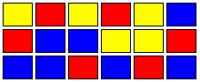 (Fig. 1)
Yellow: Temporary written internet files
Red: Installation (Game)
Blue: Song cache
The purpose of disk defragmenters is to reorganize such files which are supposed to be together. An ideal situation after defragmentation would look like this:
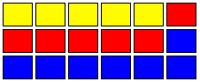 (Fig. 2)
But what happens when you uninstall, delete, or simply clean your temporary files? Imagine yourself uninstalling the application (game) you installed. The disk could look like this:
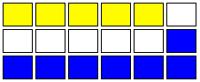 (Fig. 3)
The white zone is empty space without fragmentation. A disk looking like this will have just a little or even imperceptible impact on performance. In this case defragmentation is needed but not critical.
The last thing you want to see is a hybrid combination. Files very fragmented fig 1 and empty disk space fig3 but instead of contiguous clean sectors you'll find what we call fragmented empty space. And this is what it looks like:
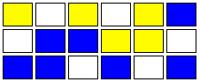 (Fig. 4)
This is the worst case scenario. Overall system performance will be compromised and fragmentation is critical. You should defragment (defrag) or let your defragmenter schedule and execute the defrag process for you.
Defragmentation: Do you need it?
Standard mechanical HDDs (hard disk drives) will benefit from defragmentation and continuous disk use, because when spinning, it keeps remagnetizing the HDD plates. But if you own an SSD (solid state drive) you SHOULD NOT defrag or install any defragmenter application because it will shorten the life of the drive.
Editor
This software review is copy-edited by Ian Richards. Please help edit and improve this article by clicking here.
Back to the top of the article
 We are looking for people with skills or interest in the following areas:
Comments
It came back on 10th April. Problem was with faulty dns-server, none could access the site although it was up and running.
Watch out. UltraDefrag just blew in the middle of an Optimization on one of my PCs running Win7. It's got plenty of power and space on the HD. My system is hosed for now.
Hello,
Nope, I was using the newest stable version. I started the full slower optimization and left the house. Came back later to a shutdown PC. Started it up and got the message that Windows couldn't start. Two options... repair or start Windows normally. Starting Windows normally would just put me in the same spot. When I tried a repair, Windows gave me a message that it couldn't do it. Can't remember exactly what the message was. Luckily, I keep most of my stuff on an external drive! I would love to have been able to look at the events if Windows was able to log them. I still have the drive if you know where I could look for the events.
I also like the many options that this software gives you but I'm scared! Going back to Defraggler for now.
Why not to review and include Ultimate Defrag Freeware Public Domain Edition?
It's old, released 2008, and non-supported version of the main commercial one, but still rather good and advanced defragger alternative, and in my opinion should be mentioned here. Is it for the same reason that the O&O freeware is not reviewed? Both are more adware than freeware :)
"More than just a defragger, UltimateDefrag is also a hard drive file placement optimizer that enables you to defrag and place your files in the areas on your hard drive where you achieve maximum performance. 80% of the time you only use 20% of the files on your hard drive. UltimateDefrag places your rarely used files out of the way and onto the slower performing areas of your hard drive making your drive perform like a new, almost-empty drive. Version 1.72 includes unspecified updates."
Read more: UltimateDefrag Freeware Edition - CNET Download.com http://download.cnet.com/UltimateDefrag-Freeware-Edition/3000-2094_4-108...
Moderators comment: Be sure to only use the "Direct Download Link" button to avoid the cnet wrapped installer and it's unwanted components.
http://www.techsupportalert.com/content/cnet-downloadcom-wrapped-install...
I don't use it myself, I prefer other one, but it is in my opinion a good disk defragmenter to be mentioned and reviewed on a freeware disk defragmenter list as an alternative to these that are already mentioned.
Yeah the CNET is crap nowadays. Hard to find a download link for it and that was the first one. It seems that Disktrix isn't offering it anymore, although they seem to still host it.
Here is a better alternative link:
http://www.neowin.net/news/ultimatedefrag-freeware-edition-172
And Direct Download link from Disktrix:
[Edited out, direct download link is not allowed.]
Hello rmitch,
hope you have a good time with this.
One thing about defragging I've rarely seen mentioned is that many programs perform badly if hiberfile.sys and pagefile.sys get in the way. Temporarily disabling these, even on a disc with lots of room on it, can magically allow the program to do its job. I'm not sure if I'd advise the inexperienced to do this though.
One bonus with temporarily disabling the pagefile is that it gets defragged properly, something that a lot of programs don't actually seem to manage.
Pages