
Gizmo's Freeware
Published on Gizmo's Freeware (https://www.techsupportalert.com)

Home > AES Crypt

AES Crypt [1]

Last updated by philip [2] on 15. March 2017 - 04:52

AES Crypt

A simple program using Advanced Encryption Standard to encrypt and decrypt files via a context menu in the file system.
[3]
3

Our rating: 

3
Get It: Android [4] | iOS [4] | Linux [4] | Mac OS [4] | Windows (Desktop) [4] [5]
License: Free (Open source)
Website: https://www.aescrypt.com/ [6]
Review & Alternatives: Best Free File Encryption Utility [7]
Categories: Security & Privacy [8], File Encryption [9]
Tags: password-protection [10], data-encryption [11], file-encryption [12], folder-encryption [13]

Pros & Cons:

Quick install. Always ready. Simple to use directly from the file system (Windows Explorer; File Explorer in Windows 8/10). Fast.
Does not remove the original, unencrypted file. AES Crypt can encrypt single or multiple files, but it does not encrypt folders. Installs Microsoft C++ Runtime.

Our Review:

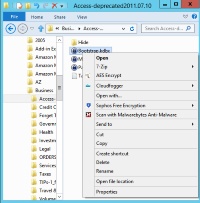
AES Crypt is a simple program that adds a context menu item in the file system context menu. There is no program window as you have for most programs.

You simply right-click the file you want to encrypt or decrypt in the file listing, select the AES Crypt item, and enter your password in a little dialog box. A new encrypted or decrypted version of the file is created. In the case shown, the filename will be Bootstrap.kdbx.aes.

Since the original file is not purged, AES Crypt is best used for situations where you need to upload, email or otherwise move the encrypted file. If you want to prevent access to the unencrypted version file you would need to shred it with a secure erase utility.

The short Users Manual for AES Crypt makes the encryption and decryption processes easy to understand.


AES Crypt was reviewed by Gizmos Freeware [14] on 2017-03-15 based on version 3.0.8.

toggle-button

Terms & Conditions | Privacy Policy | Contact | About


Source URL: https://www.techsupportalert.com/content/aes-crypt.htm-0

Links
[1] https://www.techsupportalert.com/content/aes-crypt.htm-0
[2] https://www.techsupportalert.com/users/philip
[3] https://www.techsupportalert.com/files/aescrypt.png
[4] https://www.aescrypt.com/download/
[5] https://www.techsupportalert.com/content/installer_advice.htm
[6] https://www.aescrypt.com/
[7] http://best-free-file-encryption-utility.htm
[8] https://www.techsupportalert.com/software-finder?field_soft_categories_tid=135
[9] https://www.techsupportalert.com/software-finder?field_soft_categories_tid=919
[10] https://www.techsupportalert.com/software-finder?field_tags_tid=password-protection
[11] https://www.techsupportalert.com/software-finder?field_tags_tid=data-encryption
[12] https://www.techsupportalert.com/software-finder?field_tags_tid=file-encryption
[13] https://www.techsupportalert.com/software-finder?field_tags_tid=folder-encryption
[14] https://plus.google.com/118396188147577447707