


Google Play Music
Google Play Music is a good option if you're using Google's cloud services to store your music. Otherwise, not really.
Pros & Cons:
Summary:
Google Play Music is specifically designed to work with Google's cloud services, and it does that job decently well. Otherwise, there isn't too much exciting about this music player. Also, if you're interested in the cloud, this app will let you upload 50 000 tracks to Google's servers for free.
Our Review:
Google Play Music is actually a service for buying music, and is part of Google's Play system. This app is basically meant to tie in with the Google Play Music service, and it doubles as a music player - but in its recent incarnations, it's been pushing Google's music service more and more. Starting with Android 4.1, it's bundled with most Android phones. It also has a good tablet interface - so if you have an android tablet, you can give it a try there.
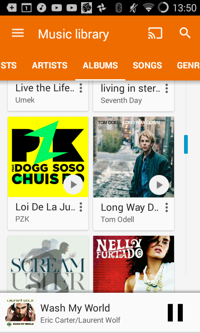
The albums, artists, songs, and genres sections work as expected. One interesting feature is that if you choose a track, for instance, you can find the corresponding artist or album. The playlist functionality doesn't have anything new, with a "last added" playlist, and the "thumbs up" playlist.
You can "thumbs up" or "thumbs down" a song. Thumbs up adds it to the "thumbs up" playlist, and I'm not sure what "thumbs down" does, other than play the next track.
One of the only unique features in Google Play music is the "Listen Now" feature. Here, it collects music it thinks you might want to hear, and, if you're in a supported country, you can also see your recommended radio stations. It has some shortcuts to commonly used features, such as a Shuffle all function, and some shortcuts to some tracks you might be interested in listening to. It's hit-or-miss - sometimes it has something interesting, but lately it hasn't shown me anything interesting. It also has an "Instant mix" function, but I couldn't get that to work anywhere, even on some very popular tracks.
The app only takes up a pretty lean 6MB RAM when playing music in the background, and usually doesn't run in the background when it's not needed.
What's interesting for some is that is has Chromecast support, so if you have a Chromecast, it might be worth giving Google Play Music a look.
There aren't all too many settings related to music playback, just a few basics. It's better than it once was, but it could still be more. You have an equalizer there - you can add some effects, but only apply predefined profiles for the equalizer. Really, Google?
What may be interesting to some is that you can upload up to 50 000 tracks to Google's cloud for free so that you can access those tracks from anywhere, as long as you have an internet connection.
Coming from Google, I was expecting more, but aside from that, it's a decent app.
Google Play Music was reviewed by trainman261 on based on version 7.8.4817-1.R.4044904.
 We are looking for people with skills or interest in the following areas: