


Ghost Installer Free
Featureful XML based Windows setup builder
Pros & Cons:
Summary:
If you want to have major control about your setup routine and are not afraid of just dealing with an XML configuration file, then Ghost Installer Free might be a good choice for you. While the commercial version comes with a GUI (Ghost Installer Studio), the free version just offers the so-called gEditor to edit the XML file that the compiler of the setup routine uses. This product requires a high learning curve but once you get a hang of it and know about all the settings you can use you have a mighty powerful tool here.
Our Review:
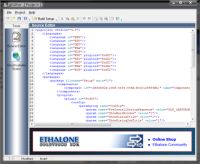
Similar to InnoSetup, if you want to have major control about your setup routine and are not afraid of just dealing with an XML configuration file, then Ghost Installer Free might be a good choice for you. While the commercial version comes with a GUI (Ghost Installer Studio), the free version just offers the so-called gEditor to edit the XML file that the compiler of the setup routine uses.
This product requires a high learning curve but once you get a hang of it and know about all the settings you can use you have a mighty powerful tool here. The help file is pretty good as well and lists all keywords and settings you can use. When you start a new project a wizard will create a basic or advanced template that you can start to work with and that provides the appropriate XML tag structure for you. I found this tool a little tougher to learn compared to InnoSetup but I am sure it is as powerful as my top pick.
In the end gEditor is just an XML editor with a build button to compile what you have created. If you find this appealing you should surely give it a try.
Ghost Installer Free was reviewed by George Lewe on based on version 4.7.
 We are looking for people with skills or interest in the following areas: