

I was recently faced with a problem on my network. Copy large files between the 2 local hard disks on my PC was WAY faster than copying the same file across the network to a different PC. This is obviously to be expected, but before I could start trying to solve the problem I needed a decent diagnostic tool. Something that would allow me to guage the speed of copying a file between any 2 given drives on my PC or to somewhere else on my LAN. I could then repeatedly run the tests as I worked through my ideas for resolving the problem, and get meaningful data on whether I was any closer to a resolution.
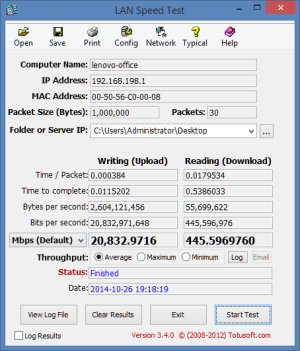
The diagnostic tool I preferred is something called LAN Speed Test. Its interface is very simple, and the default generally make sense. So all you have to do is choose a destination drive, press the Start Test button, and then read off how long the transfer took. Then change the destination, run the test again, and compare the 2 sets of figures.
The program automatically takes care of clearing any caches, so your system won't have a "head start" the second time you run the program.
LAN Speed Test is portable, a download of less than half a megabyte, and should run on all recent versions of Windows. You'll find it at http://www.totusoft.com/lanspeed.html to download. The Lite version, which doesn't include all of the data shown in the screen shot below, is free. Registering for the full version is $6. However, for simply comparing the time taken to copy files to multiple destinations, the free edition should suffice.
 We are looking for people with skills or interest in the following areas: