Gizmo's Freeware is Recruiting

Gizmos Needs YouWe are currently looking for people with skills and/or interest in the following areas:

- Digital photography software
- Windows defragmentation software

If this sounds like you then click here for more details

Best Free Microsoft Downloads

Introduction

Note: This article is still growing - I welcome suggestions and criticisms so I can make this article better. I do have a current list of programs to test that may be included in the next update (I've got my eyes on the MSN Gaming Zone and other entertainment entries).

When people set out to look for freeware, a lot of times they specifically look for free alternatives to Microsoft products – free office suites, free alternatives to built-in programs like Paint, Notepad, Internet Explorer, Windows Explorer... even free alternatives to Windows itself. However, Microsoft does provide a collection of free software that is definitely worth checking out.  This article is designed to provide an overview of the best free Microsoft programs, some of which are featured in other articles on this website.

Using free Microsoft software does have some advantages. A big company like Microsoft has the resources to produce a multitude of help resources for users, from support pages to Technet pages to video overviews and tutorials. Some of the programs can conveniently be updated as part of Windows Update. Perhaps the best advantage is knowing that you're installing a program that is safe and not bundled with anything extra.

I have set a couple guidelines for this list. An unavoidable fact is that some alternatives will be better than programs listed here, but the programs listed here are still good and useful - however, if a Microsoft program is ridiculously inferior to other free alternatives and simply not worth using, I won't include it. If a program has a loose affiliation with Microsoft but is not actually a Microsoft product (e.g. Paint.NET), it won't be listed here.

Best Free Microsoft Downloads – Quick Select Index

After clicking a link, use your browser's Back icon to return here.

Items added or updated most recently: Standalone System Sweeper | Microsoft Safety Scanner | RootkitRevealer | EMET | Process Monitor | BGInfo | AccessEnum | ZoomIt | Expression Encoder 4 | WebMatrix | Fix it Solution Center | Disk2vhd | BlueScreen (screensaver)

Security Antivirus | Malware Scanner | Emergency Tool | Rootkit Detection | System Analysis | Network Analysis | Application Security | Virtualization | Parental Control | Windows Service Packs
Internet Browser | File/Folder Synchronization | Mail | Instant Messenger | Blogging Tools
System Tools System Tools Suite | Startup Manager | Process Viewer | System Monitor | System Info | Permissions Analysis | Autoplay Utility | Tweaking | Search Tool
Desktop CMD Shortcut | Task Switcher | Virtual Desktop | Screen Magnifier
Multimedia Animation | Image Tools | Photo Organizer | Video Editor | Video Encoder | Slideshow Software
Office Document Viewer | Spreadsheet Viewer | Presentation Viewer | Diagram Viewer
Educational Mathematics | Programming
Programming Programming Editor | HTML Editor | Web Development
Online Services File Hosting | Online Office Suite | Support & Troubleshooting
Entertainment Screensaver
Miscellaneous Virtualization | USB Flash Drive Tool
 
Security
Antivirus
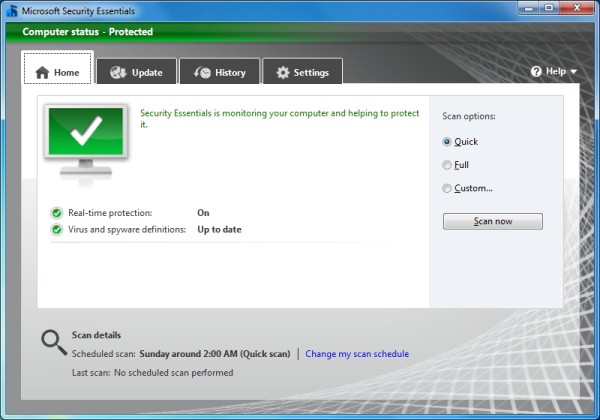
  • Microsoft Security EssentialsMicrosoft Security Essentials

    System Requirements: Windows XP and up

    This may be the best free product ever from Microsoft, and it was chosen as Gizmo's Freeware 2010 Product of the Year. MSE is a free anti-malware program with an interface ideal for average users, and effectiveness ideal for advanced users as well. Its interface is simple and unobtrusive, and when it detects threats, it displays messages that are meaningful and easy to understand. It is light on resources, receives regular updates, and has exceptional detection rates. You can perform scans on demand, but it also continuously guards your system with real-time protection. The recent release of version 2 adds more features, including a "Network Inspection System" and a heuristics engine for a more comprehensive set of protective measures. Another feature added in the new version is the ability to adjust the maximum CPU usage the scanner uses – this is particularly useful if the computer in question is underpowered and the scanner needs to use less resources. Overall, MSE is an excellent product that rivals even some commercial antivirus software. (Review)

Malware Scanner
  • Microsoft Safety Scanner

    System Requirements: Windows XP and up

    This tool scans your computer for all types of malware threats and removes them if found. Unlike the Malicious Software Removal Tool which targets specific threats, Microsoft Safety Scanner includes complete definitions and looks for all viruses and malware. Because of this, however, the download is about 70MB large and expires after ten days - this is to ensure that an updated version is always used. The intended use of this tool is for emergency situations where installed security software has failed to detect/remove threats. It is true that other products serve this purpose, like Malwarebytes and SuperAntiSpyware, but it is nice to have options.

  •  

  • Malicious Software Removal Tool

    System Requirements: Windows XP and up

    This tool scans your computer for specific widespread virus threats and removes them if found. It is downloaded and executed in the background monthly via Windows Update, but you can download and run it on demand.

Emergency Tool
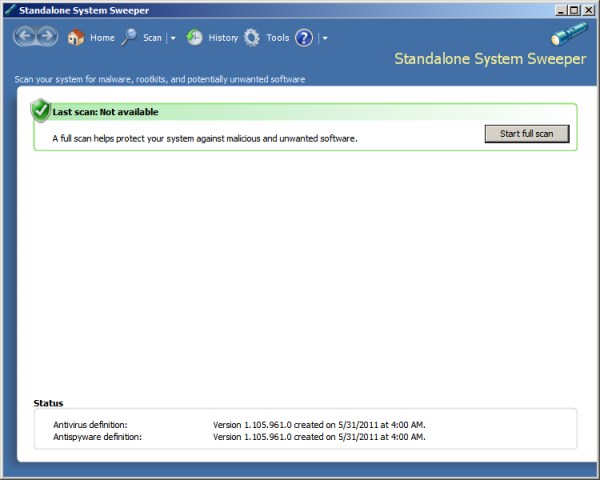
  • Microsoft Standalone System Sweeper BetaMicrosoft Standalone System Sweeper Beta
    System Requirements: Windows XP SP3 and up - please see additional requirements listed here

    This new offering from Microsoft allows you to create a bootable rescue system on a CD or USB flash drive (you can also create an ISO file as well). The rescue system contains a malware scanner that looks for all kinds of malware, including viruses, trojans, rootkits and more. For users who install it on a USB flash stick, you can update the definitions periodically by running the executable again. As with other rescue systems, the intended use for this tool is to save computers that are so infected they aren't bootable, usable, or can't be fixed with antivirus software installed on the system.

    Some notes: First, please be aware this is a beta version so it may not be as stable or polished as the finished product will be. Second, choose the architecture (32- or 64-bit) that matches the computer on which you will be booting the rescue system. Third, XP users cannot generate ISO files unless IMAPIv2.0 is installed - you can find it here: 32-bit | 64-bit

Rootkit Detection
  • Rootkit Revealer

    System Requirements: Windows XP 32-bit only

    I was originally exluding this from the list because it only works on XP and it doesn't remove the rootkits - the world has been gradually moving away from XP, and other software exists that is capable of detecting and removing rootkits (Microsoft Security Essentials does this remarkably well). However, I've included it because it is popular, lightweight, and really does what it does well. Just note that scan results don't guarantee the presence of rootkits, so please don't try acting upon them unless you're an expert.

System Analysis
  • Microsoft Baseline Security Analyzer

    System Requirements: Windows 2000 and up

    This tool analyzes a computer and provides a summary of how secure or insecure it is. Some of the things it checks for are security updates that have not yet been installed, settings that are not recommended (such as weak passwords, disabled firewall, etc), running services that may not be necessary, network shares, and more. This program can be a valuable tool for IT professionals, but it can also help average users who want to make sure their computers are as secure as possible.

Network Analysis
  • Promqry

    System Requirements: Windows 2000, XP only

    This small utility is geared more toward IT professionals. It is used to query network computers to determine if they're running network sniffers (programs that are listening to network traffic, possibly to steal passwords and other information). It does have several limitations, but it can still be a valuable tool in detecting suspicious network behavior. Both gui and command line versions are available.

Application Security
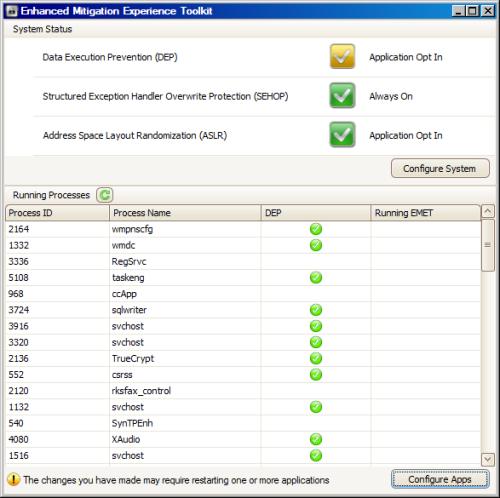
  • Enhanced Mitigation Experience Toolkit (EMET)Enhanced Mitigation Experience Toolkit
    System Requirements: Windows XP SP3; Vista SP1 or later; Windows 7

    This toolkit helps prevent security flaws in software from being exploited. It does this by employing various security mitigation technologies. This is especially useful when applied to older applications that have a multitude of security flaws, but it works for newer applications too. Its ease of use and high degree of configurability make EMET a valuable tool. Just be aware that some processes may break when certain mitigations are applied, so make sure your software works after applying them. Also note that you do not need to keep the main program running for your applications to be protected.

Parental Control
  • Windows Live Family Safety

    System Requirements: Windows Vista and up; Click here for the XP version

    Family Safety is a parental control program for filtering web content. It can also restrict email contacts. It has an activity log that allows you to see who tries to access which sites, and activity across multiple PCs with Family Safety installed can be collected in the same log.

Windows Service Packs
  • Service packs are extremely important for the security and stability of the Windows operating systems. With a few exceptions (e.g. testing environments, rare occurrence of software incompatibility), it is always recommended to have the latest service pack installed, preferably through Windows Update. For those who have machines that for some reason can't use Windows Update, here are links to the various service packs available.

  • Windows XP - SP1a | SP2 | SP3
  • Windows XP Pro 64-bit - SP2
  • Windows Vista 32-bit - SP1 | SP2
  • Windows Vista 64-bit - SP1 | SP2
  • Windows 7 - SP1 (validation required | KB976902 must be installed first)
 
Internet
Browser
  • Internet Explorer 9Internet Explorer 9

    System Requirements: Windows Vista and up

    Internet Explorer has long been troubled, unable to keep up with other browsers in several areas, particularly in speed, security, and support for newer web features. Internet Explorer 9 looks to change all that, boasting a wealth of improvements over IE8. It starts much faster, it loads web pages much faster, and it takes full advantage of hardware acceleration wherever possible. It includes a download manager (with pause/resume), and it has a startup manager for add-ons that lets you see which add-ons use the most resources and disable them if needed. The interface has been revamped and is simpler - the address bar now doubles as a search bar (like in Chrome), tabs are on the same row as the address bar by default (this can be changed), and the buttons have been shrunk and rearranged.  Also, its improved support for standards like CSS 3 and HTML 5 allow web designers to deliver a richer online experience to IE users. As for security, Microsoft has added protective measures against pop-ups, phishing sites, and suspicious downloads. A sandbox mode has also been added, which can help keep malware contained and prevent it from affecting your system. I can't say whether it will outdo Firefox or Chrome, but it definitely looks to redeem Internet Explorer as a viable browser. (Review)

File/Folder Synchronization
  • Windows Live MeshWindows Live Mesh

    System Requirements: Windows Vista and up

    Mesh is a synchronization program that lets you synchronize files, folders, and settings for IE and Office between different machines over the Internet. You can also sync up to 5GB of files and folders onto your SkyDrive online storage. Additionally, if you log into your Live account, you can see a list of your computers that have Mesh installed, and you can remotely control any that are currently running Mesh (this feature must be manually enabled in Mesh, and Internet Explorer is required). In my experience, the remote control is not as fast or smooth as TeamViewer, but it does work well and is a nice feature to have bundled with the synchronization functionality.

Mail
  • Windows Live Mail

    System Requirements: Windows Vista and up; Click here for the XP version

    Mail is actually a decent program and is similar to Outlook. It supports multiple email accounts, RSS feeds and a calendar all combined in one attractive application.

Instant Messenger
  • Windows Live Messenger

    System Requirements: Windows Vista and up; Click here for the XP version

    Messenger has the standard features expected of an instant messenger client, but it also has integration support for social networks (Facebook, MySpace, LinkedIn) and a photo viewer for shared albums on SkyDrive and Facebook. Messenger Companion is an add-on that lets you share links to websites with friends, who in turn can share comments on these links.

Blogging Tools
  • Windows Live Writer

    System Requirements: Windows Vista and up; Click here for the XP version

    Writer provides an easy way to create and publish blog entries. It has the standard formatting features, and you can add links, pictures, videos, maps, and more. It integrates with many popular blog sites, including Blogger, WordPress, SharePoint, and several others.

 
System Tools
System Tools Suite
  • Sysinternals Suite

    System Requirements: Windows XP and up for all tools except RAMMap (Vista and up); some tools won't run on 64-bit systems

    This suite contains a long list of a variety of system utilities and troubleshooting tools, from system monitors to disk tools to maintenance. Some of them are listed separately in this article.

Startup Manager
  • AutorunsAutoruns

    System Requirements: Windows XP and up

    Arguably the best tool of its kind, Autoruns gives you complete control over the things that run when you start Windows, including items in the Startup folder and items listed in the Registry. It can be useful for optimizing the speed of your system by letting you disable unnecessary programs, and it can also help combat certain types of malware that run when Windows starts. This is a must-have for any computer repair kit. (Review)

Process Viewer
  • Process ExplorerProcess Explorer

    System Requirements: Windows XP and up, including IA64

    An advanced process viewer. Process Explorer was once the best tool of its kind, but it is still useful for anyone who wants something better than Task Manager but doesn't need all the whistles and bells. It lists all running processes in a hierarchical format, you can restart, suspend or kill processes, you can kill process trees, and you can set process priorities. It also lets you view threads, strings, and other details about processes. It displays CPU and memory usage, and you can configure tray icons to show these as well. You can optionally configure it to replace Task Manager. (Review)

System Monitor
  • Process MonitorProcess Monitor

    System Requirements: Windows XP and up

    This advanced monitoring tool displays and logs file system, Registry and process activity in real-time. You can filter the data by any field, and you can export it in csv and xml formats as well as the Process Monitor pml format. With these features and plenty more, Process Monitor can be a powerful tool in the hands of advanced users for troubleshooting problems or fighting malware.

System Information
  • BGInfoBGInfo

    System Requirements: Windows XP and up

    This tool prints various system information and statistics to your desktop background. You can choose from a list of different details to show, and advanced users can add custom ones as well. The appearence is also completely customizable. I personally find this extremely useful for monitoring servers at work. Just to clarify, it displays the information as snapshots and is NOT a real-time monitoring utility.

Permissions Analysis
  • AccessEnum

    System Requirements: Windows XP and up

    This tool provides a quick and easy way to see what users have what permissions to files, folders and registry keys. If you find a permission that needs to be changed, you can right-click the item from within the program and view its properties.

Autoplay Utility
  • Autoplay Repair Wizard

    System Requirements: Windows XP/2003 only

    This utility is used to fix invalid or broken autoplay settings for CD, USB or other drives.

Tweaking
  • Tweak UI

    System Requirements: Windows XP only

    One of the PowerToys for Windows XP, Tweak UI lets you change various settings to the appearance and behavior of the user interface. For most users, these settings would otherwise be unavailable for adjustment.

Search Tool
  • Windows Search 4.0

    System Requirements: Windows XP and up

    A search tool that uses indexing to allow quick searching for files. You can search local or network folders, and you can modify exactly which folders are included and excluded. By default it adds a search toolbar to the taskbar, and it can be closed if desired. The main search window includes a preview pane, and it lets you finetune your search by choosing which type of files you're looking for. It isn't the fanciest search tool out there, but it certainly is a viable option for some and it can be installed via Windows Update.

 
Desktop
CMD Shortcut
  • Open Command Window HereOpen Command Window Here

    System Requirements: Windows XP only

    One of the PowerToys for Windows XP, this adds an entry to the menu when you right-click a folder - it allows you to open a Command Prompt window at that particular folder, which can be quite convenient. One annoying detail is that it does not work if you right-click empty space within an Explorer window - you have to go up one folder and then right-click the folder to get there. It is worth noting that this functionality is built-in for Windows Vista and 7 (hold SHIFT while right-clicking to access it).

Task Switcher
  • Alt-Tab ReplacementAlt-Tab Replacement

    System Requirements: Windows XP only

    One of the PowerToys for Windows XP, this replaces the standard interface that appears when you press Alt + Tab to switch windows and it includes window previews. It's really nice, but just be aware that it runs in the background at all times (the memory footprint is about half a MB on my system).

Virtual Desktop
  • Virtual Desktop Manager

    System Requirements: Windows XP only

    One of the PowerToys for Windows XP, this tool lets you manage up to four desktops, in which you can set different backgrounds and run different programs. After installing it, to enable it you right-click the taskbar, select Toolbars, then click Desktop Manager. To access the options, simply right-click anywhere on the toolbar. For each desktop to have its own set of running programs, ensure that the "Shared Desktops" option is disabled. Other programs offer more advanced features, but this one is perfect if you're just looking for basic functionality.

Screen Magnifier
  • ZoomIt

    System Requirements: Windows XP and up

    This screen zoom and annotation tool is perfect for presentations and demonstrations. Annotations can be made with a free-hand draw tool as well as text.

 
Multimedia
Animation
  • Microsoft GIF AnimatorMicrosoft GIF Animator

    System Requirements: Windows 95 and up

    This program is no longer supported by Microsoft or even hosted on their site, but it serves its purpose well as a simple GIF animation creator. You can create new frames from the clipboard or from files, you can set the duration of individual frames, you can configure looping and transparency, and a few other features. It isn't very fancy, but it does about everything you need if you create your frames in a separate program like Paint or Photoshop. (Review)

Image Tools
  • Microsoft Image Composite Editor (ICE)Microsoft Image Composite Editor

    System Requirements: Windows XP and up

    This is a panorama stitcher – it takes a group of overlapping photos and uses them to form a panoramic image. When started writing this list, I had not previously used Microsoft ICE. I was eager to try it out since it has received so much praise. I took a few quick photos of my office with my cell phone and fed them to ICE, and I was amazed – they were stitched together nearly perfectly and the exposure was blended across the whole image.  ICE allows you to do some additional things, such as crop the panorama, change the panorama rotation, choose between planar, cylindrical or spherical projection, and save in several different formats, including JPEG, TIFF, BMP, PNG, HD Photo, and Silverlight Deep Zoom. You can also upload and share your panoramas on the Microsoft Photosynth website, where others can view them interactively by rotating and zooming, even panoramas that are full 360 degrees (Microsoft SilverLight is required to use Photosynth). Needless to say, there are many awesome examples that show off the power of ICE on Photosynth, examples that weren't taken with cell phone cameras. (Review)

  •  

  • Image ResizerImage Resizer

    System Requirements: Windows XP only

    One of the PowerToys for Windows XP, Image Resizer lets you quickly resize one or multiple images to fit within a certain length and width. You right-click on the file(s) and select "Resize pictures" to bring up a simple interface, where you can select one of four pre-set sizes, or specify your own. You can also choose whether to save over the original files or create new files.

Photo Organizer
  • Windows Live Photo Gallery

    System Requirements: Windows Vista and up; Click here for the XP version

    Photo Gallery lets you organize, tag, upload, and edit your photos, among other features. The editing features are no replacement for programs like Photoshop, but they are handy for quick and easy alterations. (Review)

Video Editor
  • Windows Live Movie MakerWindows Live Movie Maker

    System Requirements: Windows Vista and up (XP users can find "Windows Movie Maker" in their Programs menu, but the features are not all the same)

    Movie Maker doesn't boast a set of advanced features, but the features it includes are sufficient for many users and are ideal for putting together slide shows and short videos. Plus, you can use it to publish your videos on SkyDrive, Youtube, Facebook and Flickr.

Video Encoder
  • Expression Encoder 4 with SP1Expression Encoder 4

    System Requirements: Windows XP SP3 and up; .NET Framework 4.0; Silverlight 4.0

    The replacement for Windows Media Encoder, Expression Encoder 4 is a high-performance video encoding program. It is mainly geared toward Silverlight projects but it also exports in Windows Media format, and it includes some video editing features. One excellent feature (which alone makes it worth installing) is the screen capture component, which is easy to use and yields high quality videos that can be immediately opened in Expression Encoder for editing and exporting. The free version of the program leaves out some features, including support for some formats and a ten-minute screen capture limit (a features comparison table can be found here).

Slideshow Software
  • Photo Story 3Photo Story 3

    System Requirements: Windows XP and up

    A very easy yet powerful program for creating slideshows. The program walks you through each step, providing a variety of different feataures along the way. You can add effects of every sort, from photo effects to transition effects to panning and zooming effects. You can add text to each picture, narration, and background music. Overall I think this program is outstanding, and I wish I had started using it years ago. Just be aware of two things: the only video format it can save is wmv, and WGA validation is required if you download from Microsoft. (Alternate download location | Review)

 
Office
Document Viewer
  • Word Viewer

    System Requirements: Windows 2000 and up

    Allows you to view and print Word documents (but you cannot edit them). Formats supported include doc, docx, Microsoft Works documents, WordPerfect documents, and web page formats.

Spreadsheet Viewer
  • Excel Viewer

    System Requirements: Windows XP and up

    Allows you to view and print spreadsheets created in Microsoft Excel versions 97 through 2010 (but you cannot edit them).

Presentation Viewer
  • PowerPoint Viewer

    System Requirements: Windows XP SP3; Windows Vista SP1/SP2 and up

    Allows you to view and print PowerPoint presentations created in PowerPoint versions 97 and up (but you cannot edit them).

Diagram Viewer
  • Visio 2010 Viewer

    System Requirements: Windows XP SP3; Windows Vista SP1/SP2 and up; Internet Explorer 5, 6, 7, 8

    Allows you to view and print Visio diagrams and drawings (but you cannot edit them). Unlike the other Office viewers, Visio Viewer is not a stand-alone program - it opens the diagrams within Internet Explorer.

 
Educational
Mathematics
  • Microsoft MathematicsMicrosoft Mathematics

    System Requirements: Windows XP and up; .NET Framework 3.5 SP1

    This program is targeted primarily for the educational audience, but it can be useful for jobs that require math calculations. It packs in many features, including equation-solving, unit conversion, 2d and 3d graphing, algebra, trigonometry, and even calculus. It can display step-by-step instructions on how to solve a problem, which can be very helpful to students who are learning new math topics. You can also scribble things free-hand as input, and it does a fairly decent job at recognizing everything (although sometimes you may need to redraw some symbols). This program was originally not free, but Microsoft released the newest version as freeware on January 11, 2011. Microsoft also provides Microsoft Mathematics Add-In for Word and OneNote, which adds Microsoft Mathematics features to those programs.

Programming
  • Small BasicSmall Basic

    System Requirements: Windows XP and up; .NET Framework 3.5

    Small Basic provides a programming environment suitable for beginner programmers. It uses a simplified version of the BASIC programming language. Even though it's found in the "Kid's Corner", it can be an excellent learning tool for both kids and adults who are just getting into programming. It includes a PDF tutorial to get you acquainted with the program and walk you through programming concepts.

 
Programming
Programming Editor
  • Microsoft Visual Studio 2010 Express

    System Requirements: Windows XP SP3 and up

    This is a great free set of integrated development environments, essentially lightweight versions of the commercial Visual Studio programs. It consists of Visual Basic Express, Visual C# Express, Visual C++ Express, Visual Web Developer Express, and Windows Phone Developer Tools.  It also supports the newer .NET Framework 4. Registration is required within 30 days.

HTML Editor
  • SharePoint Designer 2007SharePoint Designer 2007

    System Requirements: Windows XP and up

    SharePoint Designer was originally conceived as a way to build SharePoint sites, but SharePoint Designer 2007 can be used as a generic web page editor. Unlike new versions of SharePoint Designer, this one is completely free and does not require a SharePoint server to operate. (Service pack 2 for the program can be downloaded HERE; service pack 1 appears to be included with the program installer.)

Web Development
  • Microsoft WebMatrixMicrosoft WebMatrix

    System Requirements: Windows XP and up

    WebMatrix is a web development tool designed to be easy to use. It integrates a web server and database engine, and you can use it to install additional components such as PHP and open-source web applications. You can use page templates or write your own code from scratch. Other features include coding in ASP.NET and PHP, HTML5 support, deployment using FTP or WebDeploy, and building sites that can run on Windows or Linux systems. For those who might be interested, I highly recommend viewing the overview video available on the WebMatrix page. After installation, you can find a help shortcut to some useful online guides in the Start menu.

 
Online Services

I am aware that these are not downloads, but they are included here because they are definitely worth noting.

File Hosting Service
  • Windows Live SkyDrive

    SkyDrive is an online file hosting service provided to anyone with a Live account (registration is free). It offers an impressive 25GB of online storage for documents, pictures, website favorites, and other files, and you can share these with friends. It includes a search feature so you can find things quickly. Folders on SkyDrive can be added to the Live Mesh program for synchronization with folders on local machines. The one downside is a file size limit of 50MB, so if you're looking to store large files, you'll have to split them or use a different service.(Review)

Online Office Suite
  • Office Web Apps

    An online office suite that lets you create, upload and edit Word, Excel, PowerPoint and OneNote documents. These web apps include common office features and work really well; just bear in mind that they are essentially stripped-down versions of the Office programs and don't have all the features. Office Web Apps has been merged with the SkyDrive service and makes use of its online storage. (Review)

Support & Troubleshooting
  • Fix it Solution Center

    This online service helps troubleshoot common problems encountered in Windows, Office and other Microsoft software. It lets you narrow it down by category and sub-categories to make it easier to find a solution to a specific problem, and it offers a small downloadable executable to automatically fix it.

 
Entertainment
Screensaver
  • BlueScreenBlueScreen

    It's nice that an internal Microsoft group has a sense of humor. This screensaver from SysInternals simulates the infamous Blue Screen of Death, complete with a simulated reboot. Just a note: if you plan on using this at work, we IT people would appreciate if you run it by us first!

 
Miscellaneous
Virtualization
  • Microsoft Virtual PC 2007Microsoft Virtual PC 2007

    System Requirements: Windows XP and up

    A virtual machine is a simulated environment in which an operating system can run without actually being installed on real hardware. It can have several uses – some use it to test software without altering their system; others use it to run an older operating system compatible with older software; and some even use it for their Internet usage so any malware encountered will be contained within the virtual environment. Several free options exist for creating and running virtual machines, and one of them is Microsoft Virtual PC. Linux and other non-Microsoft operating systems are not officially supported (although it is possible to get them to work), but it runs versions of Windows just fine.

    When you create a virtual machine for a specific operating system, Virtual PC will recommend certain settings (hard drive size, memory), but you can adjust these as desired. Once your guest OS is installed, you can install a set of tools called Virtual Machine Additions that make the virtual machine run more smoothly. It also adds support for seamlessly moving the mouse from the host OS to the guest, drag-and-drop files from the host to the guest, and setting up shared folders. One feature that's especially useful for testing purposes is undo disks, which gives you the option to run a virtual machine without committing the changes to the virtual hard drive. Other virtual machine programs can run a wider range of operating systems, but if you're virtualizing a Microsoft OS, Virtual PC is a solid solution. It hasn't disappointed me in the 4+ years I've used it.

  •  

  • Windows Virtual PC

    System Requirements: Windows 7 only

    Windows Virtual PC is the latest version of Virtual PC, exclusively for Windows 7. It only supports (officially) guest operating systems from XP SP3 and up. If you have Windows 7 Professional or higher, you can download and install XP Mode – this installs a pre-configured XP virtual machine and allows you to run applications in the virtual machine while making them appear to run on the host operating system.

  •  

  • Disk2vhd

    System Requirements: Windows XP and up

    This utility copies physical drives and partitions and saves them as vhd (virtual hard drive) files, which can be used with Microsoft virtualization software. My experience with it is mostly positive, but it doesn't always give me a bootable virtual machine. Ironically, after trying several fancier programs (including VMware and Paragon), this tiny tool is the only one I've used to successfully convert a Windows 98 computer to a virtual machine. It's not a replacement for more robust physical-to-virtual programs, but it's quick and easy and can be very handy.

USB Flash Drive Tool
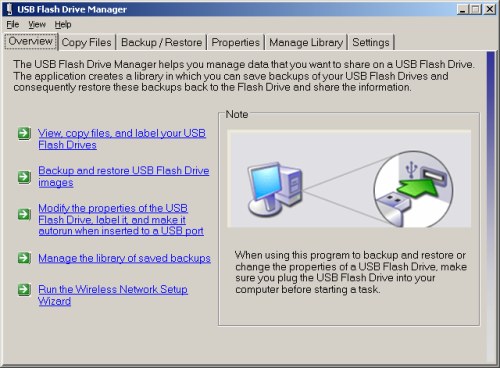
  • USB Flash Drive ManagerUSB Flash Drive Manager

    System Requirements: Windows XP only

    This utility provides a convenient way to manage multiple USB flash drives. You can create and restore backup images, browse or delete files on flash drives, and you can optionally set your flash drives to autorun the manager when it's plugged into a computer.

 
Related Links

Related Software Lists

Microsoft-Related Articles

Tags
best free microsoft downloads, free microsoft downloads, microsoft downloads, best microsoft downloads, list of microsoft downloads, free microsoft programs, free microsoft applications, free microsoft software, microsoft freeware, best microsoft freeware, free microsoft utilities, free microsoft tools, list of microsoft freeware, list of free microsoft programs, free microsoft products

Back to the top of the article.


Share this
4.589285
Average: 4.6 (56 votes)
Your rating: None

Comments

by rik on 20. February 2011 - 6:06  (#66776)

A very nice piece, has brought me up to date.

Many thanks,

Rik

by Bogs_Dollox (not verified) on 21. February 2011 - 13:25  (#66838)

Can I suggest adding the XP Powertoys Image Resizer. It adds a 'Right Click' to enable very easy & quick photo resizing.

by Kenneth Wolf (not verified) on 21. February 2011 - 14:01  (#66840)

Tweak UI for XP systems is a must mention. Included in the Powertoys web page. Allows adjustment of many little things in XP in one place.

by chesscanoe (not verified) on 21. February 2011 - 14:03  (#66841)

Small Basic offers a fairly refined free opportunity to learn BASIC from Microsoft.
http://msdn.microsoft.com/en-us/beginner/ff384126.aspx

by chesscanoe (not verified) on 21. February 2011 - 14:20  (#66842)

Paint.NET is a free Microsoft sponsored image editor that complements other image editors like GIMP and IrfanView. It provides some unique function not available in other editors that makes it a useful download.
http://www.getpaint.net/index.html

by Shimsar (not verified) on 21. February 2011 - 14:24  (#66844)

I recently upgraded from Windows xp home to XP pro but now don't have the Hebrew/English/Hebrew translator feature.
I'm wondering how to get that feature into my computer as I work in both languages and need the translator.
The Thesaurus works in both languages. But the Thesaurus is an Office XP feature.
Thanks for any help
Shimsar

by Jojoyee on 21. February 2011 - 15:05  (#66851)

Miscrosoft Visual Studio 2010 Express might be a good addon to the list. It's a set of programming tools, free registration required.

http://www.microsoft.com/express/Windows/

by tuxster on 21. February 2011 - 15:12  (#66852)

SyncToy has to be the best Microsoft utility out there. Can't believe it's not mentioned yet.

by MikeR (not verified) on 21. February 2011 - 15:21  (#66854)

Great stuff, IronPlatypus: much appreciated! Just a quick word about two apps, one of which you've mentioned, and one you haven't:

1) ICE. The only app I ever swore by (rather than at) for panoramic work was Arcsoft's Panorama Maker. An absolutely first-class piece of payware. I still use it, but I've also tried Microsoft's ICE. There's so little to choose between 'em that there's not much point, now, in anyone purchasing any commercial stitch-and-set image melding software: ICE is excellent. (Though quite what Microsoft would have to say had Arcsoft muscled in on one of their products. . ?)

2) Windows Photostory 3 for XP. The great commercial opportunity Microsoft missed: perhaps the finest slideshow maker of 'em all, trouncing all opposition up to the (hugely expensive) ProShow Gold product. (And even that isn't as easy to use as Photostory.)

I don't think Microsoft ever fully appreciated just how brilliant Photostory was. It came out in 2004 and I've used it ever since for some spectacular DVD slide-shows, with the Ken Burns Effects for panning and zooming as good as it gets. I would gladly have paid for it so as to fund ongoing development but Microsoft issued it for nothing and then, well, forgot about it.

There's a vast amount of support all over the 'Net from other Photostory users and so it was a sad day when Windows 7 came along and effectively nixed it: Windows 7 is not an OS recognised by the 2004-vintage PS. (Then again, neither is Vista, but I've had no problems with it.)

However. . . Microsoft appears to have done an unpublicised fix in the wake of howls of protest from PS users who've migrated to Windows 7. So it's now a case of going to Microsoft Downloads Center, typing in Photostory, and that's it, the download dated 2005 is there (for both 32 and 64 bit OS.) NOTE: don't go to the dedicated Photostory3 page on Microsoft as that link still causes problems; you must use Microsoft Download Center.

So, now that Photostory3 is still freely available and functioning on both Vista AND Windows 7, I'd commend it as an addition to your list. Simply put, there's nothing better out there for DVD 'productions' that look like professional creations, and at a price of precisely nothing, there's no better value, either.

Thanks again for the great list!

by IronPlatypus on 21. February 2011 - 15:29  (#66856)

I had considered including SyncToy, but I've used it at my place of work and it really did not work too well. However I will give it another run on my home computer and see if I have better luck there.

by Anonymous_46745674574 (not verified) on 21. February 2011 - 15:31  (#66857)

maybe Jojoyee mentioned it already but doesn't MS have a bunch of these "Express" programs or something like that - i was interested in making a small website a few years ago and there was some free MS program that was supposed to be pretty good..

by IronPlatypus on 21. February 2011 - 15:36  (#66859)

I really like Paint.NET and would love to include it in my list if I can argue that it's really a Microsoft product. I will give it some thought.

by IronPlatypus on 21. February 2011 - 15:39  (#66860)

Thanks for mentioning this one - I never heard of it before and it looks really good.

by Darren D (not verified) on 21. February 2011 - 21:33  (#66881)

Feb 21
Well Cool Gizmo, a Nice pile of Windows Apps ! But users need to be aware of that a lot only work in Vista or Windows 7, not XP. I have an OS of each. So IE 9 and the new Messenger is not for XP and so is GIF editor, So to any users wanting Apps here have to be be aware of the : "System Requirements"...
I direct a lot to this site. but what I would like to see is a decent Rescue Disk app for the HP Users. There was one in a Partitioned Drive but not accessible to all with HP's. The Kaz-Rescue.ISO does not cut it as HP no longer ships Rescue disks with some Canadian systems. Unless one requests it or pays for one with additional Money. And even those are limited... I get a lot of users asking questions and for links to a rescue disk. I now tell them to get use a USB and a Backup utility to make one but a lot want one on a CD...

by Greybeard (not verified) on 21. February 2011 - 21:04  (#66880)

Microsoft Virtual PC 2007 may not support Linux, but I have been using it to run a virtual version of Ubuntu 9.10 for about the last year and a half. I don't use it very often, but it does seem to work.

by IronPlatypus on 22. February 2011 - 1:30  (#66894)

Thanks for the suggestion. I will include Image Resizer (and other PowerToys) in my next update.

by IronPlatypus on 22. February 2011 - 1:37  (#66895)

Hi Darren!

You're absolutely right about the system requirements. I will add them when I perform my next update, which will hopefully be this week.

by IronPlatypus on 22. February 2011 - 20:30  (#66939)

Added. Thanks for the suggestion!

by IronPlatypus on 22. February 2011 - 20:38  (#66940)

Hi Shimsar

Typically questions like this would be posted in the following forum for general computer help:

http://www.techsupportalert.com/freeware-forum/general-computer-support/

I did find this Microsoft page and I think it may have the answer you are looking for:

http://support.microsoft.com/kb/177561

I hope that helps!

by IronPlatypus on 22. February 2011 - 20:39  (#66941)

Added. Thanks for the suggestion, and also thanks for fixing that typo for me. =P

by IronPlatypus on 22. February 2011 - 20:57  (#66943)

Hi MikeR

Thanks for your comment. I don't have a lot of experience with panoramic stitching software in general, but I agree that ICE really is a fine piece of software. I've heard from other people too that it's as good as, if not better than, any payware program for the average consumer.

As for Photostory, I have added it to my article. I had heard about it before but never thought to try it out, and I forgot about it when coming up with my list of programs to evaluate. It makes a good addition to the list, so thanks for bringing it up!

by tuskin (not verified) on 24. February 2011 - 8:43  (#66998)

HTML editor Sharepoint Designer 2007 (formerly known as Frontpage) is available for free from:
http://www.microsoft.com/downloads/en/details.aspx?FamilyID=baa3ad86-bfc1-4bd4-9812-d9e710d44f42&displaylang=en

by IronPlatypus on 17. March 2011 - 14:00  (#68082)

Thanks for the suggestion. I've included it in my latest update.

by MidnightCowboy on 22. March 2011 - 11:27  (#68319)

See "system requirements" in the list above.

by HarryL (not verified) on 22. March 2011 - 8:11  (#68307)

For those of us who are still in XP-land, I think Windows Search is worth considering (I believe it's bundled into Vista and 7, but I have downloaded the version for XP). In my experience, on old hardware, it has been slow to come up with results; but it does have a very full set of filters. (As with other desktop search programs, one needs to tweak the file-type and folder settings.)

by boristhemoggy on 22. March 2011 - 9:47  (#68315)

An obvious question for me would be which ones run in Windows 7?

by Festeron (not verified) on 22. March 2011 - 14:22  (#68327)

I've found the presentation tool ZoomIt indispensable for classroom use. Written by Mark Russinovich, it lets a presenter enlarge any section of the screen, add annotations, and time coffee/tea breaks.

I can't teach without it.

by Anonymous...... (not verified) on 22. March 2011 - 15:29  (#68332)

virtual pc 2007 dose not support win7....

by Faust (not verified) on 23. March 2011 - 1:52  (#68366)

The "USB Flash Drive Manager" link links to the jpeg, not the download link. FYI.

Post new comment

The content of this field is kept private and will not be shown publicly.