Get our Latest Finds
 Subscribe to our RSS feed or enter your email address below to get the feed delivered to you by email:
Follow Gizmo
Using this Site

Gizmo's Freeware is Recruiting
 We are currently looking for people with skills and/or interest in the following areas:
- Digital photography software
- Windows defragmentation software
If this sounds like you then click here for more details
Best Free Software Update Monitor
|
In a Hurry?
|
 Go straight to the Quick Selection Guide Go straight to the Quick Selection Guide |
|
Introduction
|
|
Developers usually release new versions of software after improving its features, GUI, removing some bugs or when security weaknesses in earlier versions were fixed. If you would like to keep the software on your computer up-to-date, you may find it difficult and time-consuming if you have many programs installed. Sometimes software will automatically check for updates (such as Adobe Reader, Mozilla's Firefox and Thunderbird, Skype, iTunes, etc.), or it will update itself (e.g. Google Chrome) but this isn't true of all software. That's where Software Update Monitors (SUMs) are useful. A (sometimes) quick scan of your computer by one of these products will reveal which software is old and needs to be updated. So, if you would like to know which tools I recommend to keep your software updated (and which I use to keep my software updated), read on. Just a word of warning though, updated software may behave in a manner that is different to the version you have installed. Very rarely updates may have a bug that makes it unsafe to upgrade. If you have any doubts, please do an internet search for any problems related to the upgrade. |
|
Discussion
|
|
There are different types of users that may wish to use update monitors, so I have separated them into four categories. The first is for the security concious. I recommend that everyone install this excellent application. The second category is for people that want an easy way of keeping their software updated, the third is for intermediate/advanced users that don't mind taking some time to set up their software, while the final category is for Mac users. Security
Easy-To-Use
Intermediate/Advanced Users
The advantage of SUMo is that it informs you of updates to software that is not limited to security updates (such as PSI) or availablity on FileHippo (UDC). It also lets you add or remove programs to the list it scans for updates by simply dragging the executable into SUMo's open window; a feature not available on any other software update monitor (UDC allows one to add folders to the search space). Unfortunately, some developers do not include version information in their binaries which makes it impossible for SUMo to detect updates for them. This is a problem for most software update monitors. Unfortunately, when SUMo performs its first thorough scan it detects executable files that may not be the main executable files of your installed software. Experienced PC users should therefore take care to add the executable files that should not be checked for updates to the ignore list. Once this has been done, the unwanted executables will not appear in future scans.
Mac
|

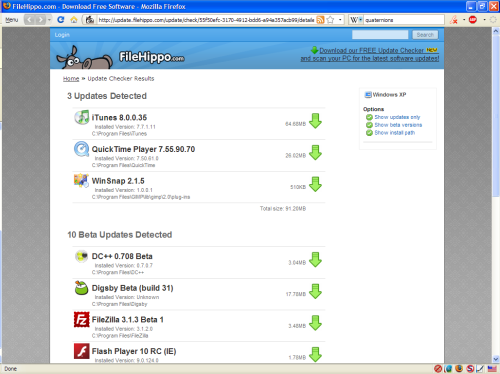 FileHippo's


Please help us by rating this review
|
Related Products and Links
|
|
Other Software Update Monitors
Ketarin takes another approach at software updating. It keeps your install files up-to-date. Once installed, you have to point it to the download link of the software you wish to keep updated (or give it its FileHippo ID). This is quite nifty if you have to keep a database of install files updated for software you may not have installed on your own machine. Many users have posted other SUMs since this article was first published. I will briefly cover some of them and tell you why I did not like them. Update Notifier used to be my top pick, but it was a victim of its own success when the team was unable to scale their venture accordingly. The project may be started again and I will keep you updated. UpdateStar is a SUM that I find annoying to use. It keeps asking if you wish to upgrade to a premium service and the user interface is quite cluttered. The updates generally appear quite reliable, though it is not perfect. It does not add anything that would make me want to use it over those listed in the review. Software Informer has improved a lot. It is very thorough, with the side-effect that it often informed me of updates that are not available, or it would inform me of an update for version I have installed because it interpreted the version incorrectly. Probably the best of the updaters not discussed in the main discussion. The Mac version is terrible. I can't even get it to work. TechTracker by CNET gives me a few concerns. Their privacy policy states that they collect information about you and share it with other companies. It also comes bundled with OpenCandy. That should be enough to stay far away from it. But, I decided to test it anyway so that you don't need to. Seemed quite good since it has the might of CNET's database behind it. Still, I'm not sure if it is worth it over UDC because of the privacy concerns. I signed up with an email account that I created especially for it and have been getting spam (approximately once a week) from CNET since (GMail detects it as such). DownloadPlex.com's Software Update is slow with updates, does not make it clear which applications have updates and sometimes informs of updates that do not exist, or suggests updates that are not stable releases. Software-UpToDate has recently been updated. I will need to test it before making comments on it. It seems that it does not support all software though. There is a similar group of software that acts like a software manager, similar to the Synaptic Package Manager used by Ubuntu. They give you access to a selected group of programs, install them and keep them up-to-date. There are examples such as Appsnap, Appupdater and FreewareUpdater. I could not get Appupdater to work and Appsnap and FreewareUpdater only supported a limited amount of software (and could not detect software that was already installed). I feel these three programs belong in a different category and will not review them here. RSS Feeds
There are some website RSS feeds I like to check for updates. FreewareFiles has a great feed that list updates very quickly after they have been released, while Freeware-Guide gathers a list of software updated in a day and displays the list in an RSS feed the following day. FileHippo and Softpedia also have RSS feeds for the latest additions to their databases. Here are the five feeds:
If you would prefer the RSS feed of individual programs without using that program's homepage, FileHippo offers individual RSS feeds. Related Topics
|
|
Have Your Say
|
|
Please visit our freeware forum to share and discuss your views and get advice on software update monitors. To post in the forum you need to register first but that's quick and immediate. Related Forums: |
|
||||||||||||||||||||||||
|
||||||||||||||||||||||||
|
||||||||||||||||||||||||
|
||||||||||||||||||||||||
|
This software category is is maintained by volunteer editor Frank Ortmann. Registered site visitors can contact Frank by clicking here. |
||||||||||||||||||||||||


 2.13.4.111
  Unrestricted Freeware
  Install the "Lite", 7z or ZIP versions


|
Tags
|
|
Software updater, software update monitor, software update notifier, software monitor, software update checker, software update searcher, Personal Software Inspector, Update Notifier, Update Checker, PSI, UDC, SUMo, AppFresh |

- Article type:
 Printer-friendly version
Comments
Is it just me or does SUMO get stuck when checking for updates?
I need to know.
FrankO, I downloaded the light version of SUMo from the page where you wrote the warring. To use the software you must accept the term that gives them the right to monitor your browser uses as stated in my first post. Please read the statement while loading the software under "Accept" or "Decline". One of us is missing something.
I had the same problem. I later found RelevantKnowledge had set itself up. It refused to be deleted. I then ran full superantispyware. It found it had infected 13 files and deleted it. I then ran Avast in pre-boot mode. It found a further 6 infected filed and deleted them. I deleted all previous system restore points and back ups.
I am highly suspicious of update programs other than File Hippo and Secunia and Secunia occasionally goes nuts but I never trust those that try to send you to download sites other than your PC manufacturer, Microsoft or the supplier of your programs.
See MidnightCowboy's response below. CNET writes:
And:
I'm not going to register to try their software. Besides, it is not well rated.
May I suggest the new Orbit Downloader? The latest version also has an in-built software updater. From an initial glance, it looks pretty decent. Orbit is one of the programs listed in the Free Download Managers section as well.
Strangely enough after years of testing, I use ALL the recommended utilities above. Each tool usually shows updates that the others may not. I run Update Notifier, FileHippo and SUMo almost everyday. Secunia PSI, I use on occasions to check for security vulnerability issues. The challenge for software updaters and the developers that make these tools, is that there are often various versions of programs that are available stable, alpha or betas.
1. Update Notifier is fast and accurate for the large catalog of software it discovers updates for.
2. FileHippo is also fast and discovers new beta versions too which are often missed elsewhere.
3. SUMo is very comprehensive but sometimes shows dubious updates for some components software. The KC Software developer is very responsive to any issues on their forum. I have well over 500 installed applications and SUMo does an excellent job discovering updates where other updaters fail or do not even detect the installed software in the first place. Like most applications it is not perfect but it is one of the better updaters out there.
Thankfully there is a LITE version of SUMo that DOES NOT contain the insidious Relevant Knowledge "SPYWARE" which is very hard to eliminate all traces from your system. Just when updating SUMo your updater software usually points to the infected version of SUMo so you are better off downloading it manually. Relevant Knowledge is a marketing company who makes and distributes the RK SPYWARE component to subtly gain end user information and browsing habits. Their so called "agreement to install" their SPYWARE is easily missed when installing other programs. The LITE version of SUMO is quite safe and retains full functionality but doesn't bundle the RK SPYWARE.
Out of apparent necessity KC Software fund some of their development by bundling that garbage with SUMo and some of their other utilities. Since many other developers don't compromise their integrity in this manner I find it hard that KC Software justifies this activity however, I am not a starving developer either.
4. Secunia PSI to me is a really interesting piece of coding. It is a quasi update notification and software risk assessment tool. The vulnerability information it provides about installed, patched or updated programs is quite an eye opener. It now does an assessment of the security issues associated with your installed browser(s). This little gem helps me remove and update my system to minimize as many risks as possible and at the very least makes me aware of what programs are a potential risk to my systems security.
Thanks for taking the time to write down your thoughts. I also use SUMo, UDN and UDC on a daily basis. I have set them to start automatically once a day (for when I know I will be at my PC) using the Windows Scheduler so that I do not forget to run them. I use PSI less though. Once a month, or fortnightly perhaps.
Has anyone ever tried CNET's TechTracker http://download.cnet.com/CNET-TechTracker-app/3000-18513_4-10912909.html... ?
I've being trying "Update Notifier", in the past I used SUMO, but I noticed that "Update Notifier" is VERY limited, SUMO detects MORE software than "Update Notifier", even SUMO can check updates of software that was not installed, that is, software that you just extract from a zip file without an installation wizard.
So Now I'll go back to the good SUMO, Will uninstall "Update Notifier"!
In Update Notifier you can add a folder of portable software (those with no installer) when you click on Settings and enter the folder with all this software in the text box under Other Options. Ensure that the check box labelled Check for updates the portable/stand-alone software located in this folder is ticked.
I tend to extract my portable software to my Program Files folder, so this is the one I have added to the search space.
I have removed Update Notifier from the article. I did not get any reply from CleanSofts. SUMo is back as my favourite.
I think Cnet's Techtracker is a candidate for this page. I have only just started using it as a replacement for downlaod notifier as Sumo does not have any direct download links
SUMo is spyware, please read their terms of use. This is the part you will be most interested in, “This software allows millions of participants in an online market research community to voice their opinions by allowing their online browsing and purchasing behavior to be monitored, collected, aggregated, and once anonymized, used to generate market reports which our clients use to understand Internet trends and patterns and other market research purposes.
Okwhen, I cover this in the article and make it clear that you should download the "lite" version which does not contain the spyware.
In their Terms of Use they write:
I don't like that at all. But I did sign up and will test the software. It may take some time though.
I've recently started using it myself i.e. TechTracker from CNET and I certainly find it impressive. Sure there might be some marketing messages but when you consider it works well and even gives the d/l links from CNET it works better than other alternatives I've tried out.
If you can find a product that will not have adverts or emails, will not give me d/l links, but update from within the main s/w interface itself then that's something I would love to check out. Hopefully you can find something like that for me!!!
Hi Okwhen
I downloaded both the normal (sumo.exe) and lite (sumo_lite.exe) versions and only the normal version included the statement you wrote when it asks if you agree to install Relevant Knowledge software. I found no such wording in the license agreement for the lite version of SUMo. Perhaps if you could quote the section number if I am once again mistaken and missed it.
Hi FrankO,
I have discovered my error. I was unaware that each icon beside the "Click Here" carried a link. I thought they represented the information under About "More" links. This is the first time I have encountered this with an icon definition index is provided. Thanks for being gentle.
No worries, I'm glad we could sort out the misunderstanding.
Have tried most of these update notifiers. The most reliable one I have used recently was Update Checker from file hippo, but it doesn't find many programs. Tried SUMO on the strength of this recommendation, and I am very happy with it.
Thanks!
Excellent info
Suggest you include a word or two about other software, even if they are not worth reviewing in detail, so that those who happen to use them know that they are no good.
I would like your opinion of CNet's TechTracker which I recently installed.
Thanks.
- Harry.
I have not used it a lot, but I am not that impressed by it yet. It is very slow in scanning my PC, and some of the software I have installed is newer that the versions it claims are most recent (not betas). I still prefer SUMo.
Incorrect advice re SUMo lite
Don't download SUMo lite (the button with 'RK' crossed out) Something in there set my ThreatFire screaming
I agree. I gave up using CNet updater for the same reasons. File Hippo is much more reliable. However, I am cautious. I use it only as a check. I get updates from the original program site only. I have even more reservations about driver updaters. Only use the official driver site or the Computer manufacturer to check for updates. You can end up in real trouble if you don't.
Missed the part about downloading the lite version, Threatfire reported a Major Trojan " proxy-oss " after downloading the regular version. Now the lite version will not install even though I have completely scrubbed my system and removed the KC file folder. I get error messages reporting it can not install to that folder. Is this program worth pursuing or more trouble than it's worth?
JD
It is not the top pick for nothing. I have no idea why you cannot install the file into the folder. Have you tried Unlocker, or LockHunter (see article stub here), to try delete the folder first (if it is still there)?
you can use fileheppo updater . i think it's very good.
I was disturbed by the above comment so I just installed SUMo lite on a PC with the latest version of Threatfire installed. No problems were reported. I can only assume that you downloaded the wrong version of the file.
To double check I then uploaded the SUMo lite file to the Jotti online scanning service.(http://virusscan.jotti.org/en). It scanned totally clean. You can see the results here:
http://virusscan.jotti.org/en/scanresult/749ac84fd810429531ccaa5e6ebfd29...
As a final check I installed and ran SUMo lite on several machines under the watchful eye of various security programs including Avira, PrevX, Avast and MSE. Actually installing a program is a much better check for adware or other nasties than just scanning a file yet none of these security programs reported a problem of any kind with SUMo lite.
So SUMo lite passed all the tests I threw at it.
Do be careful though to ensure you download the Lite version. These days many software vendors are pushing advertising supported versions of their products so you need to be careful. CCleaner is a good example. It installs the Yahoo search bar unless you specifically uncheck that option. That doesn't stop me using or recommending CCleaner - I simply uncheck the Yahoo option when installing.
The same applies to SUMo lite. Good product but make sure you install the lite version.
More generally I don't have a problem with adware supported products provided the developer is totally upfront about it. It's when developers deliberately hide the facts or worse still, say nothing that I really have a problem. The folks who make SUMo need to watch this as they are on the borderline here and we are watching them closely. One move in wrong direction and they are going to get dropped by Gizmos despite the fact that they offer a class leading product.
Gizmo
I get an error message when I try to use Filehippo updater. I'm using Windows 7 64bit . Anyone else using this with Filehippo and not getting an error message?
The Sumo lite software is really excellent for a freebie and works very well on my 64 bit system. It accurately listed ALL installed software on my PC from both 32 bit and 64 bit program files. Thanks FrankO for this great recommendation. ;-)
Post new comment