Get our Latest Finds
 Subscribe to our RSS feed or enter your email address below to get the feed delivered to you by email:
Follow Gizmo
Using this Site

Gizmo's Freeware is Recruiting
 We are currently looking for people with skills and/or interest in the following areas:
- Online Backup Sites
- Windows Video Editors
If this sounds like you then click here for more details
Best Free MP3 Tag Editor
|
In a Hurry?
|
 Go straight to the Quick Selection Guide Go straight to the Quick Selection Guide |
|
Introduction
|
|
MP3 has become the most common audio format for playback, storage and transfer of music. If we need to playback MP3 files with their tag information shown correctly, or to organize a large collection of MP3 files based on their tag information, a good MP3 tag editor will be helpful. In this category, both standalone and built-in MP3 tag editors are reviewed based on three basic needs which include:
|
|
Standalone Tag Editors
|
|
Files can be renamed with Music Renamer and tags can be generated from file names. TagScanner with its Tag Processor allows you to preview tags and cover arts from online databases before saving them into MP3 files. However, it does not come with a normal windows menu. You may need to spend some time to get yourself familiarized with its user interface. |
|
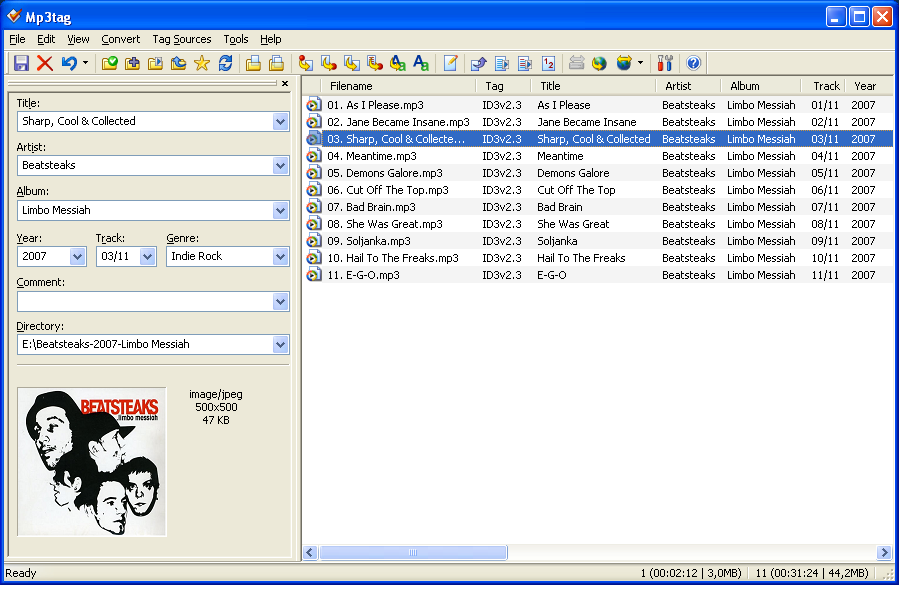
Basic tags are shown in a customizable front panel. Extended tags are shown in a separate window for all existing tags stored in your MP3 files. If a tag for lyrics or other info does not exist, it can be added, or if a tag is repeated, it can be removed easily. Mp3tag allows you to rename files based on the tag information, import or export tag information and create playlists. It supports online Amazon, freedb, MusicBrainz and other database look-ups, allowing you to auto tag and embed multiple images for album covers. It also has a powerful Web Sources Framework, allowing you to get album info from additional online databases. The latest web sources are available from Mp3tag Forums at Web Sources Archive. You can download the ones you need, and extract them to your Mp3tag data folder in order to gain access to more online databases for auto tagging. |
|
The application allows for dragging and dropping a cover art to a file and helps searching album arts and lyrics via a browser from online resources as well. Other features include convert between ID3v1.1, ID3v2.3 and ID3v2.4 tags, edit tags of multiple files, generate playlist files, rename and create directories from tags, case conversion and export tags. Despite all the features, it lacks a column view available to other editors for glancing at the same tag fields but of different values in multiple files. Due to this, you can only see 'un-equal' signs in tags for different values when multiple files are selected. |
|
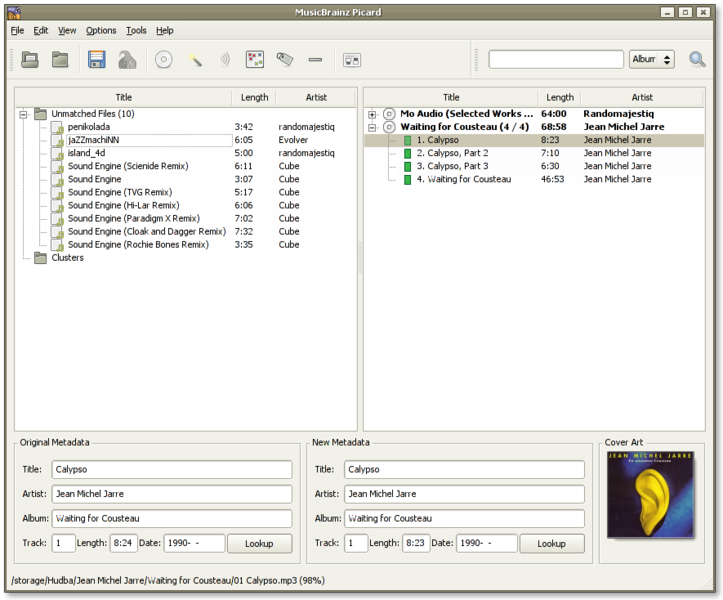
It identifies track information by comparing a unique digital thumbprint to the information in the MusicBrainz database. Once the tracks are best matched, you can save their respective tag information into selected MP3 files. How To Tag Files With Picard is a helpful guide for a quick start. As with Mp3tag, checking the details of a selected file evokes a list of all existing tags, including lyrics, which you can then edit. If a tag doesn't currently exist, you can always add it. But in the version under review, cover art edits aren't possible except by updating from online databases. |
|
The program features a collapsible left panel for viewing or editing tags and cover art of a selected file. Another collapsible panel is placed to the right to search for cover arts or retrieve tags from the Database. Other than tagging from scripts and filenames, tagging from the acoustic fingerprint is supported and found to be quite accurate. Lyrics can be optionally added to the tag if retrieved from Wikia.com successfully. On the downside, the editor only supports for one cover art per file and its searching tags from the Database is found not quite stable. |
|
As regards tagging, it allows auto tag from file names or the Internet as well as identifying files. Another very useful feature is auto tagging of lyrics and album art from the Internet, even though retrieving cover art takes a while. Other features of the program include organizing or renaming files based on tag information, case conversion, removing tags, execute scripts, etc. The program is still under active development and has the potential to improve in quality. Don't be surprised if you encounter some handling errors in the current version under review. |
|
Under its library tab, it allows you to edit and show up to 4 pictures per album stored in MP3 files. Moreover, the "Search lyrics using Google" function gets you the results in a Google search page or the web page showing lyrics of the selected file. This expedites the search for lyrics but you need to copy and save them to the tag manually, not so efficient as MPTagThat. In addition to manual editing of tags, it provides auto tagging via online databases such as freedb, Allmusic and Amazon. However, All Music Guide is disabled due to possible terms of service violation, and the built-in Amazon search seems to retrieve tag info less successfully than other selected tag editors. Another drawback is that this program has no Unicode support. |




|
Built-in Tag Editors
|
|
It allows you to auto tag by albums or tracks, look up album arts, lyrics and other tag info from the web, save tags and embed lyrics and multiple images into the music files in your collection. The tedious tagging work is made so much easier and more intuitive now with this program.
It also supports editing lyrics and multiple images with types and descriptions for album art, and allows fixing of tags in your selected MP3 files with automatic lookup and tagging of album art and other track information from Amazon online database.
After installing AudioShell, you do not need to run it again. It adds 27 optional additional columns to show tags in Explorer "Details" view. Editing basic tags and the cover art of an MP3 file is allowed at Editor tab of Properties windows, and editing lyrics is allowed at Summary tab in Advanced mode. Group editing is possible by selecting multiple files. AudioShell does not offer connection to online databases, but it is a good program to accompany any one of the above applications. |


|
Other Tag Editors
|
|
These are other MP3 tag editors which were brought up in comments here or noted from other sources. As they are not rated in this review, I am listing them here with brief descriptions and links to their sites for ease of reference.
|
|
Have Your Say
|
| You are invited to share and discuss your views in our freeware forum. To post in the forum you need to register first but that's quick and immediate. Alternatively, anyone can leave a comment at the bottom of this page. |
Please help us by rating this review
|
Related Products and Links
|
|
|||||||||||||||||||||
|
|||||||||||||||||||||
|
|||||||||||||||||||||
|
|||||||||||||||||||||
|
|||||||||||||||||||||
|
|||||||||||||||||||||
|
|||||||||||||||||||||
|
|||||||||||||||||||||
|
|||||||||||||||||||||
|
|||||||||||||||||||||


 5.1.597
  Unrestricted freeware
  Win 2000 to Win 7
  Portable version available


|
Editor
|
|
This article is maintained by volunteer editor Jojoyee. |
|
Tags
|
|
mp3 tag, free mp3 tag, free tag editor, tag scanner, tag tools, mp3 tagger, tag editing software, freeware, free mp3 tagger |

- Article type:
 Printer-friendly version
Comments
MP3 Tag works a treat. Anyone with a basic knowledge will have this working in no time. Saved me a lot of hassle. Cheers.
Thanks for the comment. Looks like it's more than a tag editor. I'll give it a try.
Should I create two independent sites for freeware and for shareware? I don't think so.
MP3Tag is my choice
A long time, now
:-)
What about Picard or media monkey? I use these as well as MP3 tag tools
Thanks for the list! But don't forget EasyTAG:
http://easytag.sourceforge.net/
It's free and OpenSource.
You should take a look at ID3-TagIT as well http://www.id3-tagit.de/
Very good.
Pat
Yes, Picard is one of the best tools if you have a large amount of MP3s to tag. It can fetch the info bases on a song's "fingerprint", so if you haven't got a clue what the MP3's info is all about it's one of the best!
I really like MP3Tag but have had trouble with tagging ogg vorbis files (does not do album art). TagScanner handles them very well and runs clean as a portable app, but is taking a while to get used to.
Just recently switched from MP3 Tag Tools to TagScanner - All I can say is WOW!
I did use this tag editor sometime ago. It will be included in the next review. Thanks a lot.
Thanks for the good suggestion. It will be included in the next review soon.
Good info. It will be evaluated in the next review.
Another good one which I use is Audioshell, which lets you edit the ID3 tags from the properties pages of the files - no need to start up another program! You can add cover art, plus all the usual ones and you can do multiple ones by choosing multiple ones and doing the group properties. Well worth it.
Usman
Tag & Rename is a great one as well!
This has been excluded as it is not a freeware.
Yes, I tried this software sometime ago. As it has added more features supporting cover arts and lyrics, it will be included for next review soon. Many thanks for the update.
Yes, it is quite a good software designed more towards file renaming. I notice that it is being reviewed under the category of "Best Free File Rename Utility".
It has a built-in ID3 Tag editor, but its functions are quite limited as compared to other software designed more solely for editing tags.
Jojoyee....you should check out File Renamer Basic.
http://www.sherrodcomputers.com/products_FileRenamer.cfm
If you're not intimidated by its interface, I haven't yet found anything more powerful than MP3BookHelper. It appears that it's no longer in development and lacks synchronization with online databases, but for mass tagging using regular expressions and the like, it works marvelously.
http://sourceforge.net/project/showfiles.php?group_id=57079
What about The GodFather. I have been using it for a long time and found that its very powerful tag editor.
:)
Good suggestion. It has been updated in the review. Thanks.
Thanks for the helpful info. It has been included for review.
TagScanner is certainly powerful, but its non-standard interface is incredibly frustrating. Far-be-it from me to suggest Windows is itself the best model for a UI, but at least it provides a standard and there's nothing in the way that TagScanner works that needs/justifies such a complete departure from the basic Windows standard, and the TagScanner UI is very far from intuitive to me (based on almost 30 years of using a wide variety of UIs).
Hi. The post below was mine, I didn't mean to post it anonymously, sorry!
Is The Godfather supported in Win7? I have a friend that uses it and he says that it won't, so he uses the "Use as XP" feature to use it. I personally have used MusicMatch Jukebox for many years, and loved it until they sold out to Yahoo. Unfortunately, it will not work on a 64-bit system, either. Going to be downloading and giving most of these a try. Thanks!!!
I have to say that, as a seasoned veteran of mp3 taggers, and using them very frequently MpTagThat is definitely the one.
I used to use a trio of programs (MediaMonkey, Tagscanner and even the old, apparently unsupported but exceptionally useful Media Tagger) in order to achieve everything I wanted. MpTagthat, however, does everything I want and more, it actually has the feel of a program designed by someone who actually tags mp3's often.
It doesn't suffer as much from the same non standard design flaws as Tagscanner, tho it can take a tiny bit too long to familiarise yourself with it. It is far more useful and has more features than Mp3Tag. It is far more intuitive than Picard and it's success at identifying tracks is uncanny.
It can, although exceptionally rarely bomb, perhaps twice in couple of weeks of intensive testing and there are tiny little quirks, like being unable to rename directories from the program itself, but overall, and I don't say this lately, it's even better than the over-rated Mp3 Tag Pro...
I recommend you an another beautiful sound free software, MP3Gain. MP3Gain analyzes mp3 files to determine how loud they sound to the human ear. It can then adjust the mp3 files so that they all have the same loudness without any quality loss.
This is probably a good candidate for Best Free Audio Editing Software.
Post new comment