
Gizmo's Freeware
Published on Gizmo's Freeware (https://www.techsupportalert.com)

Home > Screenshot Captor

Screenshot Captor [1]

Last updated by site.editor [2] on 23. April 2020 - 04:30

Screenshot Captor

The only capture facility that can take a self-portrait
[3]
5

Our rating: 

5
Get It: Windows (Desktop) [4] [5]
License: Free (Donationware)
Website: http://www.donationcoder.com...screenshotcaptor [4]
Review & Alternatives: Best Free Screen Capture Tool [6]
Categories: Photos & Graphics [7], Screen Capture Tool [8]
Tags: capture-screen [9], snap-screen [10], screenshot [11], snipping-tool [12]

Pros & Cons:

Supports snapping a Multimon (multiple monitors), Desktop, Active Window, Region, Windows Object, and Scrolling Capture using a hot-key or from the system tray. Editor. Delayed Capture. Output to clipboard, editor, printer, auto-save to a file, or automatic or on-demand uploading of screenshots to image hosting services. Scanner acquisition tools and scanner image correction. Capture Windows 7 partial transparency effects.
Requests for free registration on start up

Our Review:

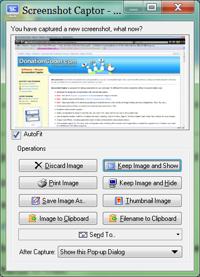
Screenshot Captor supports multiple screens, full screen, window, rectangular area, and fixed area captures from either hot keys or from the programs menu. The cursor can be included or excluded. It's the only capture facility that can take a self-portrait. The software can acquire images from a scanner.

Once captured the program can automatically do the following to the image: keep, save, print, move to the clipboard, display in the built-in editor, email, or upload to hosting services.

The built-in editor is rich with features. You might not find it necessary to use an image editor.

Requests for free registration on start up.


Screenshot Captor was reviewed by Gizmos Freeware [13] on 2016-04-25

toggle-button

Terms & Conditions | Privacy Policy | Contact | About


Source URL: https://www.techsupportalert.com/content/screenshot-captor.htm-1

Links
[1] https://www.techsupportalert.com/content/screenshot-captor.htm-1
[2] https://www.techsupportalert.com/users/siteeditor
[3] https://www.techsupportalert.com/files/screenshot-captor_0.png
[4] http://www.donationcoder.com/Software/Mouser/screenshotcaptor
[5] https://www.techsupportalert.com/content/installer_advice.htm
[6] https://www.techsupportalert.com/best-free-screen-capture-tool.htm
[7] https://www.techsupportalert.com/software-finder?field_soft_categories_tid=133
[8] https://www.techsupportalert.com/software-finder?field_soft_categories_tid=898
[9] https://www.techsupportalert.com/software-finder?field_tags_tid=capture-screen
[10] https://www.techsupportalert.com/software-finder?field_tags_tid=snap-screen
[11] https://www.techsupportalert.com/software-finder?field_tags_tid=screenshot
[12] https://www.techsupportalert.com/software-finder?field_tags_tid=snipping-tool
[13] https://plus.google.com/118396188147577447707