
Photoscape [1]

Photoscape
A suite of modules containing image editor, file management, presentation and capture
 [3]
[3]
Pros & Cons:
Our Review:
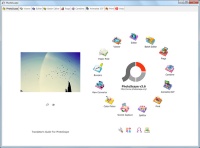
Photoscape is a suite of modules. Don't be fooled by the unusual interface that looks outdated. It is easy to use so it is a good step up from a basic image editor. It is also moderately powerful but it would be lot more powerful with abilities like editing many images at the same time, opening and exporting to more file formats, having more pixel editing tools, adding a colour management subsystem, editing meta-data particularly Exif, being able to merge images with High Dynamic Range (HDR), and providing more Raw processing options.
All modules are accessible from the main windows with the main ones having their own tabbed windows in Photoscape. The only module that does not really fit is Paper Print which prints annual, monthly and weekly calendars, lined/squared paper, and music notation sheets. Below are the module details:
Image editing
-
Interactive Editor* (the * indicates that this is one of the main modules) with four menu groups:
- Home has basic corrections for the whole image;
- Object has tools to insert Photoscape objects, other images, and clip art into your image. These objects are modifiable until they are combined into the image at which point the photo correction tools can be applied to them;
- Crop provides provides many pre-set ratios and documents sizes including any size that you want- selections are limited to rectangular, circular or elliptical;
- Tools to correct selected areas of the image.
- Batch Editor* to convert multiple images at the same time. Changes can be previewed before running and the configuration saved or reloaded.
- Raw Converter to JPEG for batches of files with preview and options for white balance and half-size images.
Image file management
- Viewer* similar to Windows default viewer except it defaults to thumbnails and displays Exif data.
- Rename tool with pre-set name formats using dates (file, photo, or current date) and automatic numbering.
Image presentation
- Print* batches of images in a range of pre-set sizes and layouts with page preview and gamma control.
- Page* to place images on one page with frames, vignetting and basic image enhancement.
- Combine* images into one joined image horizontally, vertically, or in a matrix. But there is no blending of joins.
- Animated GIF*.
- Image Splitter to cut an image into many smaller images
Image capture
- Screen Capture of either a full-screen, a window, or a region.
- Colour Picker with the usual dipper, magnifier, and colour codes..
Photoscape was reviewed by Gizmos Freeware [14] on