Gizmo's Freeware
Published on Gizmo's Freeware (http://www.techsupportalert.com)

Home > Best Free DVD Ripper

Best Free DVD Ripper [1]

Submitted by Viola4u [2] | Last update on 25th July, 2015 - 6:53am

Other Language?
  Read this article in Chinese [3]
 
In a Hurry?
Go to details...  Go straight to the Quick Selection Guide
 
Introduction

While a CD ripper is commonly used for copying raw digital audio from a CD to a file encoded in MP3 or other audio formats, a DVD ripper is usually used for copying the audio and video content of a DVD to a file encoded in AVI, MP4, MPEG, WMV or other video formats. The ripped file saves in a hard disk or other media device for further editing, backup, sharing or playback without the need to load a DVD.

If you have a collection of DVD movies or music videos and want to extract a chapter or make a full backup copy from a DVD to a video file in selected format, these are the free DVD rippers you might be looking for.

After testing several free DVD rippers, I find it’s really hard to say which one is the best. Perhaps A supports numerous outputs. But it only rips part of the protected DVDs. Maybe B is powerful enough to rip the latest protected DVDs. However, the features are difficult to understand for beginners. Hence, you are welcome to comment below with your own experience. Let’s work together to make this category better and better.

 
Discussion

Handbrake: open-source DVD ripper with presets for iPod, iPhone, iPad and Apple TV
HandBrake [4]HandBrake is an open source, GPL-licensed, multiplatform, multithreaded DVD ripper or video transcoder, available for Windows, Linux or Mac OS X. The latest version was released on Mar.8, 2015. According to its official news, Handbrake introduced some new encoders with this release, such as the H.264 encoder "Intel QuickSync Video", the next-generation H.265 encoder and libvpx VP8 encoder.

Handbrake transforms your DVD to an MP4 file which is compatible with a wide range of media players. It also supports ripping DVD to a MKV file. A very great feature is Handbrake is designed with preset profiles for Apple iPhone, iPad, iPod, Apple TV, Android and WP8. Moreover, it provides numerous video and audio parameter settings for users to alter file size and video quality.

However, unencrypted-protection methods including CSS are not supported internally and must be handled externally with third-party software which helps break the copy protection so HandBrake can read the DVD.

Alternatively, you can also combine libdvdcss with HandBrake in order to read a DVD that uses CSS. What you need to do is to get the necessary dll file by downloading a DVD player that is based on it. Browse the installation folder of your DVD player and copy the libdvdcss dll file to the HankBrake installation folder. Rename the file to libdvdcss.dll and restart HandBrake.

WinX DVD Ripper: fast rip DVD to MP4 WMV MPEG Music iPod iPhone Android HTC Samsung
WinX DVD Ripper [5]WinX DVD Ripper is another Windows-based DVD ripper freeware that is kept up to date. If you think Handbrake is complicated to handle (some users do) and has limited output video formats, WinX is more straightforward which supports ripping DVD to MP4, WMV, MPEG, MOV, FLV and Music (MP3). What you need to do is import your DVD disc or folder, choose an output file and hit "Start". No third-party codec package is needed.

In addition, WinX DVD Ripper has plenty of preconfigured profiles for not only iPhone, iPod, Apple TV, but also PSP, HTC and Samsung. Each profile represents different video quality and file size. You can use the default settings or customize profile for your Apple/Android device by adjusting video and audio parameters.

A tip: The "Video Quality" is namely the output file video bitrate. Increasing the “Video Quality” will increase the output file size and image quality.

How about its decryption ability? Based on test, it supports encrypted DVDs. I find a few negative comments below saying this ripper cannot rip DVDs at all. True? The fact is if you load DVD by clicking Folder, it will do! I tested John Cater and it ripped the DVD fast and smoothly. But when it comes to DVDs encrypted by strong protection system, the program will tell you that it is not able to read them. There are two options: 1. Upgrade to its Platinum edition (paid). 2. Use other programs to remove the copy protection, and then make use of WinX.

DVDFab HD Decrypter: clone DVD to hard drive, two copy modes available
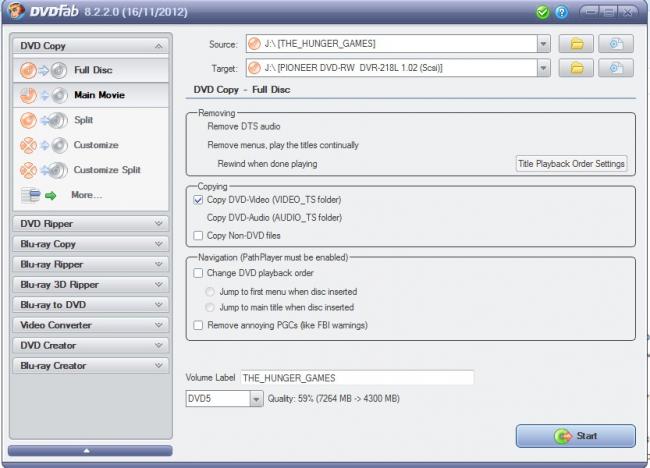
 DVDFab HD Decrypter [6] DVDFab HD Decrypter , as its name indicates, enables you to remove DVD protections and copy the DVD content to hard drive. Considering this article is about freeware, it’s necessary to point it out this HD Decrypter is just a free portion of the DVDFab application. Due to this reason, it looks like a "big" program. But actually it is very easy to handle.

You can use the two intelligent Copy modes built in DVDFab (the free parts) to either copy the full disc or just copy the main movie. The first one copies everything the DVD has (including menus, trailer, extras, etc) while the second one only rips the movie itself. You need to purchase its other advanced features in order to output more formats, such as ripping DVD to MP4, WMV, iPhone, iPad, etc.

DVDFab HD Decrypter only copies SOME old DVDs as its official web page states. But how it copies SOME DVDs might be inconsistent. You will need to try out the program with what you have available as success can vary.

DVD Shrink: easy-to-use solution for shrinking original DVDs onto recordable media
DVD Shrink [7]Another alternative is DVD Shrink . It is able to rip DVD to your hard drive as video files or as an ISO image. Then you can burn the output files by integrating with Nero or other DVD burning software. What makes this program unique is its ability to compress DVD data to the standard 4.7-gig DVD. You will rarely, if ever, notice any decrease in video quality.

The latest version was built in 2004. The UI looks "unfashionable" today. But personally, I like its considerate and friendly design very much. It lists the DVD structure including Menus, Main Movie and Unreferenced Materials. This means you can easily choose which parts of the DVD you want to include for ripping and shrinking. It’s a nice feature for you to leave out unwanted bonus features, audio data for languages, etc.

DVD Shrink offers built-in decryption algorithms to “read” encrypted DVDs. Unfortunately, as it stopped updating in 2004, some recent copy protection methods are not supported. I tested Transformers 2 and UP. It freezed when analyzing the DVD info. Non-encrypted DVDs work perfectly.

Format Factory: rip DVDs and mucis CDs to video file as well as create ISO images
Format Factory [8]Format Factory also won votes from us. The strongest point of this program lies in its support of converting numerous file formats, including video to video, audio to audio, DVD to video, and also image to image. The latest version supports 62 different languages which further makes it a global application.

This program supports converting videos to mobile devices as can be seen on the top of the Video column on the left side. 20+ mobile devices or mobile device compatible formats are available, including Apple, Sony, Google, Nokia, etc. It's really convenient for some folks who wanna playing various videos on their portable devices. (However, when loading ISO file as source video, it failed.)

In addition to converting videos, FormatFactory also acts as a DVD/CD ripper. But the output format seems a little bit limited. It only supports ripping DVD to ISO/CSO file. What's more, it can’t rip DVDs with CSS according to my test. (But perhaps it supports some old CSS protected DVDs, I guess.)

Freemake Video Converter: multifunctional media converter to rip DVD to AVI, MP4, WMW, MKV, MPEG
Freemake Video Converter [9]Someone suggests adding Freemake Video Converter to the review list. When talking about this freeware, I must firstly mention its all-round video converting features. It supports 200+ input videos which cover almost all popular video formats users would require. Besides converting from one video format to another, it's also capable of converting videos to portable devices, such as iPad, iPhone, iPod, Android, PSP, Blackberry, etc. By Pasting URL, you can convert online videos from 50+ sites. That's really an impressive feature to simplify the converting task.

But when comes to another ability – ripping DVD, I’m afraid, this application is not all satisfying. It can rip DVD to AVI, WMV, MP4, MPEG, MKV, FLV, SWF, 3GP, but it doesn't support encrypted DVDs. It crashes on almost all my commercial DVDs such as UP and Thor.

I feel sorry if this review doesn't fit "the Best Free DVD Ripper" category. I just personally wish the developer can improve its DVD ripping function and make it as powerful as its video conversion ability.

Other freeware products to be reviewed:

  • DVD Catalyst [10] helps you remove the copy protection on the disc and convert your DVD movie to various popular formats.
  • Free DVD MP3 Ripper [11], extracts audio from DVD, VCD/SVCD and MPEG (MPEG-1, MPEG-2) files into MP3.
  • FreeStar Free DVD Ripper [12], rips DVDs to VCD, SVCD, MPEG-1, MPEG-2, MPEG-4, AVI, DivX, and XviD formats.
  • MakeMKV [13], DVD and Blu-ray ripper
 
Related Products and Links

You might want to check out these articles too:

  • Best Free Audio / Video Format Conversion Program [14]
  • How to rip DVD movies using Freeware [15]
  • Best Free DVD Authoring Software [16]
  • Best Free CD Ripper [17]
  • Best Free Media Player [18]
  • Best Free CD / DVD Burning Software [19]
  • Best Free CD / DVD Emulation Software [20]
 
Quick Selection Guide

HandBrake

4
 
Gizmo's Freeware award as the best product in its class!

Runs as a stand-alone program on a user's computer
Good quality in transcoded video, supports multi-platform, small file size.
Slow speed in transcoding. It doesn't rip protected DVDs unless you pair it with third-party tools.
http://handbrake.fr/ [21]
http://handbrake.fr/downloads.php [22]
0.10.1
13.63 MB
32 and 64 bit versions available
Open source freeware
The current version no longer works on Power PC (PPC).

DVDFab HD Decrypter

4
 
Runs as a stand-alone program on a user's computer
Nicely remove DVD protections and copy DVD to hard drive.
Lack of commonly used output videos such as MP4, WMV, MPEG, etc.
http://www.dvdfab.cn/hd-decrypter.htm [23]
9.1.9.5
43.9 MB
32 bit but 64 bit compatible
Feature limited freeware

WinX DVD Ripper

4
 
Runs as a stand-alone program on a user's computer
Built with plenty of preconfigured profiles for popular Apple/Android devices. Fast ripping speed.
The profile for AVI is removed in the latest version.
http://www.winxdvd.com/dvd-ripper/ [24]
http://www.winxdvd.com/dvd-ripper/download.htm [25]
5.6.1
11.7 MB
32 bit but 64 bit compatible
Unrestricted freeware

DVD Shrink

3
 
Runs as a stand-alone program on a user's computer
Ripping and shrinking DVDs, built-in decryption algorithms.
The program is no longer supported by the developer.
http://www.dvdshrink.org/ [26]
http://www.softpedia.com/get/CD-DVD-Tools/CD-DVD-Rip-Other-Tools/DVD-Shrink.shtml [27]
3.2.0.15
1 MB
Unrestricted freeware

Format Factory

3
 
Runs as a stand-alone program on a user's computer
Support nearly all video file formats. Rip DVD to video file. Rip Music CD to audio file.
Ads on interface. Doesn’t support CSS encrypted DVDs.
http://www.pcfreetime.com/ [28]
http://www.formatoz.com/download.html [29]
3.6.0
50.22 MB
32 bit but 64 bit compatible
Unrestricted freeware

Freemake Video Converter

3
 
Runs as a stand-alone program on a user's computer
Support nearly all video file formats. Convert DVD to video files. Burn DVD/Blu-ray.
Doesn’t support encrypted DVDs. Installer is bundled with potentially unwanted components. Care is needed to avoid these during the install process.
http://www.freemake.com/free_video_converter/ [30]
http://www.freemake.com/downloads/ [31]
4.1.6
26.95 MB
32 bit but 64 bit compatible
Unrestricted freeware
There is no portable version of this product available.


Editor

This software category is maintained by volunteer editor Viola4u. Registered members can contact the editor with any comments or questions they might have by clicking here [32].


Back to the top of the article


Please rate this article: 

Your rating: None
3.854545
Average: 3.9 (165 votes)
toggle-button

Terms & Conditions | Privacy Policy | Contact | About


Source URL: http://www.techsupportalert.com/best-free-dvd-ripper.htm?order=title&sort;=asc

Links
[1] http://www.techsupportalert.com/best-free-dvd-ripper.htm
[2] http://www.techsupportalert.com/users/viola4u
[3] http://www.techsupportalert.com/cn/best-free-dvd-ripper.htm
[4] http://www.techsupportalert.com/files/images/HandBrake.jpg
[5] http://www.techsupportalert.com/files/images/winx-dvd-ripper-review-image.jpg
[6] http://www.techsupportalert.com/files/images/DVDFab%20HD%20Decrypter.jpg
[7] http://www.techsupportalert.com/files/images/DVDShrink.jpg
[8] http://www.techsupportalert.com/files/images/conversion_formatfactory.jpg
[9] http://www.techsupportalert.com/files/images/freemake-video-converter-review.jpg
[10] http://www.dvdcatalyst.com/
[11] http://dvd-mp3.org/index.html
[12] http://www.free-star.org/free-dvd-ripper-freeware.html
[13] http://www.makemkv.com/
[14] http://www.techsupportalert.com/best-free-audio-video-format-conversion-program.htm
[15] http://www.techsupportalert.com/content/rip-dvd-movie.htm
[16] http://www.techsupportalert.com/content/best-free-dvd-authoring-software.htm
[17] http://www.techsupportalert.com/best-free-cd-ripper.htm
[18] http://www.techsupportalert.com/best-free-windows-media-player-replacement.htm
[19] http://www.techsupportalert.com/best-free-cd-dvd-burning-software.htm
[20] http://www.techsupportalert.com/best-free-cd-emulator.htm
[21] http://handbrake.fr/
[22] http://handbrake.fr/downloads.php
[23] http://www.dvdfab.cn/hd-decrypter.htm
[24] http://www.winxdvd.com/dvd-ripper/
[25] http://www.winxdvd.com/dvd-ripper/download.htm
[26] http://www.dvdshrink.org/
[27] http://www.softpedia.com/get/CD-DVD-Tools/CD-DVD-Rip-Other-Tools/DVD-Shrink.shtml
[28] http://www.pcfreetime.com/
[29] http://www.formatoz.com/download.html
[30] http://www.freemake.com/free_video_converter/
[31] http://www.freemake.com/downloads/
[32] http://www.techsupportalert.com/user/14340/contact