
|
Other Language?
|
 Read this article in Spanish [2] Read this article in Spanish [2] |
|
In a Hurry?
|
 Go straight to the Quick Selection Guide Go straight to the Quick Selection Guide |
|
Introduction
|
|
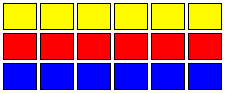
A disk defragmenter is a key toolkit element for keeping your PC running optimally. Disk fragmentation occurs through normal everyday use of your PC; over time your system becomes unable to store related data on your disk in a sequential (contiguous) manner, and must "fragment" files across different physical locations on your hard drive. This increases the number of times your hard drive must spin (or "seek"), which slows down the process of reading and writing files. Defragmentation software compresses files and free space back into contiguous blocks. Here is an example of a contiguous file system:
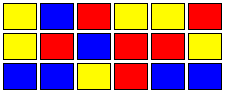
Here is an example of a fragmented file system:
Defragmenting your hard drive on a regular basis is a sound housekeeping habit; a chore that most home users should do once a month. By Defragmenting your system, one can greatly increase system performance. Your computer will be able to read files much quicker. It will also relieve stress on your hard drive. |
|
Discussion
|
|
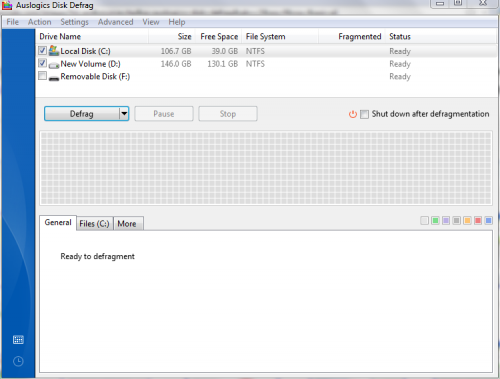
Well ladies and gentlemen, MyDefrag has been dethroned. I rarely move around the top product, for I once thought that no program could beat the programming skills that have developed such masterpieces such as MyDefrag and JKDefrag. However I stand corrected. The last couple of releases for MyDefrag were very frustrating experiences for me. That being said, I waited around in hopes of a better version being released. This corrected version, has yet to be released. On the other hand, Auslogics latest release (3.1.1.80) is way ahead of the competition. I found the defragmentation time to be incredibly fast. Analyzing my disks took seconds, and for the first time in a while, the long process of defragmenting my hard drive was shrunk to minutes. I now officially recommend Auslogics as the best free disk defragmenter.
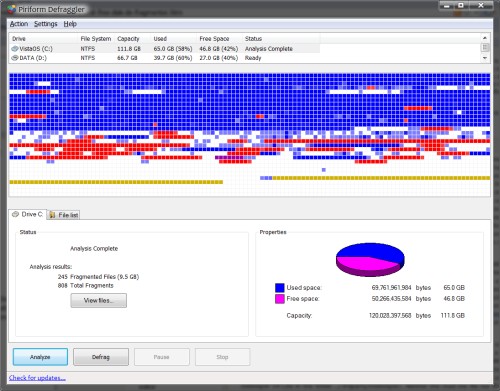
A great free program here is MyDefrag, which is actually the successor to a very popular program called JkDefrag. JkDefrag has been a favorite among many computer users for years. It provides stability and performance within a very lightweight package. I've been folowing MyDefrag since its beta, and I have been very impressed with the software. Aside from the Slow Optimize, all the processes run very fast. With other defragmenters, I was always irritated because no matter how many times I would defragment, upon analyzing afterwards, I would still have fragmented files that refused to defragment. MyDefrag completely solved the problem for me. Those stubborn files were ironed out and in my testing I personally saw increases in disk performance. Close behind is Defraggler – a solid combination of performance, stability and usability from Piriform. We have been watching Defraggler since its Beta release and now that some of the early bugs have been ironed out with its most recent version, it’s a good, safe bet. With a very clean interface design based on the common Windows defrag interface, Defraggler is incredibly easy to use and offers all the options you need to keep your machine running smoothly – including the ability to defragment individual files and folders as well as an in-built defragmentation scheduler. As an added bonus, excessive Software – the guys behind the popular Power Defragmenter interface – have released a shell extension called Enhanced Defraggler Shell [3] which allows Defraggler to be run directly from the Windows Explorer context menu.
To go along with MyDefrag, there is an excellent addon dubbed "MyDefragGUI." MyDefragGUI provides an enhanced graphical user interface for MyDefrag. It allows the user to access all the advanced features of MyDefrag in one easy console. If you use MyDefrag, then you know that instead of a GUI (graphical user interface) MyDefrag instead uses a series of start menue entries. For those of us who feel uncomfortable with that method, MyDefragGUI provides an excellent alternative. |
|
Related Products and Link
|
|
Enhanced Defraggler Shell [3] for Defraggler from eXcessive Software. Desktop Utilities [4] with Diskeeper Lite V9 from Intel. Instructions [5] to remove nag screen from Diskeeper Lite. |
|
|||||||||||||||||||||
|
|||||||||||||||||||||
|
|||||||||||||||||||||
|
|||||||||||||||||||||


 3.2.1.10
  Unrestricted Freeware
  7/Vista/2008/XP/2003

 Portable version available
|
Editor
|
| This software category is in need of an editor. If you are interested in taking it over then check out this page [13] for more details. You can then contact us from that page or by clicking here [14]. |
|
Tags
|
|
defrag disk, defragment hard disk, disk defragmenter, free disk defrag software |
 [15]
[15]