
What to do if you Reserved a Windows 10 Upgrade but Changed Your Mind [1]
Many PC users made a reservation to get Windows 10 when it was first offered but have changed their mind and now want to defer or even skip the upgrade. The problem is that sooner or later Windows 10 will automatically be downloaded and its installation scheduled unless action is taken. Even if you don’t go through the upgrade process, your system may be locked down so that no other updates can be installed.
If you don’t take steps to cancel or defer the upgrade you reserved, one day when you go to shut down your computer, a small icon will show up in the Shutdown button saying that important updates are available and not to turn off the computer until they are installed. The update will be an installation of Windows 10. Or you may suddenly get a message on the screen that says, "Your upgrade is ready to install". Or you may get the window shown in the graphic below. What to do now? The procedure to stop the upgrade process is rather messy but Woody Leonhard describes in this article [3] what he has found by trial and error. There are also instructions for several scenarios at SuperSite for Windows [4]. Unfortunately, there just doesn't seem to be a simple way to turn off the upgrade.
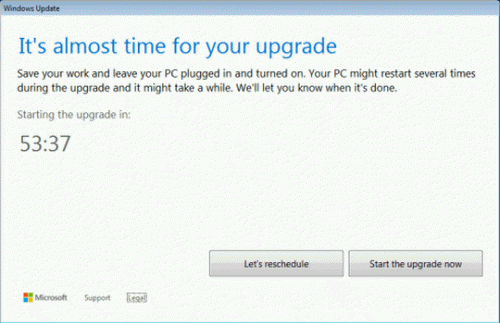
If you can’t stop the upgrade process, you can always use the rollback procedure that is described in this previous tip [5]. A few things may not be restored perfectly but the rollback seemed to work pretty well in the one system I tried it on. Always back up your personal files before doing any of this type of procedure.
Get your own favorite tip published! Know a neat tech tip or trick? Then why not have it published here and receive full credit? Click here to tell us your tip. [6]
This tips section is maintained by Vic Laurie [7]. Vic runs several websites with Windows how-to's, guides, and tutorials, including a site for learning about Windows and the Internet [8] and another with Windows 7 tips [9].
Click here [10] for more items like this. Better still, get Tech Tips delivered via your RSS feeder [11] or alternatively, have the RSS feed sent as email [12] direct to your in-box.