
Use This Powerful System Tool to Check Windows Hardware [1]
Would you like to know the details of the hardware on your Windows PC? Or maybe you would like to check the state of your hardware's health. There are a variety of ways to get information about system hardware but here is a free utility that will tell you as much as you want to know (and more) about all your hardware.
There are two editions – Hwinfo32 and Hwinfo64, for 32-bit and 64-bit systems, respectively. Hwinfo32 has been around in various versions for years but the developer keeps updating both it and the newer Hwinfo64. As of this writing, the version number for both is 4.22. They can be either installed or run as a portable program. The developer’s site is at this link [3] with download links on this page [4]. The utilities are also available at all the major software repositories like Softpedia and MajorGeeks. The programs work in Windows XP on up including Windows 8. Because of their nature, they need administrative rights. They also may trigger anti-malware warnings but these are trustworthy utilities that are well-known and virus-free.
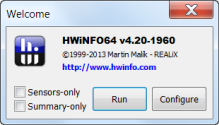
 [5]When you first run the program, a dialog to configure the display will appear as shown in the figure on the left . Until you get used to the program, you should leave both boxes "Sensors-only" and "Summary-only" unchecked so that you can see the full program interface when you open the program. (Click the first thumbnail for an example of the interface.) When you run the program, a window with a summary report will also open (second thumbnail). Assuming your system comes with sensors such as SMART, you can also open a detailed report of hardware temperatures and voltages (third thumbnail).
  [6]
[6]
As the figures illustrate, Hwininfo32/64 provides just about everything there is to know about all your hardware components and performs the important task of monitoring the health of your system. CPU, motherboard, RAM, drives, video, audio – they and other components are all covered. While it might appear that the amount of information would overwhelm most PC users, the presentation is clear and easy to understand. This is a professional-class tool but it has something for ordinary PC users too. More details on its use are at this review [7]. The review is several years old but is still mostly relevant. [8]
[8]
And there you have it – how to find out absolutely everything there is to know about your PC hardware without spending any money.
Get your own favorite tip published! Know a neat tech tip or trick? Then why not have it published here and receive full credit? Click here to tell us your tip. [9]
This tips section is maintained by Vic Laurie [10]. Vic runs several websites with Windows how-to's, guides, and tutorials, including a site for learning about Windows and the Internet [11] and another with Windows 7 tips [12].
Click here [13] for more items like this. Better still, get Tech Tips delivered via your RSS feeder [14] or alternatively, have the RSS feed sent as email [15] direct to your in-box.