
New Free Suite of Windows System Utilities [1]
There are a number of freeware suites [3] for system maintenance chores like cleanup, optimizing, and so forth and here is a new one. Its name is the simple “System Utilities [4]” and it comes from a company in Hawaii called Synei. It’s hard for a program of this kind to compete with our top pick (and my choice) CCleaner [5] but it is always worth pointing out new arrivals. Here is a quick rundown of the software.
The program supports all current versions of Windows, from XP through Windows 8, and 32- and 64-bit. Both an installer and a portable version are available. It requires the .NET Framework 3.5. There is a PDF user guide that can be downloaded here [6]. It has just been updated to version 1.1.
The download link for the installer version is here [7]. A portable version is also available and can be downloaded from Softpedia [8].
There are several modules, as the figure below shows. Features include Disk Cleaner, a Startup manager, a Service Manager, and a Defragment utility. Backup manager and a Schedule Manager, as well as a system utility for repairing the hard drive, are also included. Each of these can be configured in separate dialogs not shown here, There is also a one-click button to do everything at once. See the downloadable PDF manual [6] for instructions. One thing I did not like was that the program automatically started analyzing my disk for fragmentation. I have an SSD and I do not defragment so I had to manually cancel that action.
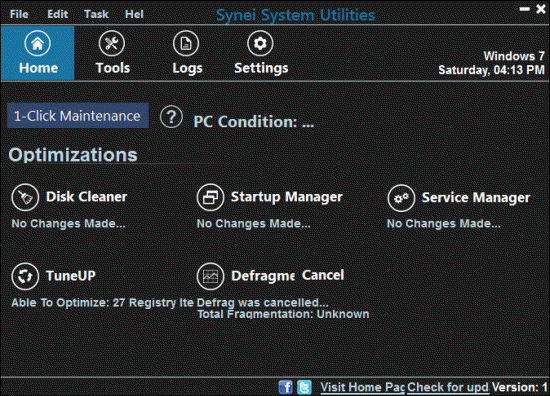
With utilities of this sort, there is always the possibility that something will go wrong. Be absolutely sure to back up before using it and read all the settings carefully. Inexperienced PC users should probably avoid using this type of program unassisted. This article is for information only and the results of applying the program are the user’s responsibility.
Get your own favorite tip published! Know a neat tech tip or trick? Then why not have it published here and receive full credit? Click here to tell us your tip. [9]
This tips section is maintained by Vic Laurie [10]. Vic runs several websites with Windows how-to's, guides, and tutorials, including a site for learning about Windows and the Internet [11] and another with Windows 7 tips [12].
Click here [13] for more items like this. Better still, get Tech Tips delivered via your RSS feeder [14] or alternatively, have the RSS feed sent as email [15] direct to your in-box.