
Manage Partitions With This Terrific Free Program [1]
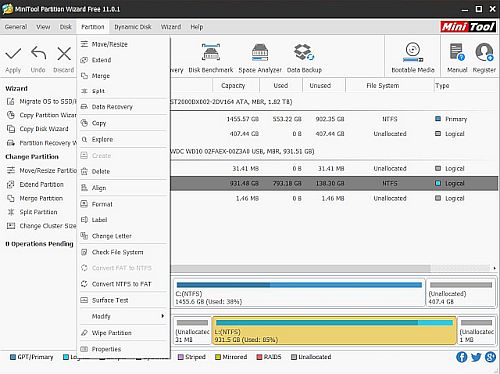
This free program can perform all the basic functions to optimize your disk usage with an easy to use and attractive interface.
MiniTool Partition Wizard handles disk management functions with ease. It performs all the usual basic disk management tasks: resizing, formatting, deleting, merging, copying, moving, and extending partitions. It can format, split, hide, wipe partitions, align disk, convert NTFS to FAT, change drive letters, add labels, set partitions as active and logical, check the file system and perform a surface test. Three new features were recently added; a disk benchmark, a space analyzer and in the free version, data recovery up to 1GB.
Features like dragging a sliding bar to make size changes (in addition to entering values manually) and queuing functions so they aren't performed instantly make disk management easier and safer. Pending operations appear in a sidebar, click "Apply" to make changes. Undo deletes pending operations. If you don't know what a function does, there's a link to a tutorial for most features in the dialog boxes. There are wizards to guide you through migrating your operating system to a new disk, copying partitions, copying disks and recovering partitions.
Cons:
Ads for new or featured products appear on the desktop as long as the program is open, though there's an option to close them and not be shown again.
Some features that are only included in the paid edition aren't grayed out and cause an upgrade prompt to appear, and the Bootable Media option on the toolbar is a paid feature.
The program is bundled with a potentially unwanted program (PUP) that is offered during installation. If you don't want to install it, uncheck the box in the "Install Additional Software" dialog box during setup. In this case, the program is Adaware Web Companion.
Potentially Unwanted Programs (PUP's) have several of these behaviors: change your default browser homepage, change your default search engine, change new tab pages, bookmarks and browser settings (including browser security settings), adding a toolbar to the browser, prompt you to download and install other programs, send usage or other data, slow down your browser, show pop up search results related to the page you are on, redirect your browser to a different, third party site, offer to install browser add-ons or extensions, show false update or infection alerts and can be difficult to remove.
Mini Tool Parition Wizard runs on Windows 10/8.1/8/7/Vista/XP, and supports FAT12/16/32, exFAT, NTFS, and Ext2/3/4 file systems. It works with these storage devices: HDD, SSD, SSHD, External Hard drives, USB Flash drives, SD cards, Dynamic disks and Hardware RAID.
VirusTotal rates it 2/67, with one engine reporting a result connected to the potentially unwanted program (PUP) bundled with the program. The other appears to be a false positive as it wasn't detected in other scans or my system malware program, but use your own judgment. The program has been around for many years and it's been featured here on Gizmo's Freeware.
If you're looking for a program to handle multiple disk management and disk optimization functions, this one is worth a look.
MiniTool Partition Wizard Free 11 [3]
You can find more Tech Treats here [4].