
How to Stop Windows 7/8.1 from Nagging You to Upgrade to Windows 10 [1]
One of the updates that Microsoft installed on Windows 7/8.1 systems installs something called GWX that resides in the tray and periodically pops up to suggest that you upgrade to Windows 10. A previous tip [3] discussed a way to temporarily disable this notification. The procedure isn’t that complicated but it does involve several steps and some PC users would prefer a little utility to do the job. If you are one of the many people who find the pop-up to be annoying and want a little program to disable it, you can try a new utility called GWX Stopper [4].
GWX Stopper is from Josh Mayfield, who gives a nice description of what his little program does and how to use it at his blog [4]. The program is a single 4.2 MB executable and is portable with no need for installation. VirusTotal gives it a clean bill of health. The download link is here [5]. There is a simple interface (example shown below) where you can toggle the nag screen notifications off or back on. Very easy to use and ideal for those who are irritated by pop-up windows.
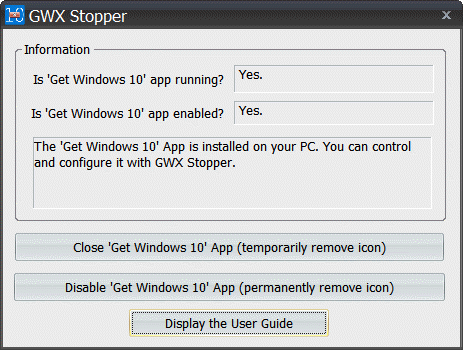
Update 14 October, 2015 - GWX Stopper has been updated and is now called "GWX Control Panel". The download link is here [5]. There is a video at YouTube [6] explaining how to use the utility.
Get your own favorite tip published! Know a neat tech tip or trick? Then why not have it published here and receive full credit? Click here to tell us your tip. [7]
This tips section is maintained by Vic Laurie [8]. Vic runs several websites with Windows how-to's, guides, and tutorials, including a site for learning about Windows and the Internet [9] and another with Windows 7 tips [10].
Click here [11] for more items like this. Better still, get Tech Tips delivered via your RSS feeder [12] or alternatively, have the RSS feed sent as email [13] direct to your in-box.