
How to Defer Installing Updates in Windows 10 [1]
One of the controversial changes in Windows 10 for home users is the forced installation of updates and drivers. Since new updates or drivers can sometimes cause system problems, many have objected to the lack of a way to block problematic updates. Microsoft has now provided the troubleshooter kb3073930 that can let you hide updates you want to defer. The description and download are at this link [3].
After clicking the download link given by Microsoft, you will be prompted to open or save the file wushowhide.diagcab. If you open the file, the screen in the graphic below will be shown.
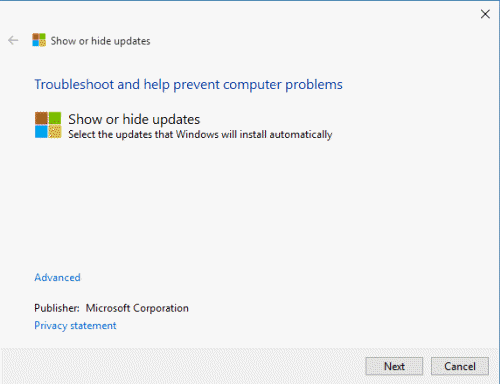
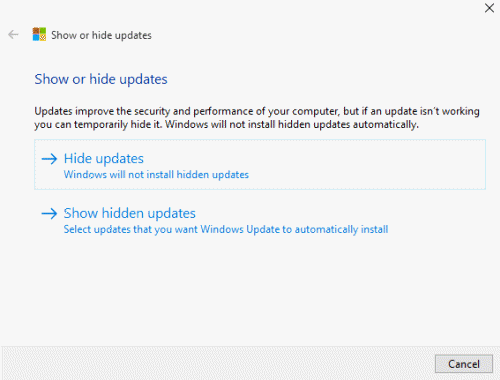
Click “Next” and the application will search for updates. When the search is finished, you will be given an option to hide or show hidden updates as displayed in the next graphic below. When you make your choice, a list of updates will be shown and individual updates can be marked as hidden. Updates that are marked "hidden" are not supposed to be installed.
As I understand it, this troubleshooter allows you to hide updates only after they have been installed and is to prevent re-installation. Of course, this is fine if your system is still functional after a dicey update and you are able to uninstall any problem. But, if an update bricks your PC, you better have a good backup.
Get your own favorite tip published! Know a neat tech tip or trick? Then why not have it published here and receive full credit? Click here to tell us your tip. [4]
This tips section is maintained by Vic Laurie [5]. Vic runs several websites with Windows how-to's, guides, and tutorials, including a site for learning about Windows and the Internet [6] and another with Windows 7 tips [7].
Click here [8] for more items like this. Better still, get Tech Tips delivered via your RSS feeder [9] or alternatively, have the RSS feed sent as email [10] direct to your in-box.