
An Easy and Convenient Way to Find Out What Software and Hardware is on a PC [1]
It always surprises me how little people know about what’s on their PC. If you want to know things such as how much RAM you have, what hardware and software are installed, and many other interesting details, there are a number of system information utilities available. One that is quite comprehensive and easy to use is a free program from Piriform called Speccy.
Piriform is the developer of CCleaner and other widely used free utilities so Speccy is well supported. It has a clean interface with a large variety of details about what is on your computer. The program is said to work in Windows XP on through Windows 8.1 and has both 32-and 64-bit versions. It was recently updated to version 1.26.698. The download is just under 5 MB. The developer’s site is at this link [3]. Because of its nature, Speccy requires administrative privileges to run.
One advantage that Speccy has over some other programs of this type (such as long-time favorite Belarc Advisor) is that it comes in a portable version as well as an installable version. The portable version can be run from a USB key or other convenient place. The download link for the portable version is not all that obvious but can be found on this Piriform page [4]. Another link for the portable version is at Softpedia [5].
The portable version comes in a ZIP file containing both a 32- and a 64-bit executable. It is best to place the appropriate executable in its own folder. It will also generate a tiny INI file (less than 1 KB) when used. The ZIP file also contains some foreign language files which English speakers can delete.
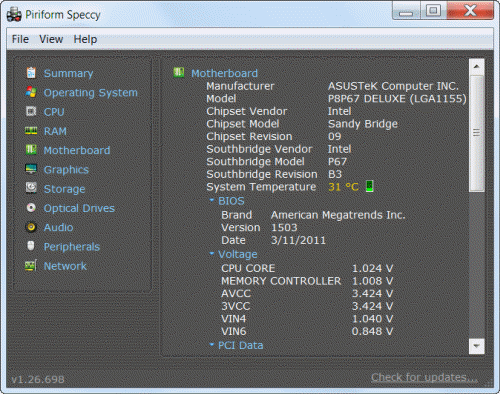
An example of using Speccy to display motherboard information is shown in the graphic below. The left column in the window shows the other categories of information available. Click each one to get a comprehensive report. The reports can be saved for future reference by using features in the Speccy file menu. Online documentation for using Speccy is at this Piriform page [6].
Speccy provides less information about installed software than some other utilities but it provides as much information about most types of hardware components as you are likely to want. It also has some real-time features such as the ability to graph component temperatures. There are also some nice network features such as information about current Internet and TCP connections. All in all, I think Speccy is worth adding to your toolkit of system utilities.
Related links
- How to Find Out What Is on Your Computer [7]
- Use This Powerful System Tool to Check Windows Hardware [8]
- Best Free System Information Utility [9]
Get your own favorite tip published! Know a neat tech tip or trick? Then why not have it published here and receive full credit? Click here to tell us your tip. [10]
This tips section is maintained by Vic Laurie [11]. Vic runs several websites with Windows how-to's, guides, and tutorials, including a site for learning about Windows and the Internet [12] and another with Windows 7 tips [13].
Click here [14] for more items like this. Better still, get Tech Tips delivered via your RSS feeder [15] or alternatively, have the RSS feed sent as email [16] direct to your in-box.