
|
In a Hurry?
|
 Go straight to Go straight to
|
|
This article compares audio software that enrich the music experience or enhance everyday listening, and provide impressive music centric features. The best MP3 and audio player ought to quench our passion for music, such as by inspiring us to rip or download music, organize our music libraries, learn more about our favorite artists or music, or just listen to music. The reviews evaluate products on sound enhancements, usability and unique features, support for common and useful audio formats (MP3, WAV, FLAC, WMA, and others), performance, security and privacy. Thanks to our faithful followers, who have been pitching their favorite players and organizers, we have a set of carefully considered selections. We have 26 listed music players and counting! Latest article update: Added more quick links at the top (8-27). Current product reviews in the discussion section are from a previous editor (they are his "I" statements). |
Light Music Players and OrganizersThe following had to have light resource efficiency while impressing us with music centric features. They were the best candidates to be our primary music player and organizer, satisfying avid audiophiles for daily listening. They aren't the best for managing music files (ripping, converting, tagging), but they often have unique advantages over bulkier programs depending on your tastes and needs. [2]Jaangle was not, when testing first began, my first choice as my favorite music player and organizer, but when the others having first impressions wore off and they started to show their weaknesses, Jaangle returned to completely capture my attention and the Jaangle icon is now a permanent resident on my toolbar. As it comes, Jaangle's looks are superior with a lot of built-in options to customize it to your liking. Along with a number of colorization options to ease or dazzle your eyes, as well as the library viewing options you can basically create your own player. You can select which panes you want to see, their size and where you want to see them. There's also a mini-mode for those who prefer to have Jaangle heard, but not seen. For those who don't feel like creating playlists, just play a song. If you do nothing, Jaangle's auto DJ mode which will randomly go through your .mp3 files. It's like a radio DJ who knows all of your favorite songs and plays them all the time. The library is where Jaangle separates itself from the competition. It displays small thumbnails of every album in your collection along with the artist's picture and bio that it automatically downloads from the internet. Should Jaangle be unable to find the artist you can also manually insert or change the photos and bios. Right clicking on a song will bring up an option to download its lyrics. A note of mocking laughter rang out when I saw the three-band equalizer, but it is surprising effective, more so than many 18-band equalizers I've used. There also an adjustable crossfading control. Click them off and automatic digital signal processing takes over for optimum sound. While you can edit tags manually in Jaangle, extended tags cannot be edited. Just like any of the reviewed players, proper tagging, before you load up the library, is essential to your sanity and can reap many rewards. Seemingly, insignificant differences in entries can wreak havoc. Example: having or not having the decimal point in .38 Special will cause these items to be listed on opposite ends of the library. This looks like another motivation for using a separate tag editor. (Psst! You didn't hear it here, but I use a program called, MP3Tag. You can find it at Best Free MP3 Tag Editor [3].) And here's a first for ANY music player. You'll notice a little icon on the top toolbar called "Games." If you click on it, you'll be presented with a "Name That Tune" type trivia game based upon the music in your library. With all its features, Jaangle is the personification of a music player & organizer [4]My first impression of Foobar2000 was that it was the workingman's media player. As it comes Foobar2000 is a basic player. Those with a bit of computer savvy can easily modify the way Foobar2000 looks with internal controls in the View menu. The interface is customizable as to what windows appear, how they look, background colors, etc. I especially liked the large cover art window, which is four times the size of the normal view of most media players. It brought me back to the days of being in a music store, during the heyday of 12-inch vinyl, and you were listening to some new music being played. If you liked it, all you had to do is look towards the register and above it would be an album cover with a "Now Playing" sign under it. That's enough with the nostalgia. As stated previously, Foobar2000 is a basic player, very basic. The library is adequate and mildly configurable. Tagging is manual and limited. Playlist editing is also manual. There is an eighteen band equalizer, but it can only be accessed through menu and cannot be viewed by default. As it comes, there are no ripping or converting capabilities. While it's beyond the scope of this review, more advanced users may want to enhance the looks of the player or add more functionality. Foobar2000 does not use skins, but uses, what would be more aptly described as, themes. A simple search on the internet will turn up a multitude of themes and plug-ins, but be aware that these third party items are written specifically for particular versions of Foobar. Most of these items I've seen were written for older versions of the player currently available and may or not work in the current version. The 7.80 MB footprint of Foobar2000 makes it useful as a portable (USB Drive) player. It can be setup as such upon installation. This could be the player of choice for those, like me, who use separate ripping, conversion, burning and tagging software. (Thirty-five years as a service technician dedication was a key word. It taught me that all-in-one's just don't cut it. As the old saying goes, "They're the Jack-of-all-trades, but the master of none."
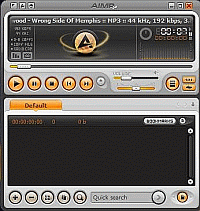
That tiny size is a bit misleading because, like anything that seems to be too good to be true, it comes with a couple of small negative aspects. The size of the AIMP 2 folder grows as you create playlists. AIMP2 does not use the standard .m3u file that many of us are so used to. If you created a number of playlists with another player, they are useless in AIMP 2. The player makes its own unique playlists (.plc) that it stores within its own borders, which means the more you use AIMP2, the bigger its footprint becomes. The other problem is that the average .plc file is 3 to 4kb and your AIMP 2 folder will grow by that much with every playlist you create. By comparison, the equivalent size of a .M3U file for the aforementioned files is less than 1kb each. Still, as I said, it's a little problem. If you were to catalog 1000 average albums in AIMP2 it would only weigh about 40MB more…still less than some of the other players here. There is something very nice that I noticed about the playlist editor. It reads the folder the music files are coming from and uses that name for the playlist itself. Since most of my mp3's are arranged in complete albums, in folders with the album's name and year it came out, my playlist naming is cut to almost zero. Despite its little shortcomings, AIMP2 is a very versatile and useful little player. It supports more than 20 audio formats and 32-bit digital audio. AIMP2 can also access Shoutcast and Icecast internet radio and allow you record what you hear. It has a 16-band graphic equalizer along with controls for speed, tempo, flanger, pitch, echo and reverb. It will play your CD's, but it cannot rip them, nor can it convert files from one format to another because, unfortunately, the ripper and converter parts of the software have been separated and the only download is located on a site with a rather dubious reputation. I did have a little trouble finding out how to access the top-notch library. After checking all the buttons on the player, I found you could bring up the library through the Utilities button on top, in the left-hand corner (or simply hitting Ctrl-M.) It will not only show you your playlists, but give you more information than need to know like the name every song you ever played on the player and when you played. The Utilities button also accesses the tag editor. Clicking on the center portion of the player's main window will bring up the visualizations. Being old school, I really like the VU Meters. The player is skinable and comes with six skins already installed. A simple Google search will reveal a plethora of additional skins online. All things accounted for AIMP2 a sleek looking player that is all about the music. I would recommend this to beginners. A word of warning…as stated AIMP2 is Russian and readily available on Russian sites, but please do not download from any Russian site due to security and virus considerations. I have provided download links located in the U.S. Full Music ManagersThe following are the best for managing music files and creating complex music libraries or playlists. They don't have light resource efficiency (sometimes doubling the light players above on some resource measures), but on modern computers they could serve as primary music players. [6]MusicBee is a musical Swiss Army Knife and I can see why so many people like it. Where do we begin? Let's start with music management. You can listen to your music and categorize your collection in an appropriate manner with help of the program's array of utilities to help edit and find tags. You have your music arranged by genre, artist and album in the three top panes while other small panes display the current playlist, song details, artwork and lyrics and a search tool to quickly locate any specific artist or track. Another panel helps you access internet services such as Shoutcast, internet radio, podcasts and audio books. You can import music from your personal music folders as well as from your iTunes or Windows Media Player libraries and sync with iPods and other MP3 players The player itself has an impressive range of controls such as a 10-band equalizer with presets, along with a preamp, digital signal processing plug-ins, an AutoDJ and a volume analyzer to normalize your collection so that you never have to touch the volume control again. The package also includes a CD ripper with secure CD ripping with AccurateRip verification and a file converter. MusicBee supports the following formats: MP3, OGG, WMA, AIFF, ALAC, APE, BWF, CDA, FLAC, M3U, MP4, PLS, TTA, WAV, TAK, SPX. With all this functionality, I am surprised that I didn't find a CD burner lurking inside. I guess you can only pack so much into 40.6 MB. MusicBee does require a bit of extra software in order to function. You'll need Microsoft.NET Framework 2.0 and the file converter requires the Lame encoder (Lame isn't a MP3 Encoder) to function. [7]MediaMonkey is on my "Nay" list, but I will review it because of its popularity. Right from installation, my immediate impression of MediaMonkey is that it is not a monkey, at all, but a 1000 lb. gorilla. Just like another well-known media player that will remain nameless, it wants flex its muscles all over your computer and be your be all-do all media player. It instantaneously began searching my hard drives for media files, without my permission, while registering itself as the player of record making it necessary to go through my files and reset their associations so that all would be well once I uninstalled this beast. With all that off my chest, let's get on to the features as there are many. First and most important MediaMonkey can organize music and edit tags in your audio library with a potent and insightful interface. It will rip and burn cd's. Its audio converter can convert MP3s, OGG, FLAC and WMA files into other formats. It will download and show album art. For those who want to play DJ for your church group or social organization, there is a Party Mode which lock down your media files while still allowing requests. Last of all, but most important some, is MediaMonkey's ability to synchronize with iPods and other MP3 players. There are more features, but they are too numerous to mention here. While I shouldn't concern myself with the following, but believe I must bring it up for reasons which will become immediately apparent. There is Gold Edition with additional features available for $19.99 and $39.95 for a "Lifetime license for all future updates." In the computer world there is no such thing as "Lifetime." Does anyone remember music software known as MusicMatch? It's still around, but totally commercial payware. At Version 1.0 it was a fairly good program for its time and I purchased a "Lifetime license" for $39.95 for full program. Two years into the "Lifetime license," I began to have difficulty upgrading the software. The good folks at MusicMatch were very accommodating and issued new registration codes. A year later the company was sold and my continuing references to the fact that, "I wasn't dead yet." Fell on deaf ears. Despite the good intentions of the people at MediaMonkey, they cannot realistically, offer a "Lifetime license." I have no idea how they managed to fit all this functionality into 34.2 MB, but as far as I'm concerned MediaMonkey is just bit too over the top and is far more than I or the average music fan needs and far more than the novice can handle. If I were a professional DJ, then all bets would be off. A Note on Sound QualityOccasionally I see claims that a particular piece of software has superior sound quality, and I too would want the player with the best sound quality (regardless of its features or lack thereof). Sometimes I've played individual products and thought “gosh that sounds crystal clear and rich”, but then found that the volume was maxed on the player's initial settings (and that other players sounded the same at their max volume settings). It's difficult to rule out wishful thinking and inexact comparisons until you try out many players on your sound system to judge for yourself. I've opened music players side by side, gone through their settings to ensure equivalence, and found that it's seemingly impossible to detect sound quality differences on the sound equipment that came with my computer (Foobar's FAQs [8] and forum posters make this argument as well). However, Gizmo noted in some of the first comments on this article that sound enhancement plugins, such as ASIO, have a noticeable improvement in sound quality on expensive equipment. Note that your sound card must support higher output settings, or the settings could degrade sound quality. And if you maximize the settings on your sound card, then music players will use significantly higher system resources. Note 2: Lightest PlayersHere is a list of music players with the best average of three measures: CPU use, I/O bytes, and RAM. The overall test list included MP3, FLAC, and WAV files (using Process Explorer and Vista Ultimate to measure).
The lightest player above was measured as an MP3 player (and is included because no other product did better as an MP3 player). Some micro players (that are light on RAM memory) didn't make the top 10 (they often have high CPU or I/O bit activity). By the way, miniplayer modes and tray icon modes (that shrink or hide the visual size of a player's interface) don't decrease the consumption of system resources, but some players have graphics that subside when the player loses focus (resource hungry visualizations were disabled for this comparison). |


|
There are also basic and further stripped down music players that either didn't make the cut for the main review or don't fit the review criteria. They are listed in order of impressiveness (for sound enhancements, usability and unique features, support for music formats, state of development, performance and security).
|
|
Here are music managers and players that are impressive enough for a quick mention, but not quite enough to get featured in the review:
Some of these have fans, but didn't impress me in comparison to other players in the review. The quick negatives beside each aren't comprehensive comments; visit the respective sites for plenty of positives. Listed alphabetically.
|
Portable version available [53] (files only version)
Audio Formats: MPEG audio (MP1/MP2/MP3), M4A, MP4, AC3, AIFF, APE, CDA, FLAC, MIDI/MID, Musepack (MPC), Tracker Music (UMX, MOD, MO3, IT, S3M, MTM, XM), OGG, WMA, and more based on directshow filters installed
Play List Formats: opens and saves M3U
Screenshots [54] | Skins [55] | Wiki [56] | Forum [57] | Change Log [58]
Portable version available (the Foobar2000 installer gives an option between a standard and portable installation; just select the portable installation)
Audio Formats: MPEG audio (MP1/MP2/MP3), MP4/M4A/M4B, 8SVX, AAC, AIFF/AIF/AIFC/AFC, APE, AU, CDA, CUE, FLAC/FLA, MKA, MIDI, Musepack (MPC, MP+, MPP), SND, Speex, OGG/OGA, WAV, WavPack/WV, WMA, and more with additional components
Play List Formats: opens/loads ASX, FPL, M3U, M3U8, PLS, WAX, WVX, but saves FPL, M3U, M3U8
Screenshots [61] | Components [62] | Wiki [63] | Forum [64] | Change Log [65]
Portable version available (the AIMP installer gives an option between a standard and portable installation; just select the portable installation)
*Note: I don't recommend downloading from the main website because it links to a download site (Brothersoft) that receives yellow ratings from WOT and block status from certain Host file providers (hpHosts, MVPS). A previous version had an unpatched Secunia advisory (may still be present).
Audio Formats: MPEG audio (MP1/MP2/MP3), MP4, M4A, AAC, AC3, AIFF/AIF, APE, CDA, FLAC/FLA, MIDI (MIDI/MID/MI/KAR), Musepack (MPC, MP+, MPP), OFR/OFS, OGG/OGA, Speex/SPX, Tracker Music (UMX, MOD, MO3, IT, S3M, MTM, XM), TTA, WAV, WavPack/WV, WMA
Play List Formats: opens/adds PLC, M3U, M3U8, ASX, PLS, CUE, XSPF, but saves PLS, PLC, M3U, M3U8
Screenshots [68] | Skins [69] | Forum [70] | Change Log [71]
Has a "run as portable application" option.
Audio Formats: MPEG audio (MP1/MP2/MP3), AC3, AIFF/AIF, APE, BWF, CDA, FLAC, Musepack (MPC, MP+, MPP), OFR/OFS, OGG/OGA, Speex/SPX, TAK, TTA, WavPack/WV, WAV, WMA (see the vendor 'Help' link if you need AAC)
Play List Formats: opens/saves M3U, ASX, PLS, CUE, WPL, XSPF
Screenshots [74] | Addons [75] | Help [76] | Forum [77] | Change Log [78]
Audio Formats: MP3, MP4, AAC, APE, APL, CDA, FLA, FLAC, M4A, M4B, M4P, Musepack (MPC, MP+, MPP), OGG, WAV, WMA
Play List Formats: opens/adds M3U, ASX, PLS, XSPF; saves M3U
Screenshots [81] | Addons [82] | Help [83] | Forum [84] | Change Log [85]
|
Editor
|
| This software category is maintained by volunteer editor Rizar. |
|
Tags
|
|
best free music player and organizer, MP3 and audio software, MP3 player, media library, lite music player for windows, music manager, sound enhancements or effects, online radio browser |
Back to the top of the article.
 [86]
[86]