Another Way To Keep Tabs On Your LAN [1]
A few days ago I wrote about a program from Nirsoft, called Wireless Network Monitor, which provides a display of who (or which devices) are connected to your network. http://www.techsupportalert.com/content/want-constant-readout-whos-conne... [3] has the original story.
The program has proved popular with Gizmo's readers, so here's another similar product which works in much the same way. It's called WiFi Guard, from SoftPerfect, and you'll find the 4 MB download at https://www.softperfect.com/products/wifiguard/ [4] . It's free to download and use, and malware-free according to VirusTotal and Web of Trust.
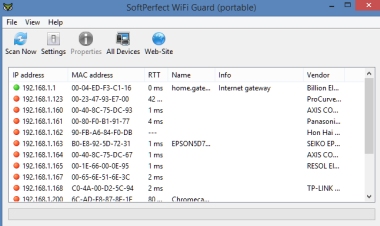
There are 32- and 64-bit versions available, in installable and portable formats. I used the 64-bit portable version for my tests. When you first start the program you are asked to choose between the available network connections on your PC - if you have both wired and wifi connections then there will be 2. Once you've selected on, the program will scan your network and show you who, or what, else is connected. It will pick up details about any IP devices, such as printers, cameras, routers, smartphones and tablets, and so on.
The program also has the ability to show you a list of every device ever seen on your network since you started using WiFi Guard, even if that device isn't currently connected. So it's a great way to keep track of how your LAN is being used. It's also a handy troubleshooting tool to check that a device such as a phone or tablet has really connected, when it says that it has.
So check out both of these excellent tools, and decide for yourself which is your favourite.