
|
In a Hurry?
|
 Go straight to the Quick Selection Guide Go straight to the Quick Selection Guide |
|
Introduction
|
|
Developers usually release new versions of software after improving its features, GUI, removing some bugs or when security weaknesses in earlier versions were fixed. If you would like to keep the software on your computer up-to-date, you may find it difficult and time-consuming if you have many programs installed. Sometimes software will automatically check for updates (such as Adobe Reader, Mozilla's Firefox and Thunderbird, Skype, iTunes, etc.), or it will update itself (e.g. Google Chrome) but this isn't true of all software. That's where Software Update Monitors (SUMs) are useful. A (sometimes) quick scan of your computer by one of these products will reveal which software is old and needs to be updated. So, if you would like to know which tools I recommend to keep your software updated (and which I use to keep my software updated), read on. Just a word of warning though, updated software may behave in a manner that is different to the version you have installed. Very rarely updates may have a bug that makes it unsafe to upgrade. If you have any doubts, please do an internet search for any problems related to the upgrade. |
|
Discussion
|
|
There are different types of users that may wish to use update monitors, so I have separated them into four categories. The first is for the security concious. I recommend that everyone install this excellent application. The second category is for people that want an easy way of keeping their software updated, the third is for intermediate/advanced users that don't mind taking some time to set up their software, while the final category is for Mac users. Security
Easy-To-Use
Intermediate/Advanced Users
The advantage of SUMo is that it informs you of updates to software that is not limited to security updates (such as PSI) or availablity on FileHippo (UDC). It also lets you add or remove programs to the list it scans for updates by simply dragging the executable into SUMo's open window; a feature not available on any other software update monitor (UDC allows one to add folders to the search space). Unfortunately, some developers do not include version information in their binaries which makes it impossible for SUMo to detect updates for them. This is a problem for most software update monitors. Unfortunately, when SUMo performs its first thorough scan it detects executable files that may not be the main executable files of your installed software. Experienced PC users should therefore take care to add the executable files that should not be checked for updates to the ignore list. Once this has been done, the unwanted executables will not appear in future scans.
Mac
|

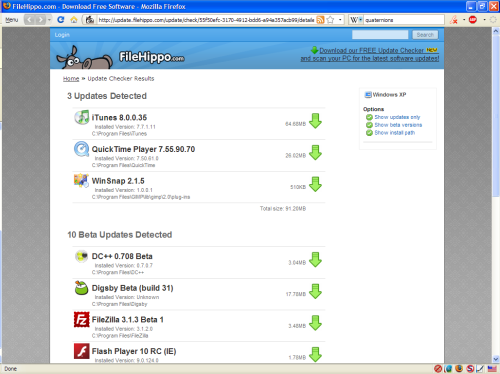 FileHippo's


Please help us by rating this review
|
Related Products and Links
|
|
Other Software Update Monitors
Ketarin [10] takes another approach at software updating. It keeps your install files up-to-date. Once installed, you have to point it to the download link of the software you wish to keep updated (or give it its FileHippo ID). This is quite nifty if you have to keep a database of install files updated for software you may not have installed on your own machine. Many users have posted other SUMs since this article was first published. I will briefly cover some of them and tell you why I did not like them. Update Notifier [11] used to be my top pick, but it was a victim of its own success when the team was unable to scale their venture accordingly. The project may be started again and I will keep you updated. UpdateStar [12] is a SUM that I find annoying to use. It keeps asking if you wish to upgrade to a premium service and the user interface is quite cluttered. The updates generally appear quite reliable, though it is not perfect. It does not add anything that would make me want to use it over those listed in the review. Software Informer [13] has improved a lot. It is very thorough, with the side-effect that it often informed me of updates that are not available, or it would inform me of an update for version I have installed because it interpreted the version incorrectly. Probably the best of the updaters not discussed in the main discussion. The Mac version is terrible. I can't even get it to work. TechTracker [14] by CNET gives me a few concerns. Their privacy policy [15] states that they collect information about you and share it with other companies. It also comes bundled with OpenCandy [7]. That should be enough to stay far away from it. But, I decided to test it anyway so that you don't need to. Seemed quite good since it has the might of CNET's database behind it. Still, I'm not sure if it is worth it over UDC because of the privacy concerns. I signed up with an email account that I created especially for it and have been getting spam (approximately once a week) from CNET since (GMail detects it as such). DownloadPlex.com's Software Update [16] is slow with updates, does not make it clear which applications have updates and sometimes informs of updates that do not exist, or suggests updates that are not stable releases. Software-UpToDate [17] has recently been updated. I will need to test it before making comments on it. It seems that it does not support all software though. There is a similar group of software that acts like a software manager, similar to the Synaptic Package Manager used by Ubuntu. They give you access to a selected group of programs, install them and keep them up-to-date. There are examples such as Appsnap [18], Appupdater [19] and FreewareUpdater [20]. I could not get Appupdater to work and Appsnap and FreewareUpdater only supported a limited amount of software (and could not detect software that was already installed). I feel these three programs belong in a different category and will not review them here. RSS Feeds
There are some website RSS feeds I like to check for updates. FreewareFiles [21] has a great feed that list updates very quickly after they have been released, while Freeware-Guide [22] gathers a list of software updated in a day and displays the list in an RSS feed the following day. FileHippo [23] and Softpedia [24] also have RSS feeds for the latest additions to their databases. Here are the five feeds:
If you would prefer the RSS feed of individual programs without using that program's homepage, FileHippo [23] offers individual RSS feeds. Related Topics
|
|
Have Your Say
|
|
Please visit our freeware forum [35] to share and discuss your views and get advice on software update monitors. To post in the forum you need to register first but that's quick and immediate. Related Forums:
|
|
||||||||||||||||||||||||
|
||||||||||||||||||||||||
|
||||||||||||||||||||||||
|
||||||||||||||||||||||||
|
This software category is is maintained by volunteer editor Frank Ortmann. Registered site visitors can contact Frank by clicking here [47]. |
||||||||||||||||||||||||


 2.13.7.114
  Unrestricted Freeware
  Install the "Lite", 7z or ZIP versions


|
Tags
|
|
Software updater, software update monitor, software update notifier, software monitor, software update checker, software update searcher, Personal Software Inspector, Update Notifier, Update Checker, PSI, UDC, SUMo, AppFresh |
 [48]
[48]