
Best Free Disk De-fragmenter [1]
 Read this article in Spanish [3]
Introduction
When testing defragmenter software, we evaluate it with these parameters:
- Speed of analysis on fragmented files: Isn't it speed we want from our computer?
- Speed of defrag;
- Some extras: such as scheduled defrag, shutdown PC when done, etc.;
- Defrag capabilities: Why is this placed in last position? Because almost all of today’s defragmenters can perform this task with very similar results.
With these parameters in mind, we found a few we could recommend with the best of these as good as any commercial product.
Read also Fragmentation: Why does it happen? and Defragmentation: Do you need it? at the end of this page.
Rated Products


Platforms/Download: Windows (Desktop) [7] | [8]
Version reviewed: n/a
Gizmos Freeware [9]
| Our Rating: 5/5 |
|
Read more... [6]
 [10]
[10]
MyDefrag [10] [11]
Unbelievable power user options for everyone without having to configure any script
Platforms/Download: Windows (Desktop) [12] | [8]
Version reviewed: n/a
Gizmos Freeware [9]
| Our Rating: 4.5/5 |
Read more... [11]

Platforms/Download: Windows (Desktop) [15] | [8]
Version reviewed: n/a
Gizmos Freeware [9]
| Our Rating: 4/5 |
Read more... [14]

Platforms/Download: Windows (Desktop) [18] | [8]
Version reviewed: n/a
Gizmos Freeware [9]
| Our Rating: 4/5 |
Read more... [17]
Also reviewed but not included:
- Puran Defragmenter
- O&O defrag free edition
- Others
Feel free to suggest any software not already mentioned for review.
Related Products and Links
You might want to check out these articles too:
- Types of Backup Software : What’s the difference between Disk Imaging, File Based Backup, or Synchronization, and which should I use? [19]
- Best Free Drive Cloning Software [20]
- Best Free Folder Synchronization Utility [21]
Fragmentation: Why does it happen?
Suppose you are browsing the web, downloading your favorite songs and installing an application all at the same time, how does your system write all these files without any interruption to your activity? Well it's simple: it responds to all applications' write requests (I/O operations) by writing all files at a continuous location on your disk.
Representation of a disk track:
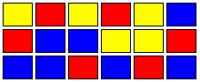 (Fig. 1)
Yellow: Temporary written internet files
Red: Installation (Game)
Blue: Song cache
The purpose of disk defragmenters is to reorganize such files which are supposed to be together. An ideal situation after defragmentation would look like this:
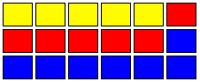 (Fig. 2)
But what happens when you uninstall, delete, or simply clean your temporary files? Imagine yourself uninstalling the application (game) you installed. The disk could look like this:
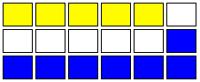 (Fig. 3)
The white zone is empty space without fragmentation. A disk looking like this will have just a little or even imperceptible impact on performance. In this case defragmentation is needed but not critical.
The last thing you want to see is a hybrid combination. Files very fragmented fig 1 and empty disk space fig3 but instead of contiguous clean sectors you'll find what we call fragmented empty space. And this is what it looks like:
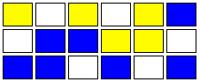 (Fig. 4)
This is the worst case scenario. Overall system performance will be compromised and fragmentation is critical. You should defragment (defrag) or let your defragmenter schedule and execute the defrag process for you.
Defragmentation: Do you need it?
Standard mechanical HDDs (hard disk drives) will benefit from defragmentation and continuous disk use, because when spinning, it keeps remagnetizing the HDD plates. But if you own an SSD (solid state drive) you SHOULD NOT defrag or install any defragmenter application because it will shorten the life of the drive.
Editor
This software review is copy-edited by Ian Richards [22]. Please help edit and improve this article by clicking here [23].
Back to the top of the article