|
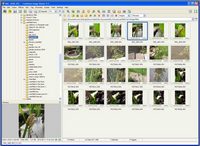 FastStone Image Viewer, now in version 4.3, has recently become my first choice. It is an excellent all round package which does far more than just help you to organise your image files. I particularly like the way in which you can, with one click on an image, get a full screen view and then edit the image or see its embedded info by moving your mouse to the edge of your screen. The program is fast, slick and stable. It is not a "slimmed down" version of more fully featured software. The only negative side I can think of is that it does not have the automatic upload to the internet features of some of the other packages on offer. But it is easy to resize images for email, or for the web, make moderate adjustments etc. It also has a easy-to-use batch processing facility. There is18- language help and all major file types are supported including a good selection of RAW image formats. And if the image editing features are not sufficient for all your needs all of the time there's a handy software linking facility which allows you to couple Faststone with your favourite image editor so you can easily switch between the two. All-in-all a first class piece of software. FastStone Image Viewer, now in version 4.3, has recently become my first choice. It is an excellent all round package which does far more than just help you to organise your image files. I particularly like the way in which you can, with one click on an image, get a full screen view and then edit the image or see its embedded info by moving your mouse to the edge of your screen. The program is fast, slick and stable. It is not a "slimmed down" version of more fully featured software. The only negative side I can think of is that it does not have the automatic upload to the internet features of some of the other packages on offer. But it is easy to resize images for email, or for the web, make moderate adjustments etc. It also has a easy-to-use batch processing facility. There is18- language help and all major file types are supported including a good selection of RAW image formats. And if the image editing features are not sufficient for all your needs all of the time there's a handy software linking facility which allows you to couple Faststone with your favourite image editor so you can easily switch between the two. All-in-all a first class piece of software.
 Zoner Photo Studio 12 Free is my second pick. To be honest there is not much to choose between any of the four packages mentioned here so a lot of it comes down to personal choice. I really like the look of Zoner: it has a professional feel and for a long time it was my first choice. Within the software you can organise, edit and share your images and there are German, French, Italian and Russian versions. On the downside, the software does not have advanced EXIF features or handle RAW image files. It is a slimmed down version of the "home" and "pro" versions which are available at a cost. On the upside, I like the three major functions within the package - manager (organiser) viewer and editor. Personally I use a separate software package to do all but the simplest image manipulation, but for basic operations Zoner is fine, quick and intuitive. Zoner Photo Studio 12 Free is my second pick. To be honest there is not much to choose between any of the four packages mentioned here so a lot of it comes down to personal choice. I really like the look of Zoner: it has a professional feel and for a long time it was my first choice. Within the software you can organise, edit and share your images and there are German, French, Italian and Russian versions. On the downside, the software does not have advanced EXIF features or handle RAW image files. It is a slimmed down version of the "home" and "pro" versions which are available at a cost. On the upside, I like the three major functions within the package - manager (organiser) viewer and editor. Personally I use a separate software package to do all but the simplest image manipulation, but for basic operations Zoner is fine, quick and intuitive.
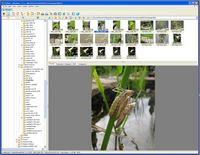 XNView is another really good package. It has many of the features of the other two, but I find it little less easy to use. It is stable, fast and has only a small download. There's a XN View sister program, XNView MP in Beta 0.35 (which I presume stands for multi-platform) which is less fully featured but runs on a Mac and in Linux. It can import more than 300 graphic file formats and export to about 50 formats. Other features include image IPTC, EXIF metadata support, editing facilities, slide shows and support in 44 languages. Excellent. XNView is another really good package. It has many of the features of the other two, but I find it little less easy to use. It is stable, fast and has only a small download. There's a XN View sister program, XNView MP in Beta 0.35 (which I presume stands for multi-platform) which is less fully featured but runs on a Mac and in Linux. It can import more than 300 graphic file formats and export to about 50 formats. Other features include image IPTC, EXIF metadata support, editing facilities, slide shows and support in 44 languages. Excellent.
 DigiKam was built for Linux but there is also a Windows version. It is difficult to load effectively in Windows - but it can be done. And it is a very good, nicely designed piece of software which should appeal to serious amateur and professional photographers alike. Like my other top picks, it is packed with useful features. It is very much work in progress: new features and add ins are on offer all the time and even if you didn't choose it right now, you might want to bookmark the link to the didiKam website because I have a feeling it will be offering even more very shortly. DigiKam was built for Linux but there is also a Windows version. It is difficult to load effectively in Windows - but it can be done. And it is a very good, nicely designed piece of software which should appeal to serious amateur and professional photographers alike. Like my other top picks, it is packed with useful features. It is very much work in progress: new features and add ins are on offer all the time and even if you didn't choose it right now, you might want to bookmark the link to the didiKam website because I have a feeling it will be offering even more very shortly.
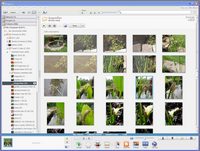
Picasa3, from the Google stable, is a superb choice for those who want an organiser which will take control of the way in which you organise your images. Once installed it will offer you several ways of organising your image collection, adopting by choice a 'timelime' which places your most recent images at the top of the tree. It is ideally suited for easy integration with web albums on-line sharing of images. Simple highly automated features offer image correction, full-screen slide shows and you can now see your pictures arranged on a global map. Picasa can also organise your photos based on the faces of people in your snapshots. It's not foolproof but it works remarkably well. Picasa is free to download and is coupled with Picasa Web Albums which provides users with a gigabyte of free online image storage.
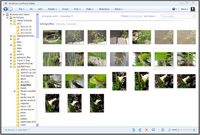 Windows Live Photo Gallery is to Microsoft what Picasa3 is to Google. It, too, works really well, and is fast and less intrusive than Picasa. But it doesn't seem to offer quite the same easy functionality as Picasa. I think it is unlikely that many people would want to use it on its own but as a quick, fast way of finding images, on your hard drive drive it is excellent. You can edit images, email or publish them, print them, make slide shows, etc. It is less full features than most of the other packages, but for some that might be a definite advantage! Windows Live Photo Gallery is to Microsoft what Picasa3 is to Google. It, too, works really well, and is fast and less intrusive than Picasa. But it doesn't seem to offer quite the same easy functionality as Picasa. I think it is unlikely that many people would want to use it on its own but as a quick, fast way of finding images, on your hard drive drive it is excellent. You can edit images, email or publish them, print them, make slide shows, etc. It is less full features than most of the other packages, but for some that might be a definite advantage!
|


 Go straight to the Quick Selection Guide


 4.3
4.3  Restricted Freeware (full commercial version available)
  Windows 98/ME/2000/XP/Vista/Server2008/Windows 7


 We are looking for people with skills or interest in the following areas: