

 These days, more and more programs are being bundled with extra components such as the Ask toolbar or Open Candy which Gizmo has written about here.
There are varying opinions about the nature of these add-ons, but without joining the argument about how developers choose to fund their existence, how can users ensure that what they download is what they get, and nothing more?
Here’s are a few simple steps.
- First decide if you really need the software at all. Quite naturally these things are promoted to offer “benefits” of one kind or another, but sometimes a quick look around the forums will reveal issues you might not want to risk.
- Enter the name of the program into your preferred search engine and add “bundled software” at the end. The results should show if and what might have been added as others will have already encountered them and posted about it online. You can then decide if you still want the program, and if so be forewarned about what else might show up during the install process.
- Only download from a reputable source. As suggested by member ichabod, "reputable" is not always the same as "recognized". Cnet (Download.com) for example is a recognized source, yet it is hardly reputable. If the vendor is new or unknown, or you have any other doubts about their web site (we recommend WOT as a safety check), go to Softpedia or one of the other recognized download sites instead. Softpedia in particular always adds a warning note if they are aware of extra components being bundled with a program. We provide a list of recommended download sites here.
- Use an ad-blocker for your browser e.g: Chrome-Firefox. This will hide most of those flashy "Download!" buttons from the page you are navigating, many of which are nothing to do with the program you want and designed instead to lead you down a completely different and often unwanted path.
-
Make sure the program number you are downloading is the one you want (usually the most recent). Sometimes the independent download sites take a while to catch up with the vendors development cycle and may not have the latest version. You can even take this a stage further by performing an MD5 “checksum”.
If the latest program contains unwanted “extras”, a previous version which doesn’t might still be available. Often an older version will still perform well enough. If this is what you want, one place to look is here. - Read the program EULA. Boring yes, but without reading it you cannot blame anyone else for what “extras” might arrive in your computer. Understand too that the vendor’s online agreement might be different to that included with the program.
-
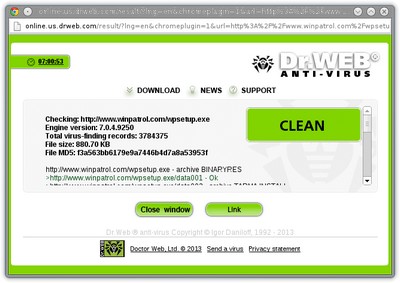 Scan the host website and the file in question before downloading it. To analyze a website for threats you can use VirusTotal, URLVoid and Zulu. For the file you would like to download, you can use the Dr.Web Anti-Virus Link Checker browser extension [Chrome] [Firefox].
 - Scan the downloaded file before you execute it. Even if your resident anti virus already does this, you can still use HitmanPro or Malwarebytes for a second opinion. This might not help to reveal adware but it’s a necessary check for true nasties.
- Take your time during the install process. Often the options necessary to avoid something are purposely made confusing because the third party vendors don’t want you to :)
- Make sure you have a security program installed which will prompt when sneaky add-ons try to install or connect to the internet. Most third party firewalls will do this providing they include a HIPS component. WinPatrol is a useful standalone of this type. This is an example of a huge mess having WinPatrol installed could have prevented. These aids are not a panacea though and can’t be guaranteed to spot everything you might not want.
-
Often, things become clearer second time around. Unfortunately, by then you might already have the Beanfest Toolbar and Magic Wallpaper Changer installed and ticking away nicely in your tray. :D Some programs offer the ability to install something “virtually” which means you can check it out first and then decide if you want it before letting it loose in your real system. How this is achieved varies between programs, and some are more complicated than others to manage and understand. My personal favorite is Toolwiz Time Freeze (free). I only activate the Virtual Mode when I’m installing a program. (Please note this is not suitable for programs that require you to reboot during the install process). You will also have to repeat the install outside of Virtual Mode if you wish to keep the program permanently, but as already mentioned, this is not always a bad thing.
Another program to consider might be Sandboxie . See also our main review of Browser Protection Software.
 We are looking for people with skills or interest in the following areas:
Comments
The best solution is an operating system that maintains a repository of clean software, and is itself malware resistant. Microsoft Windows is not it.
Try Ubuntu MATE. You get an "app store" with descriptions and ratings, one click install, and regular updating (when and how you want it). Not to say the other 200 Linux distributions are not good, but Ubuntu MATE is probably the best place to start for a new user, right now.
By all means, use a sandbox. Another route to use is to attack these bad boys with every nasty thing you can say. Do it on their websites and use the most cuss words possible in every sentence. Open Candy is a f@#^ing disgrace to the web. CNET is to be avoided at all cost.. Keep digging at these and all other BAS#&*DS until they get the message.
Thanks for an excellent article.
You're absolutely right about CNET. Despite its official-sounding acronym: well-known yes, reliable, no. There is a really horrible site called DVD Videosoft, which must have put more malware onto the world's computers than almost anything else: a whole handful of nasties which many people's anti-virus software won't pick up (although if you have Malware Bytes, you might). Repeatedly I have notified CNET and still this muck they promote. Clearly, as the vernacular would have it, they couldn't give a flying fork. Or even, a spoon.
Yet I've also downloaded toxic software from File Hippo, Softonic and elsewhere. Can they all be part of some global conspiracy? It makes more sense to suggest - you can see what an altruist I am - that it's impossible for these companies to check out every item submitted to them as thoroughly as they should. The naive downloader picks up the pieces: or rather, you fail to notice; and carry on in ignorant bliss with your contaminated machine.
The bigger problem has to do with legitimate, honest freeware which pops up in corrupted forms. VLC ("Videolan"), Paint.Net, Audacity and more...all these you will find in nobbled versions; some on third-party sites, others on sites which resemble the developer's own and can be so easily confused with it. That's the intention, of course. Never download or upgrade or update ANYTHING except from the manufacturer's own site - even if you have to scroll down two Google pages to find it. If the software itself invites you to update, following the link it provides usually seems pretty safe. Famous last words....
As for Open Candy, and those other nasty bits of work. If everything is on the level, why not offer them explicitly as an option? Adobe offers Norton Anti Virus quite openly, and you can take it or leave it as you choose. That's honesty, rather than something smuggled in via the back door.
It's high time for me to end, but I have a reasonable collection of freeware that seems not to fight each other: AVG, Avast, Malware Bytes and Comodo. Maybe I too am living in a Fool's Paradise, but I seem to detect malware that other people miss. A final word about software which rests on old laurels. There's no reason still to trust it, or to value it. The original Gimp used to be a valid alternative to Photoshop. Whenever I have downloaded Gimpshop, from source, it has come down riddled with malware far worse than PUPs like Open Candy. My inquiries via "Contact Us" meet with silence...
In English we say, "There's no such thing as a free lunch." In Russia they put it better: "You only get free cheese in a rat-trap."
Some EXE installers can be opened by 7-Zip or other compression applications. This allows inspection of some of the contents, and bypassing the full install script, when Registry changes are not needed (particularly when updating an installed application). As mentioned, submit any new executables, including DLL's, to VirusTotal directly or through PeStudio, which makes it more convenient.
Thanks for the article, with all its valid warnings!
MC, excellent article and suggestions, Thank You!
After some experiences with some of my customers who I sent to Gizmo's Best of ... articles I want to add for the less technically inclined readers, and yes, it has already been mentioned in this thread, but anyway:
If you get during the install process of the program you want to install some choice between
- Default Install (recommended)
- Custom Install (for experienced users only) in this or similar form
PLEASE ALWAYS be the "experienced user" no matter whether you think you are or not.
More often than not the experienced user will get some additional choice(s) to say yes or no to the installation of unrelated bundled PuPs. You still have to be very vigilant and follow my personal first commandment of safe computing which simply states "Thou shalt read and think(!) before you click".
I always create a restore point before running downloaded software the first time. That doesn't keep me from installing unwanted software, but it makes getting rid of it easier. If I discover unwanted software I simply reload the restore point to get rid of it.
Nice, thorough article
Always do an "advanced" install, never the "express install" when it is offered
Here is a small (free) program that will un check or decline all the "offers"
https://unchecky.com/
It runs as a service - still be careful
Open Candy thinks their business model is legit and offers a cleanup utility that has worked for me
http://opencandy.com/faqs/
I get a "precede at your own risk" warning at that page so use your own judgement
I posted a reply in the forums "MD5 checksums for reviewed software" [not letting me post link--you'll have to look it up :(
Nice article MidnightCowboy.
I got here linked from the comments in Best Free Partition Management Software. In those comments is an extremely good example of just how sneaky these software providers are, and just how easy it is to get tricked if you're not completely vigilant.
Always use custom install!
I would like to add that like Umberto requested in the forums "md5 checksums for reviewed software" i would also like to request that MD5 checksums be provided for software recommended here at Gizmo's.
It is not a perfect solution. Perhaps by the time you come to download, there is a newer version that has not yet been reviewed--wont help this situation.
But it WILL prevent the exact situation that happened with that EASEUS partition program. That was the SAME version that was re-packaged with bundled software and listed on the same download page that Gizmo's linked to. Note that in this case the MD5 hash on the software author's download page will not help this situation.
I don't really think it's too much trouble for reviewers, tho i do appreciate their contribution so much it is hard to ask for something else from them. But it would be so nice to know when downloading a program that it is the EXACT version reviewed by the reviewer. That would give me piece of mind.
I would also like to note for newcomers that many antivirus programs come with the option to search for euphemistically named "Potentially Unwanted Software" or PUP for short. Most if not all of these bundled software programs are in that category. I will just say that the "potential" that you "unwant" these programs is very, very high ;)
Excellent article. Another tip is to not be connected to the internet while installing a program, unless absolutely necessary. Often the bundled junk is not included in the installer, and has to be downloaded. An example is the extra programs offered while installing programs from NCH Software. Also, one doesn't have to be connected to the internet while using an installed program to convert a video, edit an audio file, type a document, etc.
MC, you said "Only download from a reputable source ... go to Softpedia or one of the other recognized download sites". That's an important point, and I'd like to add the suggestion that we go only to "a reputable source," rather than any "recognized" one. The latter is simply too broad and vague, especially with Cnet (Download.com) being so widely recognized while having some reputation issues as mentioned in other Gizmo articles. A link to the Gizmo article "Best Freeware Download Sites" would be helpful in the paragraph for step #3 of this article.
Thank you so much for this article. I especially appreciate the recommendations about security tools in the last 5 steps. As websites and SW developers succumb to the siren call of financial benefits in exchange for loosening their ethical standards, it's good to know that we have this site for independent advice.