

By sheer coincidence I was notified about two different application launchers on the same day. I've had a quick look at each and they are both impressive though they adopt very different approaches. They are tiny downloads and don't need installing so try them both and see which one best suits your style of working.
Appetizer
Here's what the developer Laurent Cozic wrote:
 "Appetizer is an open source launcher (or dock) for Windows with support for plugins and skins. It's in general more flexible but less flashy that its competitors. For example, it doesn't have elaborate zoom animations like Rocket Dock, however it supports skins and its entire appearance and exposed functionalities (buttons, etc.) can be fully customized if needed. Additionally, one of the main focus of the app is being lightweight and portable.
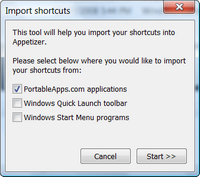
My initial goal was actually to allow it to run from any USB key on any Windows systems (2000, XP and Vista are currently supported) without admin rights to be required. I also release a version of it compatible with the PortableApps.com framework (it's currently unofficial and only available on the PortableApps.com forums).
The plugin system is based upon the Lua scripting engine, which means anybody can create a plugin with a simple text editor without having to know a low level language like C or C++, and without the need of a compiler. The plugin API is fully documented with examples at http://app.etizer.org/api-reference
In the same way, the skin is very easy to customize since there's only one image to edit. The app is currently bundled with two skins."
http://app.etizer.org/download (1.3MB)
CodySafe
News of this product came from the folks at http://www.pendriveapps.com. Here's what they said:
 "This is a great free tool that is far more useful and convenient than the standard PortableApps menu. With CodySafe you can:
- Manage and launch Portable Applications from your USB device
- Turn any portable drive from a simple storage into a Computer On A Stick.
- Manage any kind of portable apps (not just PAF)
Additional tools and features like Drive Doctor, Find-if-Lost, etc. make it even more attractive."
http://www.codyssey.com/products/codysafe.html (1.7MB)
For some more options see:
Best Free Start Menu Replacement
Gizmo
 We are looking for people with skills or interest in the following areas:
Comments
When using the link provided here, both the product and web page are fine. MC - Site Manager.
https://www.virustotal.com/en/url/40748aefc0760ca071022e716e52be64b64ab3...
https://www.virustotal.com/en/file/85b46ca1e7f5a4171c2ac1a58a409a0d29082...
http://www.urlvoid.com/scan/codyssey.com/
The only "detection" is from Zillya which is riddled with false positives and as a product about as much use as a paper bag in a thunderstorm.
When I attempted to download CodySafe, FF gave this warning -
Reported Unwanted Software Page!
This web page at fileslocker.com has been reported to contain unwanted software and has been blocked based on your security preferences.
Unwanted software pages try to install software that can be deceptive and affect your system in unexpected ways.