Gizmo's Freeware is Recruiting

Gizmos Needs YouWe are currently looking for people with skills and/or interest in the following areas:

- Anonymous Surfing Service
- Antivirus for Android

If this sounds like you then click here for more details


Microsoft Offers Web-based Office Applications for Free

In a direct response to the popular free Google Apps service Microsoft has quietly launched the beta version of its own free online suite of office programs.  Called “Office Web Apps” it offers free online versions of Microsoft Word, Microsoft Excel, Microsoft PowerPoint and Microsoft OneNote.  Even better they are giving users 25 GB of free online storage to store their documents on Microsoft’s SkyDrive service.

Before you get too excited you need to be aware that the online versions have fewer features than the equivalent Microsoft Office products that run on your PC.  However almost everything you need is there.

According to the press release Office Web Apps is initially only available to users in North America, the UK and Ireland. It can be accessed using IE7 and later, Firefox 3.5 and later and Safari 4. A wide range of portable browsers are supported including iPhone, Blackberry and Nokia S60.

That said I had no problem accessing and using the service from Australia using Google Chrome. Mind you when I registered I did tell a little white lie – I said I lived in California :)

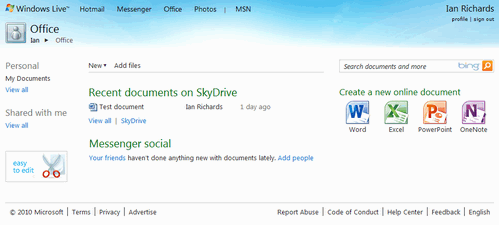
To use the service you to need to go to the Office Live home page and login using your Windows Live ID.  I created one on the spot by registering.  Once logged in you will see the main screen.


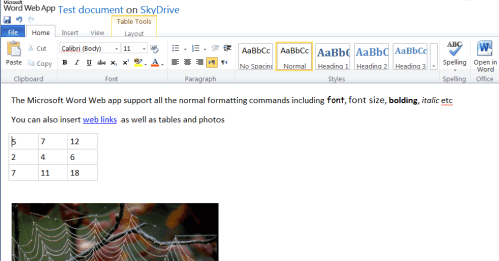
I created a document using the online version of Word and I must say the interface looks quite gorgeous and remarkably similar to the ribbon interface for the offline version of Word. It also worked remarkably similar to the offline version of Word except that some of the fancier features were missing.  For example I couldn’t resize photos by dragging.  You can however easily overcome these limitations by clicking a button and then editing your document in the local version of Office that’s installed on your own PC.


Documents you create are stored in the standard Microsoft Office formats such as .docx and .xls. You can also easily download documents created on the web.

Uploading though is not quite as neat. To get documents from your PC into Office Web you have to upload them via the SkyDrive service. It’s doable but clunky; the functionality should be available within each of the Office Apps.

Overall there is much to like here: 25GB of free online storage, an interface comfortably similar to the desktop Office programs and the same file format as well.

On the downside the online programs ran slower in my browser than the equivalent Google Docs Apps. The integration of online and offline applications is also not as complete as that available from Google Apps. Cooperative file sharing is also only partly implemented though this is expected to improve.

Those reservations aside many users are going to love this service. Whatever, all of us will benefit as this can only serve to stir Google to more quickly develop Google Docs. As ever the winners from increased competition are normal folks like you and me.

Gizmo

   
Office Web Apps: http://office.live.com
 

Share this
4.157895
Average: 4.2 (19 votes)
Your rating: None

Comments

by Ahmed Farhan (not verified) on 3. November 2010 - 7:46  (60699)

tried out the service after reading your article,
never know i already had this service activated on my existing hot mail account,

service will come in handy...

but the 25 GB space is not really as it seems ... file size limited to 50 MB ... and would be usefull only for office docs , which will never neeed 25 gb

by StopChaos2 (not verified) on 7. July 2010 - 11:25  (53888)

I, also, run the cloud version of Office Live in FF on Linux/Ubuntu 9.04, no Office software installed. It works for me. I don't need to use the extra feature of "Open in Office".

by Anonymous on 15. June 2010 - 12:29  (52161)

MS Web App is a direct answer to Google docs. Now it makes sense that Google lately tried really hard to move as many customers to its paid cloud.

However, there were plans that MS Web App would be partially funded by advertisement. I do not know whether this is a good idea, since Microsoft would have to scan thru your documents to show relevant ads. Yes, gmail already does this but documents are maybe more private than emails.

mike

by Anonymous on 15. June 2010 - 11:24  (52157)

@1 and similar comments:

Compatible PC? Vague .. please give an example of a incompatible PC .. Commodore 64 perhaps?
Must have installed software? Nope .. works fine without office or anything but a browser & the OS.
Already have installed version? Sure if you have it then use it and you can just keep paying for it. With office.live I have main office apps anywhere, anytime on any *modern* OS (i.e. not Commodore 64, Apple IIe, CP/M and few others).
Slower? Yes you are correct! .. except I can't really tell .. I have a broadband connection. If you are still running a 110 baud modem I would steer clear .. stick with whatever you have on your Commodore 64 or TRS 80.
Less functional? Correct again .. that is if you're using more advanced features .. everything I use is there and works fine.
Privacy? Good point. If you work for some intelligence agency or are planning to take over the world you might keep it on an external, encrypted drive. Most of the documents I deal with don't involve national (or even personal) secrets. p.s. If you don't trust any encrypted systems please skip the encrypted part .. just write it down and then eat the paper so your dog doesn't tell your cat.
Cursed ribbon system? That's personal preference .. I know, I know .. it was so hard to get use to the CRT .. card punch was so much more portable and they were great for notes!

These are just a few retorts that I imagined as I was reading the comments (i.e. less than 1 minute).

I love Google Docs along with anyone who wants to be a competitor since that means all users win except a few here who spend time thinking of that half empty glass. Since the most common office apps in use are from MS I am ecstatic they are entering the online office market.
It's free! I am creating and saving docx formatted documents and it didn't cost me a cent.
I have the document available to me anytime and anyplace I have access to the internet without a USB drive.
As long as there is no private content the document is probably safer as I suspect that it's more likely your local disk will fail than you losing your document in an online office app.
It's OS independent .. you can easily view and work on documents with people on a variety OSs.
Easier to collaborate with others .. your docs are stored someplace where everyone that you want to share them with can get to them.
You don't have to install or update anything! Less clutter on your computer and no problems associated with installs & updates.

These are just a few advantages I thought of while typing the retorts.
Mmmmm Mmmmm Good!

by Anonymous on 12. June 2010 - 7:16  (51958)

Gosh, this Cloud Computing is really overrated. Five disadvantages for every advantage:
For starters, some disadvantages 1)Have to have a compatible PC with the appropriate installed software (if the software is installed, why are you using the Cloud version !!!) 2)Cloud applications are slower ! (Why if you have the installed version would you tolerate a slower alternative) 3)Cloud applications are less functional. Even a small reduction in functionality can be very limiting at certain critical times when document deadlines are near. (Again, why if you have the installed version would you tolerate a slower alternative) 4)Privacy. Saving anything to the web has major problems, privacy is the main one. Having seen what Google and Facebook treat private data, I would never trust any of my documents to be saved to the internet !! And saving business documents to the web, are you out of your mind ???? I dont trust any encryption system, Im sorry. 5)Slow upload speed to web, compared to instant for saving documents to hard drive 6)Have to use the cursed ribbon system ? No thanks
These are just a few disadvantages I imagined within 2 minutes. Advantages to compensate for the disadvantages ? Hmmmmmmmmmm.

by Anonymous on 13. June 2010 - 7:33  (52016)

1)Have to have a compatible PC with the appropriate installed software (if the software is installed, why are you using the Cloud version !!!)

I run the clound verison of Office in FF on Linux, no Office software installed. It works for me. I don't need to use the extra feature of "Open in Office".

2)Cloud applications are slower ! (Why if you have the installed version would you tolerate a slower alternative)

True, but I usually dont' have the installed version on a public PC when I'm travelling.

3)Cloud applications are less functional.
True, I read it says "functionality is currently limited".

4)Privacy. Saving anything to the web has major problems, privacy is the main one.
Yes to a certain degree. Some people also asked not to talk over the phone when dealing with highly confidential business oppurnities. Must talk face-to-face in a private room with no voice recorders. :)

5)Slow upload speed to web...
The upload speed is acceptable to me and I use a broadband.

6)Have to use the cursed ribbon system?
Slowing I've got used to it.

I use Google Docs quite often, now probably I'll also use the cloud version of MS Office as an alternative, especially when I have some Office files stored on Skydrive and on those PCs which I don't have Office installed. Good for me.

by Anonymous on 11. June 2010 - 18:30  (51918)

Office 2010 must be installed in your computer. Thats why it doesnt work in my PC

by Anonymous on 13. June 2010 - 7:08  (52013)

I think only the feature of "Open In Word, Excel, etc" requires a desktop version of Office, other functions such as creating, editing and saving of files should work as usual under "editing in browsers".

by Anonymous on 11. June 2010 - 2:57  (51881)

One must download and install Office to use the cloud version.

by gizmo.richards on 12. June 2010 - 1:05  (51945)

It works fine without Office 10 regardless what it says on the website.

Gizmo

by morrig on 15. June 2010 - 16:20  (52177)

Gizmo in my Firefox Browser,their is two plug-ins, Microsoft Office 2010
Office Authorization plug-in for NPAPI browsers

Microsoft Office 2010
This plug-in allows you to open and edit files using Microsoft Office applications.
So I would presume you need 2010 or 2003 or later???

Just disabled said plug-ins and guess what, error came up stating you must have office application and plug-ins.

by Anonymous on 11. June 2010 - 0:52  (51871)

Gizmo, I didn't know you are downunder!! Who said you could go there??

by syntax_error on 10. June 2010 - 23:02  (51865)

If you do not have MS Office on your PC, can you download docs created in this web based office application?

The idea would be to open them on my PC with another app. such as OOo or send/share them from my PC to someone who does have MS Office.

by Anonymous on 10. June 2010 - 22:22  (51862)

It wouldn't even do Find and Replace for me. And the help is useless.

by Anonymous on 10. June 2010 - 18:00  (51846)

I couldn't copy or find how to import an Excel file. When I tried copying, it was always "try again in a few minutes". When it eventually imported a single column, it did it in all in a single cell. I tried exactly the same thing on Google spreadsheet and it did it perfectly whether importing or just pasting and copying. So I'm sticking to Google, at least for now.

by Anonymous on 10. June 2010 - 14:57  (51832)

I think I'll stick to WordPerfect Office - on my PC.
JC

by Anonymous on 11. June 2010 - 14:31  (51904)

I've used Word for 10 years now, and I still miss WP every single day of my life.

by Anonymous on 10. June 2010 - 17:50  (51845)

I wish I still had WP 5.2. I don't suppose it would work on Vista anyway.

by Anonymous on 10. June 2010 - 14:24  (51828)

Does Goggle have offline version?

by gizmo.richards on 11. June 2010 - 0:10  (51869)

Yes both Google Apps and Google Mail have offline clients. I use them myself.

Gizmo

by Anonymous on 10. June 2010 - 11:02  (51820)

I'm a OneNote fan, primarily because of it's excellent outlining features. I immediately tried it online and found that folding/collapsing didn't work for me. That's not a small omission, that's a major one. I'd love to know if others found that it worked.

I also couldn't get the desktop version to transfer to the web and vice-versa though MS claimed it should work (and yes I was using Office-2010).

Jim Mitchell

by Jojoyee on 10. June 2010 - 14:23  (51827)

I opened up a Word file uploaded to SkyDrive, and edited it with Word Web App, when I clicked "Open in Word", it showed me this message:

"To open this document, your computer must be running a supported version of Microsoft Word and a browser that supports opening files directly from the Office Web Apps."

Then I clicked "Learn more about the requirements." It showed me the cause of errors:

"The ActiveX control necessary for opening the file in the Office desktop application is not installed or is not running. This can happen under the following circumstances:

  1. Microsoft Office is not installed on your computer.
  2. The version of Office that is installed is earlier than Office 2003.
  3. The SharePoint OpenDocuments Class add-on is not enabled.
  4. Security settings in Internet Explorer prevent ActiveX controls from running.
  5. You are using Firefox and Office 2003 or Office 2007.
  6. Your browser does not support ActiveX, or is the 64-bit version of Internet Explorer.
  7. You are using a browser other than Internet Explorer or Firefox."

Well, I switched over from FF3.6 to IE8 to try it out, it prompted me to install an addon owssupp.dll. After installation, I keyed in the same user id and password as used in Word Web App. Then it worked for me in IE8 for this feature -- "Open in Word".

I can now open a file on SkyDrive in Word Web App, transfer to and edit it in Office Desktop App, and save it back directly to the file on SkyDrive.

In Word Web App, it has a tag line saying: Compatibility mode, the functionality is currently limited.

by Anonymous on 10. June 2010 - 10:25  (51818)

"However almost everything you need is there." Hmm, I would qualify this. Everything is there to jot down some ideas and save them to work on later, but if you're looking for "business-grade" output, it won't do. The Excel features are particularly heavily cut back. Also, the docs created online wouldn't open (for me) on my PC-based Office (Windows 7 Ult + Office 2007). I do agree that the interface is great, big step ahead of Google Docs and ThinkFree.

by Anonymous on 11. June 2010 - 16:41  (51910)

What interface or functions. It is childish and immature. I think the price of free it is overpriced.

by Jojoyee on 10. June 2010 - 9:47  (51815)

Thanks Gizmo for the hot find and tips. I also said I lived in California when... Oops, it doesn't require to be so specific so just select California will do. :>)

Post new comment

The content of this field is kept private and will not be shown publicly.