

Yes, this is another Linux story. And yes, I know I did a Linux-ish posting yesterday. But don't worry, that doesn't mean I've defected from Windows, and it certainly doesn't mean that this section of the site is going to be overrun with Linux postings. It just so happens that I've been doing some work in this area for the last few days, and wanted to share a couple of interesting finds.
So, if you'll forgive me for mentioning the L-word yet again, here's a great web site that makes it easy to create a custom Linux CD. Ideal if you have an old PC and you're considering installing Linux on it, but you don't want to download the complete 600 MB (or even more) installation disk, when you know that you won't want to use most of the features on it.
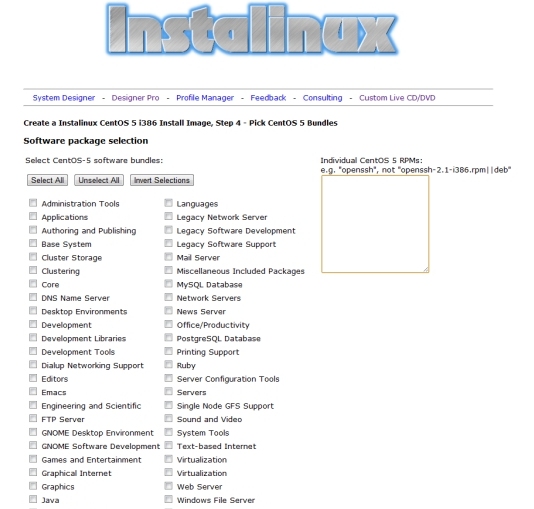
Instalinux (www.instalinux.com) is a web site which generates customised, downloadable Linux CD images. Pick a distro (Ubuntu, Debian, CentOS, etc etc), then decide what you'll be using the system for. As you can see from the list of functions in the screen shot below, there's everything from standard desktop GUI to a mail server. You'll also need to choose an initial account username and password.
Once this is done, the site will build your installation CD image. It takes just a few seconds, after which you'll see a link to your download. These downloads really are tiny. My Ubuntu one, for example, was just 12 MB. Once you've downloaded the .ISO file and burned it to a CD (in Windows 7, just right-click the file and choose the Burn option), boot your spare machine from the CD, type INSTALL at the prompt, and then sit back. Everything else is fully automated, and your Linux system will be set up with all of your chosen options. Any required components will be automatically downloaded and installed (so your Linux machine will need an internet connection).
For advanced users, there are a couple of extra options. First, there's a box (you can see it on the screen shot below) into which you can type the name of any specific packages that you also want to install. So if you want telnet up and running from the start, without having to install it, just add telnetd to the list. Secondly, there's a hidden option available if you access the site via http://www.instalinux.com/cgi-bin/coe_bootimage.cgi?defs=NoPrompt instead of the standard www.instalinux.com address. The hidden option generates a CD image which automatically boots, without the need for you to type INSTALL at the prompt. While this makes automated installations much quicker and easier, it can also be dangerous (it'll automatically wipe any PC that you boot from that CD!), so use this feature with great care. If in doubt, just access the site via the normal www.instalinux.com address.
 We are looking for people with skills or interest in the following areas: