Gizmo's Freeware is Recruiting
We are currently looking for people with skills and/or interest in the following areas:
- Anonymous Surfing Service
- Mobile Apps contributors
- Mac Section contributors
If this sounds like you then click here for more details
Clean Up Windows and Speed Up Your PC With This Free Utility
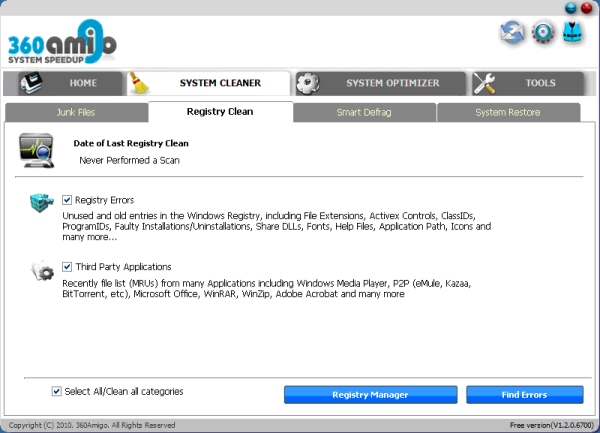
If you're a fan of programs which claim to be able to speed up/optimize/clean up your Windows installation, then you'll like 360amigo. It's quick, friendly, and easy to use. And while the paid-for version costs around $20 a year, there's also a freebie version which has loads of useful features.
Running it on my test XP system, it found 353 unnecessary registry entries, and 2007 unnecessary temporary files, all of which it deleted. There's an option to create a system restore point before anything gets deleted, which is definitely a good idea before running a program such as this for the first time on your PC. A full, recent backup would be even more sensible, and is definitely recommended.
Having said that, 360amigo performed flawlessly for me when I tested it in a Windows XP environment under VMware Player.
If you want to try it for yourself, see www.360amigo.com. The download is around 3 MB, and it runs on Windows XP, Vista and 7. Including 64-bit.
Got a Hot Find that you want to tell me about? See http://www.techsupportalert.com/content/submit-product-review.htm.
- Article type:


Comments
This program is not for everyone. Use it if you know what you are doing. I think it's too agresive for regular user.
I got a free genuine license key for this at giveawayoftheday.com and so far I like this product
Thanks for this hot find!
I've tested it and it gets nice and deep into cleanup.
However, I would only recommend 360amigo for folks who are familiar with and perform backup of the OS. CCleaner I otherwise recommend.
Why? Because the more intensive the cleanup program is, the more apt it is to exacerbate preexisting operating system problems and glitches IMO.
Hi everyone,
I've been using this program for a couple of months now, and can only say that I'm very pleased. Here's why:
Pros:
*Really easy to use
*Cleans fast and effectively, and I can always see the positive results: faster bootup, browsers don't send plugin error messages (had this problem earlier with FireFox and Chrome), PC usage overall faster and more functional
*Shows Temperature, memory etc.
*Shows Computer- and user name: I have a second hand PC and with this feature I noticed the old user's name. Now changed to my name :)
Cons:
*Earlier version may have had some difficulties with audio (as someone mentioned here), but it is fixed in the later versions. The latest is really stable and no problems what so ever. Remember always to install the latest version straight from the providers site because other sites might offer old versions.
Summary:
Highly recommended, my friends all use it now and are happy :)
I have installed this in the past few days on two XP SP3 machines. No problems at all, including using the registry cleaner. Both machines (an 8 year laptop and a 6 yead desktop) are subjectively faster. CCleaner had recently been used on both computers.
I tried 360Amigo System Speedup just to see why are there so many opposite opinions and results.
Normally, i did a fresh system backup, system restore point, and registry backup, before using the software, just in case..
And.. nothing exclusive happened, no (noticeable)speed gain, and no problems either.
So, i uninstalled it right away, ill stick to my tested couple of "system utilities".
Thanks for this hot find. It has a simple layout, it is quick to find and remove errors and puts on a restore point by itself. So many things to look through and admire. In summary, everyone will have to find out for themselves why "they" like 360Amigo System Amigo. I am a computer pro and I can safely tell 360Amigo System Speedup is better and more effective than CCleaner or Advanced System Care. For the CCleaner lovers: CCleaner is an outdated program, it have had its days, it was good, but there are programs out there which are more competitive. 360Amigo System Speedup is free and it provides an amazing amount of tools. Their latest version offers File Encryption and a Rootkit Detector. I havent tested it but will do sometime this week. You must add this tool to your utilities arsenal.
WARNING: USE THIS AT YOUR OWN CONSIDERABLE RISK.
Having said that I'd advise anyone wishing to play with this very aggressive cleaning tool to first read the full feedback from the many testers at giveawayoftheday.com. Too many people found that it knocked out their sound, or destroyed important files, even video and picture files. It appears to take a shotgun approach with little real attention to whether the vast quantities of files it finds are truly suitable for deletion. Those who are lucky don't get hit by the flying bullets, but some get caught and have their pc trashed in various ways. Not a good look, and especially risky for newbies who may be unsure how to fix the problems it causes. I'd personally recommend sticking with the tried and true free cleaners like CCleaner, WinUtiliies, Tuneup Utilities and so on .... unless you really know what you're doing or enjoy flying by the seat of your pants.
I tried this and to be blunt it trashed my system. Thankfully I use "Paragon Backup & Recovery" so was able to restore my system within minutes.
Personally I think it is far too aggressive and not one for the newbies. I shall stick to "CCleaner" for basic cleaning and "VIT Registry Fix" for more deep cleansing.
YMMV?
It was written in the giveawayoftheday comments that the problem with missing audio was fixed.
Check out the latest version, it is really stable.
ty for comments
this forum decided to delete my entry that said
DO NOT USE
it blue screened my xp home
this program is dangerous
Your comment was deleted because it contained in capital letters "do not use" etc etc. Simply writing in capital letters and screaming do not use is not very helpful, just because the program did not work for you.
Most of the comments below say that this is a very good product. So, who is right? You, or they? Actually, its not a question of who is right. Its a question of if it works for you or not. It might not be compatible with your system. Or, you might have run the program, and deleted a driver, or a system file, without knowing what it is.
The comment above you is more helpful, as to why this program should be used with caution. Any program involving registry cleaning should be used with caution. Registry cleaning is no regular thing to do, and is not child's play. Many computers have been destroyed or developed problems because some important registries were deleted. So, care has to be taken when dealing with such programs which involve registry cleaning. That part should be best left alone. Few kilobytes of registry entries are not going to make any difference in making the computer faster. Its more likely to cause problems cleaning them.
CCleaner is the safest cleaner, even then I would not recommend using its registry cleaner. Registry cleaning is best left alone, or should be done only by experts who know what they are doing.
thank you for clarification
the caps were not "screaming" but were a warning for people to be careful about this program, suggesting that this cleans everything is prob true as it deleted windows start up files
I agree CC cleaner is the best, I was able to restore my files that Amigo deleted and removed..... as most of the comments were positive, mine was posted as a warning
Thank you
This is one of the best free products I have use in a while, this reeeeaaaally speed my old laptop up I mean you will have to see it to believed. I am a computer tech at least this is what the certifications said ;-D. I do believe that Registry cleaners are detrimental to your PC OS in the long run. But this little app did an excellent job on cleaning the registry and cleaning junk. I have tested every important application all functioning with out hick-up. I did not created any kind of baseline to see actual improvement. And I'm sorry I did not, the improvement is amazing. I ran it in a virtual machine Xp x386 did notice some improvement . After that, I decided to run in a old Acer Aspire with single core 2.0ghz and 1 Gig of DDR2 RAM, 160 gig 4,200 rpm HDD. The results are astonishing. It cut more than half booting time (At least in my perception since I did not do baseline of before and after :-s) The poor old thing is running like and working as new. oh I, ran CCleaner one of my favorites, about 2 weeks ago NO installs after that still found 1.2 gig's of cr*p.
I did run this on my Hp Envy beats LE I7 820 1.7ghz with 8 gig's DDR3 1333mhz 2 HDD Intel SSD X25 in Raid 0, Win 7 ultimate 64 bits which is lighting fast and do get quite hot if you are wondering. And ran perfectly no problems did notice quite a bit of improvement in this machines as well. All apps tested operational as well. If possible will run on my servers win server 2003 and server 2008 just to see. This time will run baselines. Let you know if something interesting comes up. Hope it helps somebody. By the way thanks to Gizmo and everybody else involve for the great work.
Ran 360amigo and it found over 2000 defunct registry entries along with well over 3000 temp files! All this despite using Ccleaner at least once a week.
I let the software do its thing and touching wood it has not caused any problems. The GUI is nice and simple and very intuitive, with the option to create a restore point before fixing any found errors. I also employed the Smart Defrag feature and my DT is definitely running much faster.
Many thanks for this find.
waooo!!
I tried this util. I know no one will believe this but my laptop "pops" now when I click on something. It "pops" like in blistering speed. Scarey fast. Vista is okay now. My gmail account used to take 30 minutes of rebooting to get there on my laptop. Something wrong with a "C" spooler program This morning I went to it... BAM. Fast. Everything else seems to be on steroids, they are so fast. Try it. It's free.
Why did u have to run it "under VMware Player"? If I have to go through learning how to use VMware player too, I doubt seriously I'd ever use it.
When I'm investigating possible Hot Finds for this site, I have to install and remove dozens of programs every week. So to avoid possibly messing up my main PC, which I use for other work too, I do the tests within a virtual machine. Once I've tested a few apps, I can just delete that VM and, in a couple of minutes, create a brand new one from the master copy that I keep. No need to spend 3 hours installing and patching Windows from scratch each time.
There is no need for you to have to do this. Although, if you do want to experiment with VMs, I can recommend VMware Player as being both free of charge and very simple to use. I'm running it under Windows 7, but my virtual machines are XP (for no particular reason except that I have a legitimate copy of XP that doesn't need activating and can thus be cloned to as many VMs as I wish.)
Did you allow it to clean evrything found by default settings?
Yes, I did.
Post new comment