Gizmo's Freeware is Recruiting
We are currently looking for people with skills and/or interest in the following areas:
- Anonymous Surfing Service
- Antivirus for Android
If this sounds like you then click here for more details
Backupify: Online Account Backup "Free Forever For A Limited Time"
Do you use any of the following online Services? Gmail, Twitter, Google Docs, Flickr, Facebook, Basecamp, Wordpress, Del.icio.us, Photobucket, Blogger, FriendFeed. Have you ever considered the need to back up the information stored there in case you ever lose access?
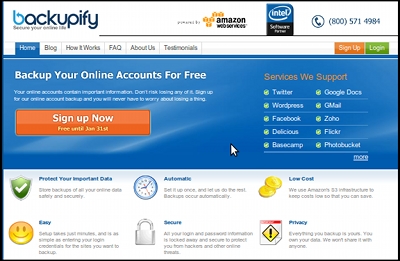
Backupify is a very different service from other online backup services you might be familiar with like Dropbox, Mosy, or Carbonite. These other services are designed to backup things which are on your computer to online storage, while Backupify is designed to backup your content that is already on the internet. It will automatically log in to your Facebook or Flickr account etc., backup any new content it finds and log back out. You don't even have to have your computer turned on. This will protect you from loss if a service ever suddenly becomes unavailable, your account is compromised, or data is unwittingly lost or corrupted.
Backupify is currently offering free unlimited accounts to anyone who signs up before January 31st. I confirmed that these free accounts will remain free forever even after their new pricing scheme goes into effect.
You also may want to consider that the Backupify service needs your login information for each of the accounts it is going to perform automatic backups on. If for some reason your Backupify account were ever compromised it could lead to your other accounts being compromised as well. Backupify only stores physical passwords for certain sites that require it such as Gmail. With other sites they only store the password token or cookie that is necessary to login to your account. In any case Backupify states that they, "use advanced encryption methods to keep your login credentials safe."
Keep in mind that there are alternatives to this service as well. If you would rather download the content to your hardrive or another location for safekeeping there are many free solutions designed to work with these individual services.
- Gmail: Supports POP3 access so you can can configure email programs like Outlook Express or Thunderbird to download your email from Google's servers. There is also the free utility Gmail-Backup that can download the content of your account to your hardrive. Get it here or here.
- Google Documents: There are a bunch of ways to download your Docs. You might try Gdocbackup or Google Docs Backup (free for one account). Other choices include a GreaseMonkey Script or OpenOffice using the OpenOffice.org2GoogleDocs Extension.
- Twitter: Try TwitterBackup or Tweetake. For a totally online service try tweetbackup.com.
- FaceBook: There are not many options here. Actually only one free choice I could find is ArchiveFacebook. Be aware that it is an experimental plugin and some have expressed concern that it might violate FaceBooks terms of use. If you just want to backup your contacts then FaceBook's own Export Friends to CVS feature will probably meet your needs. It seems the the best option to backup your FaceBook account is SocialSafe. While not free it is very moderately priced at $2.99
- Flicker: Several options here. FlickrEdit (a.k.a. FlickerBackup), or Downloadr. Also Migratr or Flump (requires Adobe Air)
- Basecamp: No second party app is really needed since Basecamp Dashboard supports exporting to HTML or XML.
- Wordpress: I imagine if you use Wordpress you already know how to back it up. Wordpress has built in feature to export your databases and files. You can also try WP-DB-Backup or WP-DBManager 2.50.
- Del.icio.us: Numerous options here but the simplest methods seem to be various browser plugins/extensions designed to sync Del.icio.us bookmarks with your browser's bookmarks. ( Firefox, Internet Explorer) Other easy choices would be to use one of the other numerous free online bookmarking services that can import your Del.icio.us bookmarks -- most of them do.
- Photobucket: Okay they made it hard if you don't have a pro account, but the above metioned Migratr will also work for Photobucket, and a lot of other online photo services too!
- Blogger: Easy choice here Blogger Backup. Might also try Blogbackupr.com
- FriendFeed: I have to admit I am stumped here. Maybe Backupify is the only real solution. I am open to suggestions here. Maybe there is a way to use an RSS feed to email type service to do a backup.
-
- Article type:
Comments
I have been a member of this site for many years and pay my subscription to Gizmo.
I noticed that anonymous on 30/12/09 did not reply to the derogatory remarks he made about the volunteer Ritho and the sterling work he does along with all the other volunteers. this is to provide better use of computers and programs for the betterment of the community at large.
I have to agree with all the volunteers that made comments regarding about this remark. Why do these people make comments if they only want to shoot down someone who is helping the unfortunates out there to make their life all the more enjoyable.
In my early days of this site I gained an awful lot of free programs that have helped me tremendously over the years.
I belong to two other web sites that deal with many technological matters, you would not believe the derogatory remarks some of the very technical people receive from idiots who do not have a clue what they are on about.
I am afraid that we live in a world where people do insult other people, this is probably why the world is in the state it is in at this moment in time.
Eric
Eric,
Thank you. We are glad we are of help to individuals like you. We believe in the value of community, and helping others to help themselves. Knowing that we have succeeded in benefiting others lives is the reward of our labor. I care very little about derogatory remarks, because I know that such people only really hurt themselves in the end.
Ritho
Thank you for your kind words Eric.
Even as a psychologist I find it hard to determine if these people are just ignorant, deliberately malicious or using website comments for some kind of sick sport. It is something we get used to but that still doesn't make it acceptable. One thing you can be certain of though is that we will continue to promote what we genuinely believe to be of interest to our visitors and will do so long after the abusive posters have got bored and moved elsewhere.
Can I use this to back up my Homeowners Association website? We just lost a year's worth of activity and it sure would have been nice to get it all back.
No this is not what you need. Go to our freeware forum and start a thread in the section called "I want a Freeware Program that.."
Ask for freeware programs to backup a website. I or another of our editors or users will help you there.
You will need create a user account in order to post.
Ritho
"backup services you might be familiar with like Dropbox, Mosy, or Carbonite. These other services are designed to backup things on your computer,"
What kind of a dummy wrote this?
This is NOT TRUE, they backup to off site locations, not on your computer...
Dear Anonymous,
There is such a thing as constructive criticism. Please, if you want to come here and contribute to our site in the form of comments, do so in a way that helps build up this site. This is a community project. Any user that wants to can come here and contribute articles. This one was designed to help users like you discover something that might be of great benefit. We don't need other users coming and discouraging community effort.
Since I am the dummy who wrote this article, I changed the sentence to read more clearly. I thank you for pointing out the ambiguity of that statement as it could be misunderstood by others as well.
--The Dummy
P.S. A kind thank you to my fellow editors who stepped up to the plate and defended me while I was sleeping. I could just delete his post, but where is the fun it that?
Most of us would interpret 'backup things on your computer', in the context of the article, as, things that are on your computer are backed up to the destination associated with the application being used. Granted, the word 'that' might have served to underline this, but that would be picky. Given that we all contribute our time as volunteers to help others, I don't think that picky is at all justified.
Rik Mayell - Category Editor, Best Free Windows 7 / Vista 64 bit Software
In the context, it means:
"These other services are designed to backup things [which are] on your computer, while Backupify is designed to backup your content that is already on the internet."
I suggest you read this part of the article again and then revise your interpretation of it before insulting the efforts of our volunteers who give their time freely to provide the content for this site.
Will it eventually back up Yahoo or Hotmail emails? Even if it amounts to 10's of Gb's?
I signed up for an account and tried to set up Google Docs. I tried three times in Chrome and got this, "Fatal error: Allowed memory size of 16777216 bytes exhausted (tried to allocate 59 bytes) in /var/www/library/Zend/Gdata/App/Base.php on line 247". So I tried several times in IE and also in Greenbrowser and got an HTTP 500 error each time.
Until I am 100% sure that some unknown company can keep my information safe from some of the best hackers in the world, I won't trust anything of importance to them.
Right now, they would have to hack into several accounts to do me any real harm. With everything in one place they could wreak havoc.
I am pretty sure you are in no way alone in this line of thinking. While I too keep many things in "one basket" I too keep that "one basket" in several other baskets. In fact, I don't even maintain ANY sensitive data on any machine, period.
I would like to make 2 quick points about Backupify. First, for most services we don't store your password. Most of the services we backup use Oauth or something similar, so we send you to their servers for authentication, they pass us a unique token that represents you and our service, and we never have to store your password. There are some exceptions, like Gmail and Basecamp, but for most services, we don't ever see your password.
Secondly, Backupify allows you to download all your data from Backupify to your PC. Right now it is a bit tedious, as you have to do it service by service, but we are working to provide easy zip files with everything.
Thanks.
Rob May
Co-founder
www.backupify.com
Rob,
I edited the review to reflect your comments about the storage of passwords. Storing a login token or cookie is definitely better that storing 'raw' login credentials. Just so our readers understand, in the unlikely event that a cookie or token is stolen, the thief is greatly hindered in what he can do with it. Though it is improbable, a users account could still be accessed, but the actual passwords or other can not retrieved or be changed. Coupled with other security measures user data is probably very safe.
-Ritho
The free account over at Dropbox works for me, since my stuff is all local and not graphics heavy. Plus, the idea of giving some unknown someone/something in the Cloud my password...um, no.
I think you missed the author's point. How would you go about using Dropbox to backup your Facebook or Twitter accounts. They are two different tools designed for two totally different things.
Since I like my privacy so much and don't like the thought of inviting strangers to look in on my life and my friends/family know how to keep in touch without using a social network, I have no use for Facebook or Twitter. So there you are, and there is this tool. Which I still don't trust.
@bernardz
The point of Backupify is that it handles data in the cloud, not on your own PC. Cloud stuff is inherently harder to back up but these guys seem to have cracked it.
If you're a "cloudy" kind of person, Backupify is for you.
I have my doubts about cloud, I have thousands of emails. I use copernic to find my stuff
Good post.
In practice, I find that the actual amount of data that I need to backup is pretty small. Most of it is software that can be reloaded from the net.
So I have been using for quite awhile
http://mozy.com/home
They have a free account.
I cannot say how good they are because fortunately I have never needed to restore but their software seems to work.
What I do is set up a directory called backup and everything in that directory and below is backup every night.
Mozy is good. But it won't backup your Gmail or Google Docs will it?
I do not use Google docs, I back up my docs with Mozy. Gmail is back up with MailStore which saves to a directory that Mozy backs up. I think the security is better too.
Post new comment