Gizmo's Freeware is Recruiting
We are looking for people with skills or interest in the following:
- Mobile Platform Reviews
- Rootkit Scanner and Remover
- Streaming Media Recorder
- Email Client
- Archive Manager Interested? Click here
Best Free Disk De-fragmenter
|
Other Language?
|
Read this article in Spanish |
|
In a Hurry?
|
|
|
|
Introduction
|
|
Fragmentation: why it happens Suppose you are browsing the web, downloading your favorite songs and installing an application all at the same time, how does your system write all these files without any interruption to your activity? Well it's simple: it responds to all applications' write requests (I/O operations) by writing all files at a continuous location on your disk. Representation of a disk track:
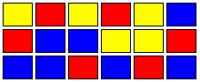
Yellow: Temporary written internet files The purpose of disk defragmenters is to reorganize such files which are supposed to be together. An ideal situation after defragmentation would look like this:
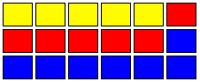
But what happens when you uninstall, delete, or simply clean your temporary files? Imagine yourself uninstalling the application (game) you installed. The disk could look like this:
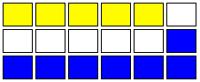
The white zone is empty space without fragmentation. A disk looking like this will have just a little or even imperceptible impact on performance. In this case defragmentation is needed but not critical. The last thing you want to see is a hybrid combination. Files very fragmented fig 1 and empty disk space fig3 but instead of contiguous clean sectors you'll find what we call fragmented empty space. And this is what it looks like:
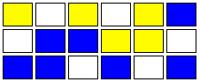
This is the worst case scenario. Overall system performance will be compromised and fragmentation is critical. You should defragment (defrag) or let your defragmenter schedule and execute the defrag process for you. Standard mechanical HDDs (hard disk drives) will benefit from defragmentation and continuous disk use, because when spinning it keeps remagnetizing the HDD plates. But if you own an SSD (solid state drive) you SHOULD NOT defrag or install any defragmenter application because it will shorten the life of the drive. So when testing defragmenter software we are going to evaluate it with some parameters:
Well, it's time for action now and let me introduce you to the de-fragmenters. |
|
Discussion
|
|
Unbelievable power user options for everyone without having to configure any script. Just select the option that best suits your needs and it's done. MyDefrag employs an algorithm that places the most used files at the beginning of the disk. This decreases access times because the actuator arm of the hard drive has no need to move to the end of a disk to search a file. If you don't know what a HDD looks like, please see below:
When you turn off your computer (or Windows shut downs your HDD), the actuator arm has a designated "landing zone" (a specific sector at the beginning of the disk) that remains stationary until the next startup. This is to avoid disk scratch and therefore, data loss (data is read via magnetism, touching surfaces is not required). When turned back on, the closest sector to the actuator arm is already near the "landing zone" (beginning of the disk) so it's faster to read files on that sector than others in outer zones of the disk. Also, the surface distance travelled is considerably less in the inner sectors of the disk. So, placing files at the beginning of the disk is the best idea. MyDefrag is not the only defragmenter capable of doing this, as many others include an option. However, MyDefrag achieves this in a much simpler way. This is combined with a good “fast defrag”; the choice of specific options, many others by scripting, and excellent defragmentation methods and simple scheduler options.
This little boy, DiskTune, is not exactly a kid. Despite the use of Windows API to do defragmentation jobs, it's incredibly fast, simple and lightweight. Many useful options just a couple pixels of distance. Direct access to usual options such as Analyze, Defrag (quick), Optimize (rearrange) and Compact (defrag free space). The best thing about DiskTune? The ability to create a shortcut to your desktop and then double-clicking it to run a fully customized defrag. Four words—“one size fits all”.
In terms of defragmentation ability, Defraggler is one of the best choices you could make. It performs a very fast “quick defragmentation” with decent file reorganization but if you perform a complete defrag process, which takes longer, you obtain results that are worthwhile. Your files will be together as they should be as solid as a concrete wall. Defraggler also supports scheduling, low priority and boot defrag. Highly recommended.
Also reviewed but not included: -Puran Defragmenter -O&O defrag free edition -Others
Feel free to suggest any software not already mentioned for review. |
Running on x64 computer requires download and replace DLLs available at Mydefragmenter website
http://www.mydefragmenter.com/help/
|
Editor
|
|
This software category is maintained by volunteer editor rmitch45. Registered members can contact the editor with any comments or questions they might have by clicking here. |
|
Tags
|
| defrag disk, defragment hard disk, disk defragmenter, free disk defrag software. |
Back to the top of the article
- Article type:
- Login or register to post comments
Printer-friendly version


(Fig. 1)
(Fig. 2)
(Fig. 3)
(Fig. 4)


Comments
Sorry, It seems to be a problem with Firefox using Sandboxie. No search works. You got me why.
George
Probably because a secondary service needs to launch to enable the search and Sandboxie is preventing this. I'm not a Sandboxie user but plenty here are. If you post this here in our forum, I'm sure one of the regulars will be able to advise how to fix it. MC - Site Manager.
http://www.techsupportalert.com/freeware-forum/security/8210-sandboxie-3...
I've been using 'DiskTune' for some time on a Windows7 computer. I've been happy with it. Today however, when I went to open it, it informed me that it had expired and to download a new version. I went to their site, downloaded and installed it, same thing happens :( Anybody else getting this?
This has also been raised in their forum.
http://www.diydatarecovery.nl/forum/index.php/topic,1364.msg5432/topicse...
I would keep an eye on this thread for an update. It's possibly due to the change of year. MC - Site Manager.
Thanks for the link MC...looks like it's gonna be fixed :D
Just a counterpoint to the "no update is needed" thought for MyDefrag.
Fans of the program in the official forums for it often say that as well when someone wonders why there have been no updates in two years. I do use MyDefrag, but its got three major issues experienced so far with the last version 4.3.1 that some other free defragmenters do not have.
1) On a fairly large amount of data and a very large number of files (2 million+ files, 800GB out of 1 TB drive capacity), it continually eats memory. Every second or two, the memory working set increases by a few KB. The developer knows about this, but refuses to call it a "memory leak". Despite the fact that is exactly what it behaves like.
This behavior is due to the program apparently needing memory assigned for every single file name it processes. Which is a big problem for drives with a large amount of file names like my example. A problem that several competing programs do not have.
2) It uses 10-12% CPU time continually when running (on a Windows 7 SP1 32-bit system). Other programs use less.
3) Finally, one other big annoyance here: it has no ask-the-user confirmation before the program closes. Accidentally press the "X" button in the top right of its window, press ALT+F4 and so on, it immediately shuts down.
A big problem because it rarely/never starts up again at the exact same spot on a drive that it exited on. Meaning lots of wasted time while it goes through areas its already defragged.
Anyway, those are my encountered issues with MyDefrag's last version 4.3.1 that need improving. Too bad development has stopped; its scripting ability is second to none.
There won't be a program that doesn't need to updated and never will be. That phrase is often said to mean that the program is good enough, and to take notice that there hasn't been any updates to MyDefrag for that long due to it's developer has not continued with his hobby or at least it seems. Along with those and other known problems, it's good enough; for many it's second to none.
This updated review by Webgremlin is very much along the lines of my own experiences, particularly with regard to the reinclusion of long-time champion Auslogics as a recommended defragmenter. It seemed unfathomable to me that such a good product didn't even make the shortlist in the previous review.
I'm not a believer in running these tools every week like some users, but I do dig one out when I see a need. A recent failure to delete a file from my external drive suggested such a need was due. :) I ran Puran twice (Windows 7 x32) and it stopped working both times. I then downloaded the portable version of Auslogics and it sailed through.
Regarding Mydefragmenter...Quote:
"Running on x64 computer requires download and replace DLL's..."
I was in My Defragmenter website and it is my understanding that the 64 bit DLL's are for Itanium processors alone, thus no need to download this for normal Intel/AMD x64 processors, right?
Also, you should mention that it is ad-supported.
Defrgmenting speed of the Deffraggler is surprisingly low. My 1TB HDD with 20 % free space isn't defragmented after 40 hours defragmenting. And its calculated remaining time is permanently 1 minute :-)
If I would copy whole HDD to another one and back (which would defragment everything), then it would take less than 10 hours.
i know of a very good, free defragmenter
Auslogics disk defrag:
http://www.auslogics.com/en/software/disk-defrag/download/
Why in your opinion is Auslogics better than those reviewed here? MC - Site Manager.
its more of a personal preference than anything else. I have never reviewed any of the other programs, but have just downloaded UltraDefrag. It might be my new favourite defragger.
I just found Auslogics DF to be easy to use, and quite reliable. Theres nothing else notable about it.
Thank you for responding. This category now needs a new minder so maybe the incoming editor will apply some different choices.
When will the reviews be updated? It has been almost 5 months.
All products are updated regulary. The date you see all above reffers to review content, comments, etc.
Believe it or not, defragmenters developer doesn't have too much to add every product release. They fix some minor bugs, most of GUI related. Nothing noticeable.
Isn't there any freeware (for Windows) that prevents fragmentation while files are being written? Or anything even close to the idea?
It would be counterproductive due to a major setback which cause a huge drop in performance because disk should remain stationary or turn around once to to comply with that parameters.
Many resident defragmenters start to work when you just stopped. So it defrags as soon as possible. Also, it has impact on performance too, when you want to resume working, it will take a bit until defragmenter stops working.
There's some freeware apps that monitors files usage in real time but doesn't defragment the same way.
Also there are commercial solutions that works in background using idle resources to keep HDD as defraged as possible. Still, no real time defrag.
By its nature, HDD works better when spinning and gain no benefit (in fact, it loose benefit). It doesn't happen in SSD. This kind of HDD lacks of mechanical parts and is able to access multi files at once. Defragmentation happens but is not as needed as in non SDD drives.
Your best option is defragmentation when PC is idle.
Your expensive option is to buy an SDD
Is there a reason Auslogics got removed from the ratings? At the moment I am using it from their free BoostSpeed Special Edition but also got [Commercial Item Removed] for free (is on a German magazine called PC Magazine and titled [removed], but it is the full Pro version). I asked, because I cannot decide which I should use, as both are working fine here. But if Auslogics got some negatives, I would use [removed].
Please do not ask for comparison/advice on commercial software. Even if you got it free from an offer, it still remains a commercial software. Also, since the offer was not run by our site, we cannot provide any help with it.
Some products did not reach a standard for performance and optimization. There's nothing -bad- or -wrong- just they're not the best or closer enough to be reviewed here. All product included on review, overtook Auslogic in test.
Thank you for the answer. I asked, because it could have been that the installer is nasty (it wants to install ask toolbar) or some other stuff and I did not find the reasons mentioned. Though I guess, I will test both for the next weeks and see, which suits me better.
I'm currently using Smart Defrag from IObit. And I decided to suggest it here.
Thank you so much, Vitaly. Unfortunately IObit software is no longer reviewed here at Gizmo's.
Hm... why so? Is it a negative experience with company itself or some product problems?
Both of them, Vitaly.
Many companies in the past create freeware apps after some time becomes a little more commercial. Some of them made their freeware programs paidware, and others becomes adware. This is the reason why the installer package began to gain weight. Too many installations containing adware toolbars as mywebsearch. This triggered in free and good products demotion.
The spirit of Gizmo and motto has always been always keep it as free as possible. We have been permissive but, there's a limit. Our nobility policy pushes us to protect user interests . And because we have the support of the users, and as users as we are, we prefer not to review a product anymore before falling into a lucrative game, that use us as intermediaries.
Thank you for such a thorough answer, you made some things clear to me. Although I'm new to Gizmo, I felt and liked it's "spirit". I believe that some companies or people have not very clear intentions distributing their software. I also believe that people change and reputation may change as well. Even one good offer for all previous bad reputation is worth mentioning, I think. But anyway Gizmo' s authors have their own experience and intuition choosing what to suggest to others, and I trully respect it.
It is site policy not to feature products with a poor WOT (Web Of Trust) website rating.