

 Read this article in Spanish
Introduction
When testing defragmenter software, we evaluate it with these parameters:
- Speed of analysis on fragmented files: Isn't it speed we want from our computer?
- Speed of defrag;
- Some extras: such as scheduled defrag, shutdown PC when done, etc.;
- Defrag capabilities: Why is this placed in last position? Because almost all of today’s defragmenters can perform this task with very similar results.
With these parameters in mind, we found a few we could recommend with the best of these as good as any commercial product.
Read also Fragmentation: Why does it happen? and Defragmentation: Do you need it? at the end of this page.
Rated Products


Platforms/Download: Windows (Desktop) |
Version reviewed: n/a
Gizmos Freeware
| Our Rating: 5/5 |
|
Read more...

Platforms/Download: Windows (Desktop) |
Version reviewed: n/a
Gizmos Freeware
| Our Rating: 4.5/5 |
Read more...

Platforms/Download: Windows (Desktop) |
Version reviewed: n/a
Gizmos Freeware
| Our Rating: 4/5 |
Read more...

Platforms/Download: Windows (Desktop) |
Version reviewed: n/a
Gizmos Freeware
| Our Rating: 4/5 |
Read more...
Also reviewed but not included:
- Puran Defragmenter
- O&O defrag free edition
- Others
Feel free to suggest any software not already mentioned for review.
Related Products and Links
You might want to check out these articles too:
- Types of Backup Software : What’s the difference between Disk Imaging, File Based Backup, or Synchronization, and which should I use?
- Best Free Drive Cloning Software
- Best Free Folder Synchronization Utility
Fragmentation: Why does it happen?
Suppose you are browsing the web, downloading your favorite songs and installing an application all at the same time, how does your system write all these files without any interruption to your activity? Well it's simple: it responds to all applications' write requests (I/O operations) by writing all files at a continuous location on your disk.
Representation of a disk track:
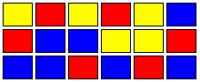 (Fig. 1)
Yellow: Temporary written internet files
Red: Installation (Game)
Blue: Song cache
The purpose of disk defragmenters is to reorganize such files which are supposed to be together. An ideal situation after defragmentation would look like this:
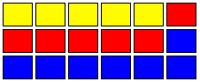 (Fig. 2)
But what happens when you uninstall, delete, or simply clean your temporary files? Imagine yourself uninstalling the application (game) you installed. The disk could look like this:
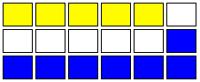 (Fig. 3)
The white zone is empty space without fragmentation. A disk looking like this will have just a little or even imperceptible impact on performance. In this case defragmentation is needed but not critical.
The last thing you want to see is a hybrid combination. Files very fragmented fig 1 and empty disk space fig3 but instead of contiguous clean sectors you'll find what we call fragmented empty space. And this is what it looks like:
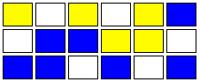 (Fig. 4)
This is the worst case scenario. Overall system performance will be compromised and fragmentation is critical. You should defragment (defrag) or let your defragmenter schedule and execute the defrag process for you.
Defragmentation: Do you need it?
Standard mechanical HDDs (hard disk drives) will benefit from defragmentation and continuous disk use, because when spinning, it keeps remagnetizing the HDD plates. But if you own an SSD (solid state drive) you SHOULD NOT defrag or install any defragmenter application because it will shorten the life of the drive.
Editor
This software review is copy-edited by Ian Richards. Please help edit and improve this article by clicking here.
Back to the top of the article
 We are looking for people with skills or interest in the following areas:
Comments
I have used UltraDefrag for a couple of weeks. Defragmentation is quick, but optimization generally takes about 24 hours :( I run Windows 7.
Missed defrags here: Auslogics defrag, IoBit defrag.
Since migrating to Windows 10, I've spent a fair amount of time analyzing this topic, and finally have uninstalled
all my 3rd party De-fragmenter software and reverted back to using the default Microsoft one.
Simply put - In my opinion Its no longer worth the effort as the built-in Microsoft utility is doing a pretty decent
job these days. (Even for a faster boot up).
Gone are the days when this issue required a 3rd party solution....that's my 2 cents!
I was surprised not to've seen any mention of the amazing Windows defragger, "Vopt". I've been using it seemingly forever, and thought I'd bring some bittersweet news.
Howard Barry Emerson, author of Vopt and co-founder of Golden Bow Systems, passed away nearly a year ago. As is headlined on the company's website, serials for both versions of Vopt are being offered at no charge. "In accordance with Barry's wish", reads a statement at Goldenbow.com, "Vopt is his bequest to Windows PC users."
Those who've been long-time Vopt users — especially those who've enjoyed personal contact with Barry over the years — feel the loss of his good heart and superlative programming skills.
Thanks for everything, Barry. We miss you....
I just ran UltraDefrag 7.0.1 through Virus Total and here are the results. Out of 56 scan engines, 8 detected malware.
AVware Trojan.Win32.Generic!BT 20160401
AegisLab Troj.Gen!c 20160401
Cyren W32/NewMalware-LSU-based!Maximu 20160401
F-Prot W32/NewMalware-LSU-based!Maximu 20160401
McAfee-GW-Edition BehavesLike.Win32.Tool.vc 20160331
Rising PE:Malware.XPACK/RDM!5.1 [F] 20160401
Symantec Trojan.Gen.2 20160331
VIPRE Trojan.Win32.Generic!BT 20160401
I suspect they are false positives, but the defragger programs should be checked against VT or other multi-malware scanners before making any recommendations.
I had to answer this.
There is no need of third party defragger if you are using Windows 7, 8, 8.1, 10.
I use the 10 and would not mess with any of these third parties anymore. Lets move on. Rule of thumb when using a Windows system: Do not risk its stability by installing lots or some unnecessary third parties or messing with its internals too much. Just run it as vanilla as you can and it will thank you.
When obtained via the link on our page, the x64 bit version gets 3 hits.
https://www.virustotal.com/en/file/554beef1b969b4dec2fd5041d442bc1142c55...
The x32 bit version does have more but these (as with the x64 bit) are all false positives as already documented on the developer's Sourceforge page. MC - Site Manager.
Is the MyDefragGui found on http://www.mydefrag.net/ the same as the MyDefrag mentioned on here, but with different user interface?
You say Defraggler is unrestricted freeware. In fact, while Defraggler Free is unrestricted in terms of its features, it is licensed for non-commercial use only. It is something that e.g. SOHO users like me need to know. In fact, I, too, missed that point at first, and installed it (long before reading your article) on a netbook I use for my professional activities. After some time, I realized I was violating the license, and removed it.
Sadly, the MyDefrag website has closed as of October 1, 2015. The last version, 4.3.1, is still available at many reputable websites, such as: http://www.softpedia.com/get/System/OS-Enhancements/JkDefrag.shtml.
It's still the best free defragmenter out there, and works with all versions of Windows from XP to 10, including the corresponding Server versions. The comparative review mentioned by AJNorth is excellent.
Guess all good things come to an end, been happily using MD for years and will continue to do so, always got immediate responses from Jeroen over at his Forum which I see is also gone.
Happy trails JCK, that's one neat piece of software you've left us.
I use JkDefrag portable from Portableapps and it's pretty easy and straight forward.
Why is it only mentioned in MyDefrag's review?
Why would it need a gui, it already has one?
Re: "Why is it only mentioned in MyDefrag's review?"
Because the programmer changed the name from JkDefrag to MyDefrag when updating it a few years ago.
An interesting comparison of the various defragmenters available (both free and boughten) is The Big Windows 7 Defragmenter Test, by Christian Hofmann (updated 2014.05.21) -- http://www.hofmannc.de/en/windows-7-defragmenter-test/ .
(I should be especially interested in the opinions of the above article from 'Gizmo' Richards and MidnightCowboy.)
Happy -- and safe -- holidays to all!
Regards,
AJN
I don't know if the author of this article don't think that shadow copies are important but most of the above don't take care of those. I think Auslogics is the only one, but I saw that O&O got better points on other sites so that is the one I use nowadays.
A concern over Auslogics which I've been using for years. Just installed on a reformatted laptop. I watch closely for toolbar check marks. Not sure if they've gotten sneaker about their location but I sure didn't see one.
It installed a redirect home page to bitable. I tried everything possible to change it back to Google. The only thing that worked to remove it was HiJackThis.
Here's how they did it:
If you Right click on browser's shortcut and choose 'Properties', the section for 'Target' says: "C:\Program Files\Mozilla Firefox\firefoxexe"
To the end of that line, Auslogics adds "bitable.com", so now that whole line reads like this:
"C:\Program Files\Mozilla Firefox\firefoxexe" "bitable.com"
really need this to try to correct my computer
MyDefrag doesn't defragment completely ("Monthly" script) and works VERY slowly. After 10 hours of defragmentig MyDefrag finishes (with many not defragmented files, this files aren't locked), then I run it again, then if runs 10 hours and result is the same. I have 1 TB not so much fragmented disk (and 25% free). I can't understand why is defragmenting so slow. If I would only copy the data to another disk, then I would have drefragmented disk in 5 hours :-|
And when you have MyDefrag screen saver and you want run MyDefrag manually, thne you have switch off its screen saver :-(
You should really consider again IObit's SmartDefrag, current version (3.1) has a lot of improvements vs previous version, it even has a new defrag engine and new algorithms to defrag, optimize and prioritize files!
I used to have PerfectDisk 13, but after installing and testing SD 3.1 I'm really impressed! My computer boots faster and is more responsive than when I had PerfectDisk 13.
The boot defrag works way better than other free and commercial software, and it's not obtrusive like PerfectDisk popup window and autorestart.
Indeed SD 3.1 should be the #1 defrag and optimizer for HDD among free and paid.
I'm a really satisfied user!
I would like to see a review of WinContig.
http://wincontig.mdtzone.it/en/
Any thoughts on Iobit's SmartDefrag? It has been around for years and has boot defrag options. Please consider for review.
Please add Smart Defrag in this list (http://www.iobit.com/iobitsmartdefrag.html)
I have a question about Defraggler...
I have been using Auslogics Disk Defrag for a number of years, but recently uninstalled it because the length of time to run "defrag and optimize" is now over 1.5 hours, when it could be accomplished in 20 minutes or less for years.
So, I tried Defraggler.
I must be incredibly stupid because I simply can't understand why Defraggler keeps telling me that it is going to take ">1 Day" to defrag.
Even quick defrag tell me that it's going to be 5 hours.
What am I doing wrong?
This morning after running the analysis again, there were 319 fragmented files, 603 MB, out of a 250 gig HD, with 65% free space.
I have yet to complete a defrag because this is completely illogical, it simply makes no intuitive sense, when I keep reading in various forums, including the Gizmo's forum, that it is so quick.
Can anyone please explain this before I uninstall this program?
I have been using 3rd. party defrags for a few years, but I am very flummoxed by recent behavior - I can't understand why all of a sudden these programs are now taking so long to get the job done.
Nothing, and I mean nothing has changed on my system from one update to another, no new software, not in a long time.
I would suggest you a very simple solution, mate: Just stop bother with all these free defrags. From time to time run "Analyze" button of built-in Windows defrag utility and if it tells you: "Your file system performance is good, you don't need to defragment at this time" (or something like that) - just go and enjoy your computing and stop worrying about nothingness...
Sometimes the "fragmentation/defragmentation" issues is too much overrated - let's not make them more significant than actually they are...
Pages