

 Read this article in Spanish (Español)
 Read this article in Chinese (中文)
Introduction
Digital image editors mix painting and drawing tools with some features specific to digital imaging, which creates images from the physical environment using normally cameras or scanners, and have two additional features you should know about:
- Process raw images: Digital imaging systems produce a raw image file which is the image detected by the sensors. This raw image is processed to produce an image file, most commonly the JPEG image format, which we then view and edit in our digital image editor. The Raw files are often described as "digital negatives" because they have a similar role to the negatives produced by film photography. For this article, you just need to know that some digital image editors are able to decode Raw files and provide further options for editing those images.
- View or edit Exif/DCF data: When a raw image is created the camera or scanner also stores information about the state of the imaging device and the physical conditions. This data is called meta-data because it is "data about data". You just need to know that there are standard formats for storing this meta-data. The two most common standards being Exif (Exchangeable Image File) and DCF (Design rule for Camera File system).
I have deliberately looked for application programs that allow you to examine and edit the above two features. There are many good products which is why there are so many options in this category. Just remember that very few are general-purpose so most users will benefit from mixing products from this category and the image viewer and photo organizer categories.
Read also Classifying Digital Image Editors and Important Features at the end of this article.
Basic Editors

Platforms/Download: [field_blackberry_download] | iOS | Web App |
Version reviewed: n/a
Gizmos Freeware
| Our Rating: 4/5 |
Read more...

Platforms/Download: Mac OS | Windows (Desktop) |
Version reviewed: n/a
Gizmos Freeware
| Our Rating: 4/5 |
Read more...

Platforms/Download: Windows (Desktop) |
Version reviewed: n/a
Gizmos Freeware
| Our Rating: 4/5 |
Read more...

Platforms/Download: Windows (Desktop) |
Version reviewed: n/a
Gizmos Freeware
| Our Rating: 3.5/5 |
Read more...

Platforms/Download: Windows (Desktop) |
Version reviewed: n/a
Gizmos Freeware
| Our Rating: 3/5 |
Read more...
Mid-level Editors

Platforms/Download: Windows (Desktop) |
Version reviewed: n/a
Gizmos Freeware
| Our Rating: 4.5/5 |
Read more...

Platforms/Download: Windows (App) | Windows (Desktop) |
Version reviewed: n/a
Gizmos Freeware
| Our Rating: 4/5 |
Read more...

Artweaver
Primarily a paint program but equipped with a curves-and-levels tool that works better than Paint.NET
Platforms/Download: Windows (Desktop) |
Version reviewed: n/a
Gizmos Freeware
| Our Rating: 3/5 |
Read more...
Advanced Editors

Platforms/Download: Linux | Mac OS | Windows (Desktop) |
Version reviewed: n/a
Gizmos Freeware
| Our Rating: 4/5 |
Read more...

Platforms/Download: Windows (Desktop) |
Version reviewed: n/a
Gizmos Freeware
| Our Rating: 4/5 |
Read more...

Platforms/Download: Linux | Mac OS | Windows (Desktop) |
Version reviewed: n/a
Gizmos Freeware
| Our Rating: 4/5 |
Read more...

Platforms/Download: Windows (Desktop) |
Version reviewed: n/a
Gizmos Freeware
| Our Rating: 3.5/5 |
Read more...
Digital Imaging Suites

Chasys Draw IES
An excellent suite of programs including Artist, Viewer, Converter and raw-Photo, each runs individually
Platforms/Download: Windows (Desktop) |
Version reviewed: n/a
Gizmos Freeware
| Our Rating: 4/5 |
Read more...

Platforms/Download: Mac OS | Windows (Desktop) |
Version reviewed: n/a
Gizmos Freeware
| Our Rating: 4/5 |
Read more...
Other Free Digital Image Editors
Most of the other Free Digital Image Editors we have reviewed are listed below. Let us know if you have any good suggestions. Either contact the editor or leave a comment below at the end of this article.
For added security we advise you to run virus scans on the websites and any downloads from those websites as they are not checked as regularly as the recommended products above.
- Ai Picture utility may not run well due to compatibility issues. Its interface is dated, help can be cryptic, printing is inadequate, and many users find it confusing. But I found it a good mid-range solution with lots of information (such as Exif data and image statistics), many tools, and a side-buy-side preview for each tool.
- FireAlpaca is unimpressive. However, I did like the choice of snap "grids".
- Fotor hasn't yet installed correctly on my test computer.
- Hornil Style Pix is a very good editor that is well documented with many capabilities. It uses a hierarchy of layers and objects which each has its own layer. Each layer has its own blend mode for combining the layers to form the final image. Grouping objects combines the layer. If it was more intuitive to use then I would recommend it. As it is, too often I was left wondering why features were inconsistent or would not work as expected: when I select an area and click on it the move pointer appears but only the first time as all later moves have a simple crosshair; redraw after measuring didn't remove all the old crosshairs; layers can't be deleted instead you delete the object which is more work to select it; and drawn objects have to be 'flattened' or converted to an image to use the paint tools on them.
- i.Mage is small and open source aiming to be a good pixel editor.
- Image View (Plus More) version 2 has shortcut keys for everything. The version 3 beta also has a 64-bit program.
- ImLab is amazing but it not for general use as it is built on a toolkit specifically designed for scientific research.
- Krita is recommended in the Best Free Paint Program article which is definitely the category it belongs in. It is listed here purely because it can open a range of Raw file formats although not all of those I was testing as it plug-in problems are one of many areas where Krita is buggy. It does not interface to cameras or scanners.
- Magix Xtreme Photo Designer is mid-level but tries to install third-party software that are likely to cause you problems.
- NPS Image Editor (Virustotal scanned site 0/58) - originally Nookkin's Image Editor - is advertised as a beta but seems fine to use. It includes a useful color selection and conversion utility that can be run separately.
- Phantasmagoria is a Java application that has been version 1.0 since 2008. Although it looks cool and has some good features - I particularly like the option to delete sensitive information from an image - it has too many bugs and underdeveloped features. For example, once I placed text I couldn't edit it.
- PhotoDemon is a very promising portable program with unusual features like support for the Photo HD file format, an option to specify color depth when saving an image, reopen files after crash, displays all image metadata, and keyboard macros. It will probably be recommended when I can sort out why it is crashing for me.
- PhotoPerfect Express is good for basic users.
- Photo Pos Pro may not run well due to compatibility issues. It is a good mid-level editor with lots of features, extras (sample photos, textures, etc), batch processing, and scripting. Warning that it wants to install third-party products that are likely to cause you problems.
- Photobie is promoted for digital scrapbooking and has support for a Photobie Club but there appears to be little activity on the website. The program is a mix of very useful and advanced features like layers and 8bf filters. But the interface is dated and icons are hard to identify.
- Photormin has a good interface and quite a few features.
- Photosun has a unique interface but too many bugs and not enough features. If does display all the Exif metadata.
- PixBuilder Studio may not run well due to compatibility issues. It looks good and takes many Photoshop 8bf filters.
- Pixia is recommended in the Best Free Paint Program. It will receive images from cameras and scanners. The English language interface is not complete so you will find yourself reading Japanese when you view the EXIF information.
- Pos Free Photo Editor is a very cut-down version of Photo Pos Pro. It also wants to install software that are likely to cause you problems.
- RealWorld Paint.com and RealWorld Photos are basically the same program. Both are mid-level editors that can create icons and GIF animations.
- Serif PhotoPlus SE is one of a range of products that are easy to use and moderately powerful.
- virtualStudio has a useful image viewer. Image editing is disappointing but there are features not commonly found like copyright notice, picture shadow, and Raw file support.
- AAphoto has very limited features, mainly color correction and resizing.
- Asclepius is largely useless because it only really orders prints online.
- JPhoto Tweek is nearly useless. It is small and fast but it lacks relevant checks. For example, it lets you open files that it can't decode.
- M2PicBuddy is very limited.
- Photo N-Gine is somewhat limited and hasn't been updated since version 1.1 in 2007. On Windows 7 64-bit, to exit it I had to kill it with Task Manager.
- PC Image Editor is a basic editor similar to Windows Paint which would be preferred.
- Rendera is limited.
- SunlitGreen Photo Editor is too limited. Plus it wants to install third-party software that are likely to cause you problems.
- Active Pixels developer has abandoned the website.
Related Products and Links
Several articles review programs with similar functions:
- Best Free Digital Image Viewer reviews software to visualize images and includes many products that have their own editing capabilities.
- Best Free Web-Based Image Editor has the web-based equivalents.
- Best Free Paint Program also works with bitmaps but focuses on creating paint-like images.
- Best Free Digital Photo Organizer reviews photo-cataloguing software that usually has the ability to link with photo editors and often has its own editing capabilities.
- Best Free Vector Graphics Editor looks at image editors that don't rely on bitmap or raster graphics to produce images or drawings.
Classifying Digital Image Editors
In this article, digital image editors are classified in four sub-categories below:
- Basic Editors are programs that only allow you to edit an existing image: "those little gems that help you quickly and easily make small adjustments to the overall lighting, colors, and tones of your images without the clutter of a lot of advanced tool sets. These also offer such tools as cropping, sharpening, and red eye correction." Ease of use is the key.
- Mid-level Editors offer more advanced tools like layers, adding captions and shapes, the ability to select portions of the image and make adjustments to just those portions, etc. These will also offer filters for applying textures, artistic effects, edge enhancements, borders and frames. The breadth of image enhancements and drawing tools are the most important considerations.
- Advanced Editors have advanced photographic features that work with the features of specific cameras and the files that they generate. They usually compete with professional programs like Photoshop or Paint Shop Pro in some aspects if not all. The primary criterion is the ability to work with imaging from many devices.
- Digital Imaging Suites that bundle related modules or programs to extend the functionality of the core image editor. The extra features can be both basic and advanced so the suites generally cover all three levels of capability. There is no primary criterion for this group because they cover aspects of the other three classes.
This article does not include on-line or web-based digital image editors which are reviewed in their own category Best Free Web-Based Image Editor.
Important Features
The following are key features that will help you to decide which digital image editor is best for you.
 General
features
General
features

-
 Context-sensitive help and other assistance. Tutorials are particularly
important.
Context-sensitive help and other assistance. Tutorials are particularly
important.
- Preview or comparison view. The example on the right is from Visions ⟹.
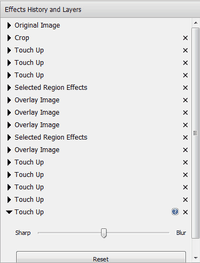
- Undo/Redo to multiple levels as shown in the far-right image of the undo list in PhotoPad ⟹⟹.
- Batch processing and scripting allows the same editing steps to be applied to multiple images in a consistent manner.
- Support for sharing of images through email, web uploads and social media.

Basic photo features
-
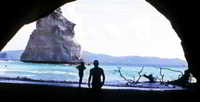 Straightening in the two-dimensional sense usually means rotating the
entire image. The easiest method is to draw a line to indicate where the horizon should be and let the program rotate the
photo for you as Imagina does in the example image on the right ⟹.
Straightening in the two-dimensional sense usually means rotating the
entire image. The easiest method is to draw a line to indicate where the horizon should be and let the program rotate the
photo for you as Imagina does in the example image on the right ⟹.
- Cropping images to cut out unneeded elements. The best cropping tools allow the aspect ratio to fit a specific output format such as a standard photo print size.
- Scaling, resizing and re-sampling to fit your output requirement.
- Photo correction tools including lighten/darken, sharpen/blur, and red-eye reduction.
- Captions, timestamps, and borders.

Drawing and painting features
-
 Layers allow objects and effefts to be
separated from the original image and from each other. Layers also allow drawn objects to retain their properties when an
image file is saved.
Layers allow objects and effefts to be
separated from the original image and from each other. Layers also allow drawn objects to retain their properties when an
image file is saved.
- Vector graphic and font support so that drawn objects are scale independent while you are working with them.
- Drawing tools including lines, brushes, shapes/polygons, clip art, fonts, accompanied by transformations that alter the drawn objects.
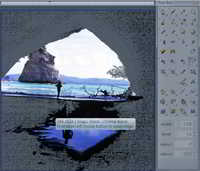
- Complex selections including silhouettes, tracing, and clipping paths. This allows areas to be selected by the outline, based on a colour, or by any shape that you want. The example to the right shows the Chasys IES Artist's magic wand selecting a shade of black anywhere in the image ⟹.
- Drawing file format support e.g. EPS, SVG, DDS (for games).

Advanced photo features
- View metadata provided from the source camera or scanner. EXIF/DCF and Raw metadata have been mentioned in the introduction.
-
 Advanced straightening consists of several similar
features that even allow 3D-like manipulation. Perspective correction and vertical straightening are often used to provide
square faces to buildings as shown in the example ⟹. Warping using a grid or mesh allows lens distortions (pincushion,
barrel, fish-eye, moustache) to be.
Advanced straightening consists of several similar
features that even allow 3D-like manipulation. Perspective correction and vertical straightening are often used to provide
square faces to buildings as shown in the example ⟹. Warping using a grid or mesh allows lens distortions (pincushion,
barrel, fish-eye, moustache) to be.
- Image enhancement tools like cloning, blending, and combining images.
- Plug-ins to provide additional features: tools, filters, and file import & export formats.
- Raw file support. Raw images are direct from the camera or scanner sensors before any pre-processing attempts to correct the image to match the human eye. This feature can be provided by plug-ins.

Professional color support
-
HDR
(High-Dynamic Range) support. Normally, 255 levels (8 bits) are used for each color of Red, Green & Blue (RGB) and the
alpha channel to make up 32-bit color. 255 levels is not very much if are performing complex transformations and the
rounding errors can become significant. So if you want to retain as much detail as possible then you should consider using
16-bits per channel to retain highlights and ensure smooth transitions in colors without any banding. That is why the HDR
file formats are important. Some programs are limited to 8-bits per channel and others require plug-ins.
Suitable file formats for HDR also provide for metadata, transparency, color management, and some handle layers (L) too. A couple are vector-based (V). The main difference between them all is the maximum bits for greater color depth.- Device dependent but normally 32-bit: Adobe EPSVL
- 32-bit: IMA, TIFF (floating), SVGVL.
- 64-bit: freedesktop.org's ORAL, Photoline's PLDL, Photoshop's PSDL, XAMLVL
- 128-bit: EXR (used for video rendering), Microsoft's HD Photo/JPEG XR and DDSV (used for gaming)
-
 Color management to reproduce colors accurately on various devices, for
example, displayed on your screen and printed on paper. The Windows Color System (WCS) is not enabled by default. The
following two features are part of color management ⟹.
Color management to reproduce colors accurately on various devices, for
example, displayed on your screen and printed on paper. The Windows Color System (WCS) is not enabled by default. The
following two features are part of color management ⟹.
- Color space conversion (gamut mapping between different color spaces) allows the best representation of colours. sRGB is usually the default.
-
Rendering intent which indicates the priority for color representation. The International Color
Consortium (ICC) has four profiles that are used to match the image color space to the output device color space. Two
factors determine the colors you will see. What happens to colors that fall outside the output device gamut and what
happens to the white point.
- absolute maintains the original white point which may not match the output device so it often looks wrong to us because it produces a color cast.
- saturation is best for graphics where exact colors don't matter.
- relative is good for photographers: it fits colors within the boundaries but does not adjust any other colors within the boundaries.
- perceptual is also good for photographers: it fits colors within the boundaries and adjusts the other colors to preserve relative differences between them.

Editor
This software category is in need of an editor. If you would like to give something back to the freeware community by taking it over, check out this page for more details. You can then contact us from that page or by clicking here.
Back to the top of the article
 We are looking for people with skills or interest in the following areas:
Comments
It looks like Lightbox has been abandoned. The wesite is now for sale.
PencilSheep - free professional image editor:
http://pencilsheep.com/
"... Saint Paint is the ideal paint package for creating and editing True Colour, 256 colour, 16 colour, and Monochrome graphics, and animating in any mode or combination of modes, with AVI editing support ...":
http://www.saintpaint.com/
http://www.softpedia.com/get/Multimedia/Graphic/Graphic-Editors/Saint-Pa...
"... Labography is a feature rich, progressive program which unites in its highly efficient tabbed interface 3 powerful modules for: Graphic design with vector objects and elements, Photo editing with Batch processing function, Publishing on professional level ...":
http://axpha.com/labography/review-english/
Phocus - free image processing software:
http://www.hasselblad.com/software/phocus
Thanks Panzer for telling us about the Phocus editor from Hasselblad. I tried it yesterday. But all Exported images from Phocus are terribly underexposed. I am unable to figure out why.
The download link to Chasys Draw IES is broken.
I have corrected the links to point to John Paul Chacha's website.
The product record was incorrectly changed by another editor. The Imaging Luminary website you refer to is undergoing a revamp but it is not the correct website for Chasys Draw IES.
Love the article and all the comments... I have been using Photoscape for years now and love it, find it easy to use but all the reviews say its difficult to learn because of different placement.. This is my question is there something similar but a little more advanced.
Remah, you missed a great one...Pixlr
"Pixlr has been a favorite online photo editor and mobile app for years. Now, you can get the same Pixlr experience with even more fun and powerful tools on your Mac or Windows computer."
https://pixlr.com/desktop
https://pixlr.com/mobile
https://pixlr.com/web
While I can't say I'm a fan of the Pixlr online editor, the version that ChronicChaos refers to is a new downloadable/installable desktop version, that would qualify to belong in this category.
https://pixlr.com/desktop
I haven't tested this version; don't know how faithful it is to the online version.
Here is my humble opinion:
The usefulness of a image editor ( or any software ) depends on the needs of the user. The writer of this article quite properly went for three categories & gave us a good overview of some nice softwares. My thanks & gratitude for that.
IMHO the best free advanced category image editors are GIMP & Photoshop CS2. They are almost equally capable & have daunting learning curves. But they are "a must know" for young hobbyists interested in image editing. After all quality of the job is the last word.
For a majority of people Paint.net should prove an excellent choice. It is easy to use as an entry-level software as well as a more advanced one. Of course it is not as good as GIMP or Photoshop.
For cropping, resizing & minor adjustments of brightness/contrast any of the basic editors will do. The choice given by the writer is quite agreeable. Only that he missed the popular Irfan View.
First, my kudos to Remah for a professional-quality article that should be a model and inspiration for other reviewers.
Second, my thanks to JediInverse for mentioning MS Picture Manager that comes free with MS Office. I knew, of course, that I owned the latter, but never realized that it included the former.
My story: On those infrequent occasions when I do image editing, I take a simplistic approach. I don't create fantastic but realistic-looking images of a sliced-open egg with its yolk replaced by a sliced-open kiwi fruit, or a cruise ship floating in a bowl of soup; I just do things that I think should be easy. Yesterday I edited an image that I wanted to rotate by 45 degrees. I used Paint.net and was appalled to discover that this sophisticated program--with so many features that I'll never need or know how to use--offered on the Image menu to rotate only in 90-degree increments. Now that I've read Remah's review, I see that all I had to do was move to the Layers menu to find its Rotate/Zoom tool, but why would a SW designer split those functions over two different menus without at least cross-linking them? And, now I know that next time I can also use Picture Manager to do the same job (and probably others that I'll soon discover) very simply.
My vote goes for a must-see that should be on the list :
http://photodemon.org/
Fantastic numbers of effects and adjustments - check it out.
The following sentence is in the LIGHTBOX discussion--seems out of place:
"As for Photo! Editor, the biggest issue is that the program is not being updated although you do have an assured upgrade path by purchasing the more fully-featured paid version."
Pages